Copilot Studio CUA Goes GA with Claude Sonnet 4.5: What Microsoft's Model Choice Means
Microsoft Copilot Studio's Computer-using Agent (CUA) reached GA on May 13. The GA build ships with both OpenAI CUA and Claude Sonnet 4.5—Microsoft officially co-deployed an Anthropic model in its core product. Here's the full 4-pillar map and a 3-axis decision framework for your next move.
What you'll learn in this article
- Where pricing and adoption questions around Claude Code stand right now
- Which plan or rollout stage fits the reader's situation
- Which follow-up article to open next for setup, cost, or bigger-picture context
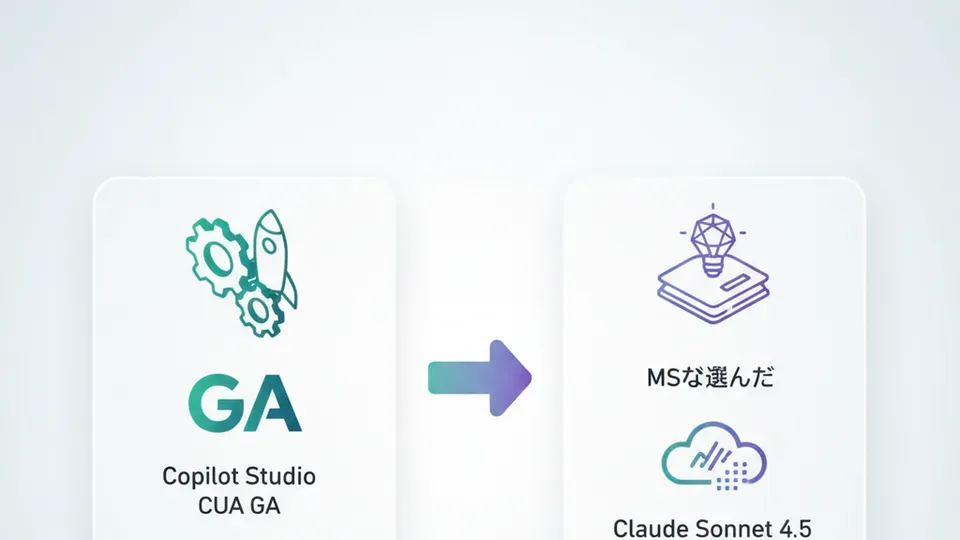
“Microsoft Copilot Studio’s CUA went GA”—CUA stands for Computer-using agents. AI that looks at a screen, moves the mouse, fills in fields, and clicks buttons. Even for websites and desktop apps with no API available. AI doing the screen operations that humans were doing.
That “AI that touches the screen in place of humans” reached general availability on Microsoft’s enterprise platform on May 13, 2026. The announcement was quiet, but reading the substance reveals the industry’s structure has shifted without making a sound.
What’s easiest to miss: the GA models included in CUA. Alongside OpenAI CUA, Claude Sonnet 4.5 is there. Microsoft officially adopted an Anthropic model in a core feature of its own product. The “Claude vs OpenAI vs Microsoft” competitive framing that’s been written about is more than half obsolete. In practice, “co-deployment” is already the norm.
This shift has a non-trivial effect on “which AI to use” decisions. I’ll map the May 13 announcement in full, then give a 3-axis decision framework for your company—plus “this week’s one move” within 7 days.
Why “Copilot Studio CUA Went GA” Can’t Be Summarized in One Line
Microsoft’s May 2026 Copilot Studio updates look like “Microsoft announced something again” if you only follow headlines. But reading the breakdown reveals four distinct capabilities—ones that competing vendors have been releasing as separate products—packed into one product nearly simultaneously.

Four major updates in the formal announcement:
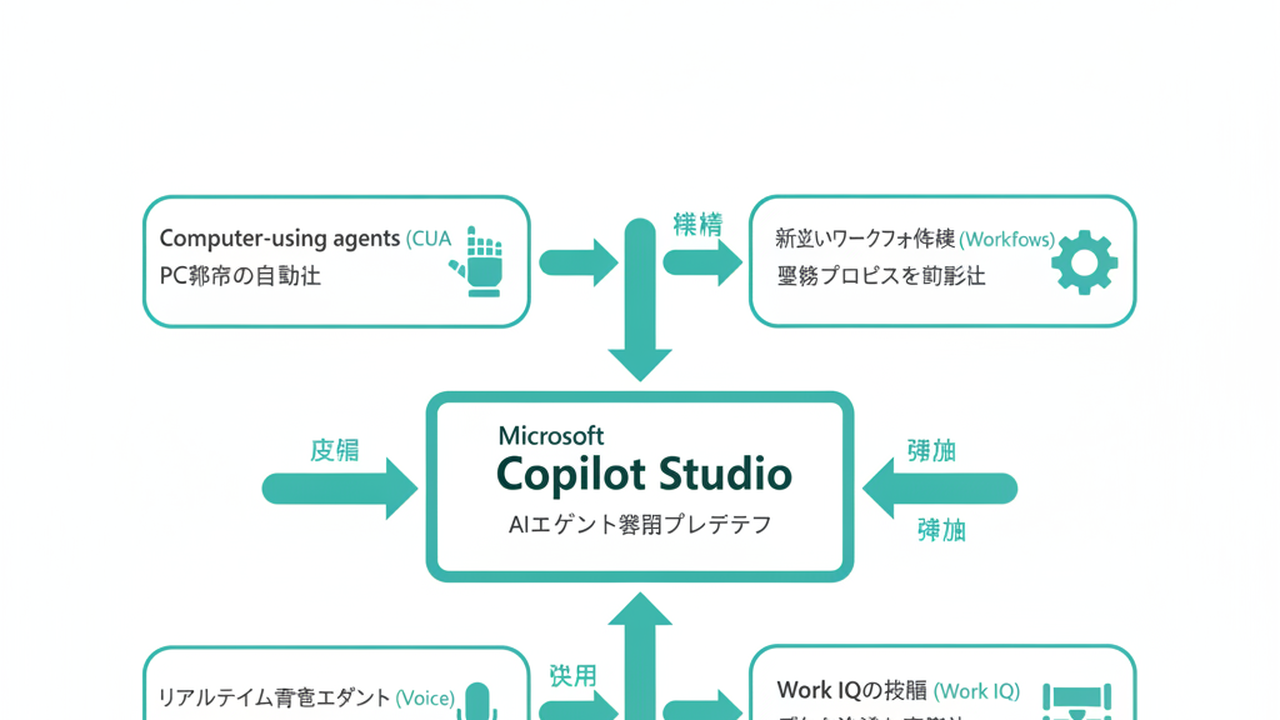
1. Computer-using agents (CUA) reaching general availability. The Microsoft Community Hub announcement is dated May 13, 2026, specifying availability across Microsoft Power Platform in all commercial regions. This means “AI that operates screens” is now in production.
2. New workflow experience. A canvas that lets you design screen operations alongside API calls, approvals, and business logic in a single interface. Early Release designation.
3. Real-time voice agents. GA in North America via Dynamics 365 Contact Center. Under 500ms latency, speech-to-speech response capability—actual deployment in call center operations has begun.
4. Work IQ expansion. REST API and CLI are now available, with connections to remote MCP (Model Context Protocol) servers. MCP is the open standard Anthropic proposed for connecting AI agents to external tools and data sources. Pre-built connectors for SAP, Salesforce, ServiceNow, and other major business systems were also added.
Reading the headline “Copilot Studio CUA went GA” at face value makes it look like only CUA changed. In reality: CUA as the “hand,” Workflows as the “blueprint,” Voice as the “mouth,” and Work IQ as the “data pipeline” all shipped together. From inside it’s separate teams’ work; from outside, this was the day “Copilot Studio as a product became commercialized as AI agent infrastructure.”
Some readers may think “we don’t run Microsoft 365 company-wide, so this doesn’t apply to us.” What happened here is not a “Microsoft 365 company story”—it’s an “AI agent implementation pattern story.” I’ll cover that in sequence.
Claude Sonnet 4.5 in the GA Build: The Day Microsoft Stopped Competing
This is the point I most want you to see.
The CUA GA announcement contained one more line, quiet but important:
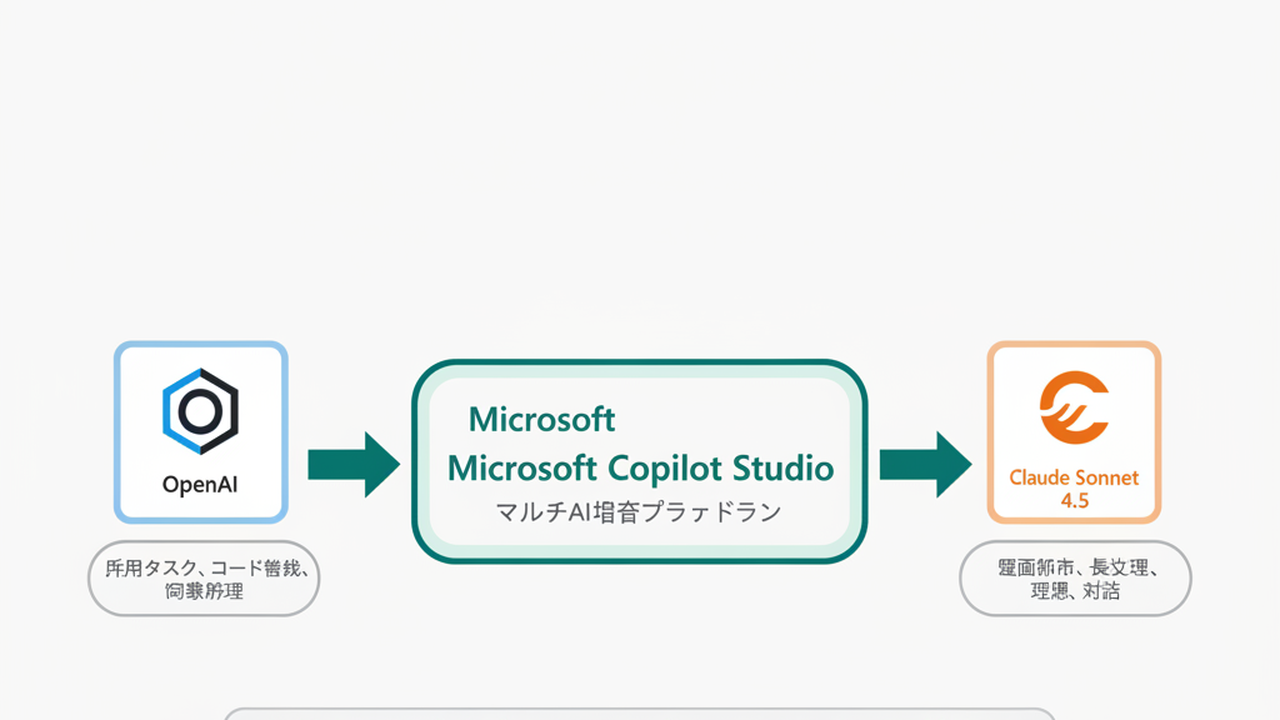
The GA build ships with OpenAI CUA and Claude Sonnet 4.5 as GA models
Copilot Studio’s computer-using agent feature runs with Anthropic’s Claude Sonnet 4.5 as an officially adopted model within Microsoft’s own platform. This is the visible result of Microsoft advancing its partnership with Anthropic.
The “Claude vs OpenAI vs Microsoft” three-way framing that’s been written about is more than half outdated. Microsoft has made clear that it’s co-deploying other companies’ models in core features of its own product.
My sense from using Claude Code: Anthropic excels at agents that work closely with human workflows—coding, screen operation (Computer Use). Meanwhile OpenAI has been building out general-purpose task delegation via the “Operator” and “ChatGPT Agent” line. Microsoft has primarily centered its own GPT-model family, but with Copilot Studio it appears to have shifted to a “best model for the task” approach rather than a single-vendor lock.
This isn’t three companies fighting—it’s the beginning of an era where three companies coexist in one product.
What changes in practice:
Until now, the discussion started from “which vendor should we start with for our AI agent?” Choose Anthropic and you worry about migration costs if you later move to OpenAI. Choose OpenAI and you can’t use Claude’s superior coding capabilities. Choose Microsoft and you feel vaguely locked in. That “who to choose” framing was how we were thinking.
Post-GA, the question itself changes. Not “which vendor” but “which model for which task?” Within Copilot Studio, screen operations → Claude Sonnet 4.5, form analysis → OpenAI CUA, internal data search → Microsoft’s built-in model—task-specific deployment becomes the realistic operating model.
And Work IQ’s MCP support means Microsoft incorporated Anthropic’s open standard into its own product. Another symbol of “from competition to coexistence.” Reading this alongside KDDI Agile Development Center’s company-wide Claude Code deployment (KAG case) and JetBrains developer survey where Claude Code grew 6x shows what’s actually happening at the operational level of enterprises. The “Claude or Microsoft” binary is already giving way to “Claude and Microsoft together” as the on-the-ground standard.
New executives reading this don’t need to be anxious. Actually the reverse: you no longer have to get “which AI to start with” right on the first try. The whole industry is moving toward more swap-friendly architecture.
Mapping the 4 Pillars: What CUA, Workflows, Voice, and Work IQ Change
Let me break down the 4 pillars more concretely through the lens of “how would this apply to our work?” This is the divergence stage—a map-building exercise.
Pillar 1: Computer-using agents (CUA). In one line: “AI that operates legacy systems without APIs, like a robot.” The GA build ships with OpenAI CUA and Claude Sonnet 4.5; billing is announced at 5 Copilot Credits per step. Azure Key Vault for credential storage, Microsoft Purview for audit logging, and fine-grained human-in-the-loop configuration are enterprise strengths.
CUA is most effective for work like: daily data entry from Excel into a legacy internal sales system. Uploading receipts to an expense SaaS. Extracting values from invoice PDFs into accounting software. All of these are tasks that “could be done via API if only an API existed.” CUA reproduces “the boring screen operations humans were doing.”
Pillar 2: New workflow experience. CUA alone is “AI that touches a screen.” Combined with workflows, you can design cross-system business processes in a single pass: “complete the screen operation, route to approver, on approval register via API in another system, on exception route back to a human.” Early Release status—currently closer to trial use than production design backbone, but the design direction is clear.
Pillar 3: Real-time voice agents. GA only in North America via Dynamics 365 Contact Center. Under 500ms latency, speech-to-speech, enabling use cases like “AI captures requirements before routing to a human operator” and “always-on first-contact response.” Japan availability is ahead (keep watching for official announcements), but technically AI has reached the level where it can hold a nearly human-equivalent conversation on a phone channel.
Pillar 4: Work IQ expansion. REST API, CLI, and connections to remote MCP servers are now available. Copilot Studio’s AI agents can now connect to SAP, Salesforce, ServiceNow, and other major business systems via a common protocol. Not “complete within Microsoft’s world” but “Microsoft’s world now has a bridge to external business systems”—that’s what Work IQ means this time.
For readers who noticed “not everything is GA”—here’s the breakdown: clearly GA are CUA and the voice agent (voice is North America only). Workflows are Early Release; Work IQ’s new APIs are in staged rollout. Testing the 2 GA features first is the rational sequence at this point.
As I wrote in the piece “AI agents have entered the operational phase”, the industry as a whole has shifted from “build” to “run.” These 4 pillars are designed exactly as infrastructure for the “run” side. That’s why, despite quiet headlines, this was a significant announcement for enterprise operators.
Vendor Lock-In Is Ending: 3 Axes for Picking “Your Company’s One Move”
Now the compression stage. In a world where 4 pillars and 3 vendors coexist, how do you choose? Three decision axes.
Axis 1: Can the work you want to automate be connected via API, or does it require screen operation?
If it’s API-connectable (SaaS integrations, connections between major systems), the combination covered in Claude Code + MCP use cases is fast and affordable. If it’s not API-connectable (legacy internal systems, SaaS apps that only have UI), Copilot Studio CUA is the current leading candidate. OpenAI Operator is a comparison option, but for enterprise-grade audit and credential management, Copilot Studio is currently a step ahead.
Axis 2: Is your existing stack primarily Microsoft-centric?
If Microsoft 365, Dynamics 365, and Power Platform are your main internal infrastructure, choosing Copilot Studio gives you Entra ID integration, Purview auditing, and Teams integration immediately. If your company runs primarily on Google Workspace, or you’re an AWS/GCP-based startup, you’ll move faster with Claude Code + MCP connecting tools directly rather than Copilot Studio alone. “The choice that overlaps with your existing stack” tends to be right.
Axis 3: Are you solving internal operations or customer-facing interactions?
For internal operations (finance, HR, sales operations), CUA + Workflows combination is effective. For customer-facing channels (call center, FAQ, booking) where phone is key, the North America real-time voice agent roadmap becomes relevant. Designing with English-language templates while waiting for Japan availability is a perfectly valid preparation.
Plotting “where your company is right now” across these 3 axes makes it visible which of the 4 pillars to start with. Not “everything is GA so do everything”—narrow to the first one is the compression goal.
My read on the shortest path for most Japanese companies right now: “If you’re already using Microsoft 365 and have people doing daily transcription into a legacy internal system that has no API, try Copilot Studio CUA first.” If you’re not using Microsoft 365, or your internal systems are already API-ready, going directly to Claude’s Computer Use is faster. This is not a vendor preference—it’s a judgment derived from the business process structure.
As I wrote in “Using AI isn’t enough”, AI has entered the “integrate” phase rather than the “use” phase. In the integration phase, ignoring vendor rivalries and focusing only on “which is fastest for our specific business” is what produces the fastest results.
This Week’s One Move: 3 Actions Within 7 Days
For anyone who read this far and is thinking “so what should I actually do this week?”—here are 3 actions completable within 7 days.
STEP 1: Try it. Build one CUA agent in a Copilot Studio trial environment (30 min).
If you have access to a Microsoft 365 Copilot trial or can access Copilot Studio’s free trial, build one CUA agent. The topic doesn’t matter. “Transcribe one row from an Excel file into the company’s expense website” is enough. CUA is fundamentally a robot that looks at a screen, clicks, and types. The fastest way to understand what works and what doesn’t is to try it with your own hands.
Critical: don’t pick a business-critical target from the start. The goal is to get the “feels like it’s working” sensation with a low-stakes target first.
STEP 2: Operate it. Reproduce one task from your existing workflow with UI automation (2 hours).
Once comfortable with STEP 1, pick one task from your own work that you do daily or weekly through a UI, and try replacing it with CUA. “Extract information from an order confirmation email and enter it into a CRM,” “download reports from multiple SaaS tools and collect them in a folder at the start of each month”—small and reproducible tasks work best.
After STEP 2, you’ll have an empirical sense of whether CUA is “useful or not.” Two hours of hands-on beats reading documentation when it comes to having credible things to say in internal discussions.
STEP 3: Measure it. Track actual 5 Copilot Credits/step cost over one week (5 min/day).
CUA runs at 5 Copilot Credits per step (per Microsoft’s official announcement). Run the task reproduced in STEP 2 daily for a week, tracking how many Credits it consumes. This becomes the “cost per business task” data point needed when considering company-wide deployment.
Five minutes of daily tracking produces, within one week, the basis for calculating “what would this business task cost if replaced by CUA, and what is that in terms of labor savings?” Your conversation with leadership or IT shifts from “sounds impressive” to “ROI recovery in N months.”
All three completed: approximately 2.5 hours + 5 min/day. That’s the fastest way to turn “Copilot Studio CUA went GA” from a news headline into something meaningful for your work.
Closing: “What to Use for What” Over “Which AI to Use”
Key points:
- May 13, 2026: Microsoft Copilot Studio’s Computer-using agents (CUA) reached general availability
- The GA build’s models are OpenAI CUA and Claude Sonnet 4.5. Microsoft officially adopted an Anthropic model in a core feature of its own product
- Simultaneously: Workflows (Early Release), real-time voice agents (North America GA), Work IQ expansion (REST/CLI/MCP support) — Copilot Studio is now commercially deployed as AI agent infrastructure
- The industry’s framing has moved from “Claude vs OpenAI vs Microsoft” to “era where 3 companies’ models coexist in a single product”
- Decision framework is 3 axes: API-connectable or requires screen operation / existing stack is Microsoft-centric or not / internal operations or customer-facing
- This week’s one move is 3 steps: try CUA (30 min), reproduce one task (2 hours), measure one week of cost (5 min/day). You’ll have ROI evidence in hand
Industry headlines love to frame “competition.” What’s actually happening in the field has already moved past that, and is in the daily testing phase of “which one, where, and how to combine.”
There’s no reason not to use AI. At the same time, “I can’t afford to lose by betting on the wrong AI” is an anxiety you no longer need to carry. In a world where co-deployment is standard, testing one company task first—before choosing a vendor—is the surest path to the next step.
Copilot Studio CUA trial can start today. Thirty minutes is enough. Only the ones who tried it get to the next stage.

AIを使いこなせない方は、この先どんどん差がつきます。僕はAIエージェントを毎日動かして、壊して、直して、また動かしてます。そういう泥臭い実践の記録をここに書いてます。理論は他の方にお任せしました。僕は動くものを作ります。朝5時に起きてウォーキングしてからコードを書くのがルーティンです。


