How to Build Your First AI Agent: 7 No-Code Tools Matched to Your Use Case
Too many AI agent options in 2026? This 3-question flow cuts 7 top no-code builders down to your best 2—then walks you through a 30-minute Zapier setup to launch your first agent today.
What you'll learn in this article
- What AI agents mean in plain language and why the term matters now
- Which real-world workflow patterns are already becoming practical
- Which next article deepens pricing, rollout, or implementation context

“I looked up how to build AI agents and got so overwhelmed I just went back to ChatGPT.”
I hear this constantly. LangChain, AutoGen, CrewAI, Claude Code, ChatGPT Agents, Cursor. Every article names a different tool as the “best,” and people stall at the starting line.
That’s a waste.
In 2026, the tools to build AI agents without writing a single line of code finally came together. Cybernews publishing its 2026 “Best No-Code AI Agent Builders” report is a direct reflection of that shift (source: https://cybernews.com/ai-tools/best-no-code-ai-agent-builders/).
Build your first agent. Then grow from there. That’s the fastest path to getting started with AI agents in 2026.
I spent time running small agents on Zapier before moving on to Claude Code + MCP. What follows is a step-by-step guide rooted in that experience—designed for people who don’t write code and want to start today.
What Is an “AI Agent”? The 30-Second Difference from ChatGPT
“AI agent” and “AI assistant like ChatGPT” look similar on the surface but play completely different roles.
The one-line difference:
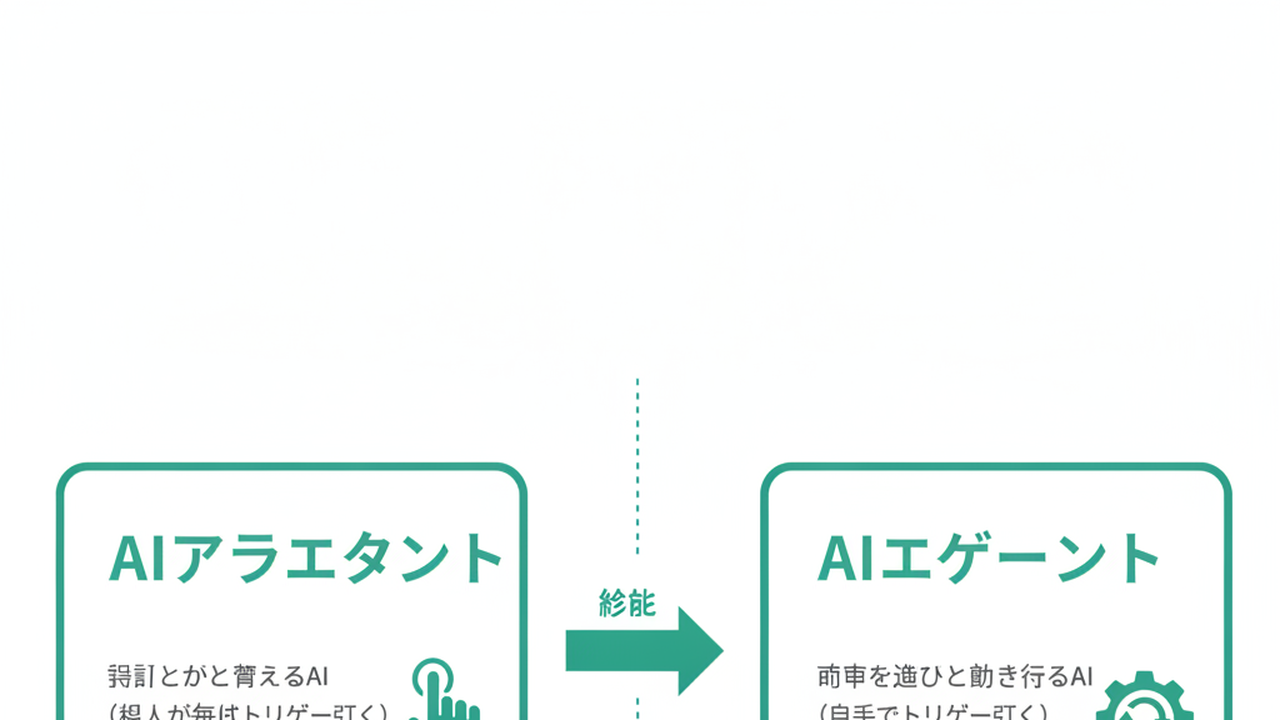
- AI assistant: an AI that thinks when you tell it to (you pull the trigger every time)
- AI agent: an AI that keeps working once you hand it a goal (it pulls its own trigger)
Consider a task like: “Summarize our competitors’ social media posts every morning and send them to Slack.”
With ChatGPT, you’d manually type “check our competitors’ latest social posts and summarize them” every single morning, then copy the output into Slack. That’s the “tells it what to do” model.
With an AI agent, you configure it once: “Goal: summarize new social posts from Competitor A, B, and C every morning at 8 AM and send to Slack.” After that, the agent handles trigger detection, data collection, AI summarization, and Slack delivery on its own.
That ability to pull its own trigger is the essence of an agent.
Why did “build one without code” become real in 2026? Three conditions converged.
First: LLM APIs standardized tool-calling. OpenAI’s Function Calling and Anthropic’s Tool Use stabilized, giving AI a consistent interface for reaching external services.
Second: MCP (Model Context Protocol) arrived. Anthropic released this standard in late 2024, creating a uniform connection layer between AI and external tools.
Third: No-code platforms caught up. Automation tools like Zapier and Make officially integrated AI actions into their platforms.
The skill that matters now isn’t the ability to write code. It’s the ability to decompose business tasks. That’s where we are in 2026.
The 7 No-Code AI Agent Builders That Emerged in 2026
Cybernews published its 2026 “Best No-Code AI Agent Builders” report (source: https://cybernews.com/ai-tools/best-no-code-ai-agent-builders/). Their research team ran the same scenarios through multiple tools side by side. Two of the publicly disclosed evaluation criteria: User Experience (35%) and Features (25%). The rest is a combination of pricing, integrations, and other factors.
Cybernews’ overall #1 is n8n, praised for its full-control philosophy. Gumloop takes #2, Nexos.ai #3, Zapier #4, Make #5, and Bubble #6.
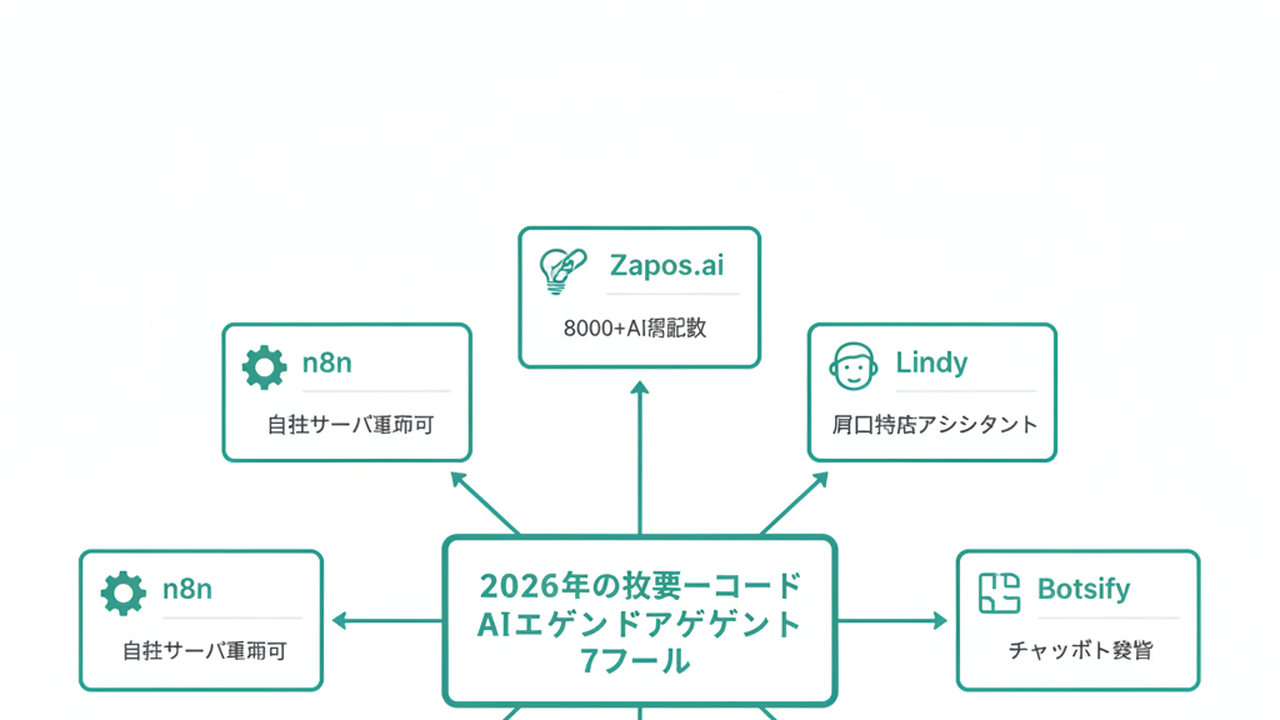
Using the top Cybernews picks as a base, I built a list of 7 tools with a focus on business use cases. Gumloop and Make from the Cybernews rankings are strong general-purpose automation tools. In their place, I added Lindy, Botsify, and Pickaxe—three tools frequently compared specifically for AI agent workflows. Picking mechanically from a ranked list gives you the wrong tool. Matching to your use case gets you started faster.
| Tool | Selection Rationale | Strength |
|---|---|---|
| n8n | Cybernews 2026 overall #1 | Full control, self-hosting available |
| Nexos.ai | Cybernews #3, team-use focus | Rich templates, built for collaboration |
| Zapier | Cybernews #4, SaaS integration king | 8,000+ integrations |
| Lindy | Market consensus, conversational focus | Sales and support workflows |
| Botsify | Market consensus, site-embed type | Customer-facing interactions |
| Pickaxe | Market consensus, external distribution | Content creator use cases |
| Bubble | Cybernews #6, UI-inclusive app building | Full product development |
One critical caveat: “best” depends entirely on your workflow. If you borrow Cybernews’ methodology, the right move is to pick one scenario, run it through 2–3 tools, and compare. Mechanically picking the top-ranked option is a risky first move.
I started with Zapier not because it ranked highest, but because I was already using it with Gmail and Notion. Compatibility with your existing environment is the most important variable in tool selection.
This raises the obvious question: “Which of these 7 should I try today?” The next section runs you through a 3-question flow to find out.
The 3-Question Flow: From Business Problem to 2 Tools
Here’s the core of this guide. A list of 7 tools doesn’t remove paralysis. Run your situation through these 3 questions.
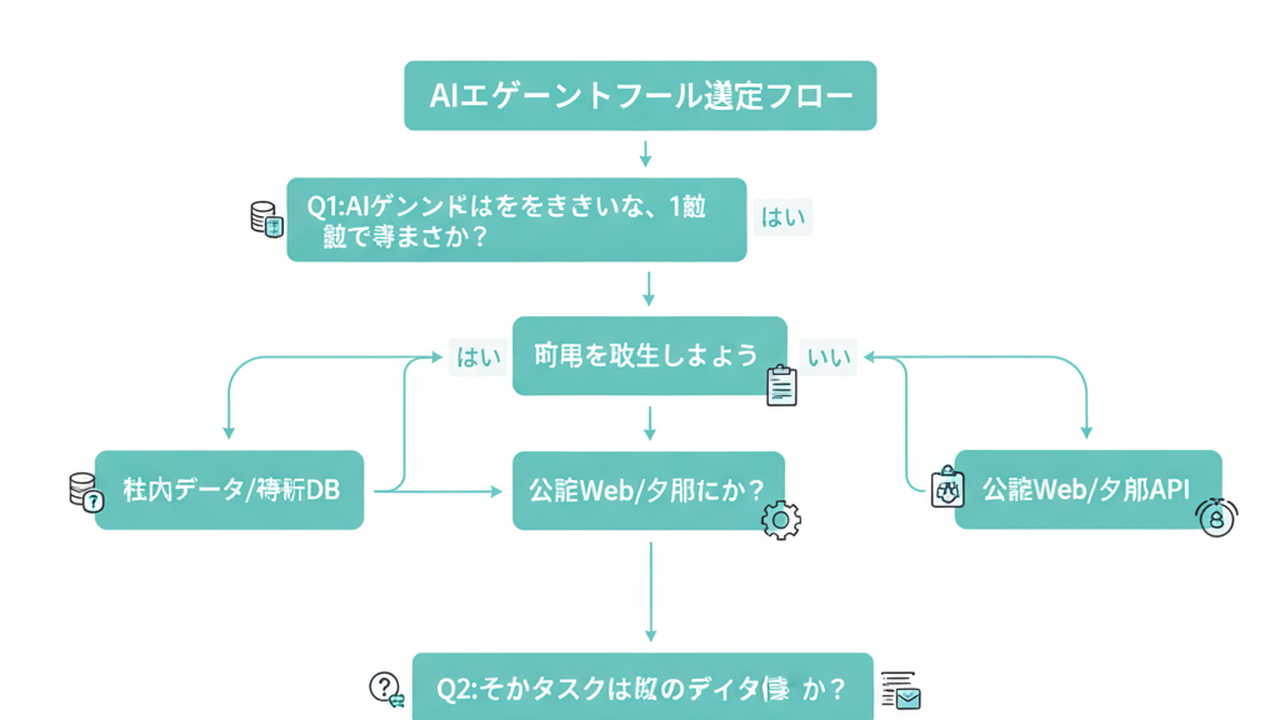
Q1: Can you write down—in one sentence—what you want the AI agent to do?
- Yes → Go to Q2
- No → Spend 5 rounds of dialogue with ChatGPT to clarify what you actually want. Agent-building starts after that one sentence exists.
Q2: Where does the data for that task live?
- Existing SaaS tools (Gmail, Slack, Notion, etc.) → Zapier or n8n
- Visitors coming to your website → Botsify (embed-type) or Lindy (conversation-focused)
- Shared internal workflows across a team → Nexos.ai (template-heavy) or Lindy (collaboration-first)
- Building a distributable AI app for external users → Pickaxe or Bubble (UI-inclusive)
Q3: How much control does your organization need?
- “It just needs to work. Cloud hosting is fine.” → Zapier, Nexos.ai, Lindy
- “We need it running on our own servers. We need logs in-house.” → n8n (open-source edition available)
Run through these and most people get to 2 tools. From there, try one real scenario on each free plan. Spend 30 minutes with each and the right one will feel obvious.
The question I hear most from small business owners and solo operators is “which one is the right answer?” My answer is straightforward: start with Zapier or n8n. Those are your two.
Three reasons. One: the free plans cover real-world use. Zapier’s free plan runs up to 100 tasks/month on Zaps; AI Agents are up to 400 activities/month. n8n’s self-hosted Community Edition is permanently free; the Cloud version has a free trial (2,500 executions) only. You’re choosing upfront between “self-host free forever” and “short cloud trial.” Two: integration breadth is unmatched—Zapier at 8,000+, n8n at 600+. Three: large communities mean solutions to your problems already exist. Japanese-language guides are plentiful too.
Nexos.ai, Lindy, Botsify, Pickaxe, and Bubble are excellent choices when your use case is clearly defined—team workflows, customer touchpoints, external distribution, or product development. For general “let me automate my operations piece by piece,” Zapier is the safest first move.
The reason I don’t name a single “2026 standard” tool: the right answer depends on the job. Once your one-sentence goal is set, that’s when the real selection happens.
The 30-Minute Setup: Building Your First Agent in Zapier
Here’s a concrete walkthrough for building “a Zapier agent that summarizes competitor social posts every morning and sends them to Slack.” The goal: something working in 30 minutes.
Step 1: Create a free Zapier account (5 min)
- Go to zapier.com and sign up with your Google account
- Enter the Zap creation screen (one automation flow = one Zap)
- Hit ”+ Create Zap” from the dashboard to open the editor
Step 2: Set the trigger (5 min)
- Choose “Schedule by Zapier”
- Set “Every Day” with a time of “08:00”
- This trigger is the switch that starts your agent every morning
Step 3: Set up your data source (5 min)
- Add “RSS by Zapier” as Action 1
- Enter your competitor’s social media RSS feed (for X, use a Nitter mirror RSS; for company blogs, use their official RSS)
- Configure it to fetch new posts from the last 24 hours
Step 4: Let the AI summarize (10 min)
- Add “AI by Zapier” or “OpenAI/ChatGPT” as Action 2
- Enter this prompt:
- “Summarize the following social media post in 3 lines. Include one line on the poster’s intent and one line on what it signals as a competitive development.”
- Feed in the post content from Step 3
- This is where the AI action gets wired in—the core experience of designing an agent
Step 5: Send the Slack notification (5 min)
- Add “Slack” as Action 3, specify the target channel
- Route the Step 4 summary into the message
- Hit “Test send” and confirm it arrives in your Slack
That’s 30 minutes. Seeing it actually work is when the concept of an AI agent finally clicks. You’ve shifted from “AI that waits for instructions” to “AI that runs toward a goal”—and you did it yourself.
Don’t aim for perfection on your first agent. Get to “something shows up in Slack every morning,” then iterate: improve the summary quality, bundle multiple competitors, add smart filtering. Trying to build everything in at once is how most people never finish. That’s not a theory—it’s what I’ve seen happen.
At this point, the natural next question is: “Once I’ve got Zapier running, what if I need something more complex?” The answer is in the failure patterns section below, and the section after that.
3 Failure Patterns I Personally Made
Here are three mistakes I actually made when building no-code AI agents. Sharing them clearly so you don’t fall into the same traps.
Failure 1: Going for “can do anything” and never finishing (scope creep)
My first agent was a “sales email response assistant,” and I got greedy. I tried to stack in: inbound email parsing, deal type classification, history search, drafting 3 response options, manager approval, and send. Three weeks of iteration later, it still didn’t work and I abandoned it.
The fix is simple: make “1 trigger, 1 action, 1 output” your starting template. The Slack notification example above uses exactly 1 trigger and 3 actions. Your first agent’s goal should be “a small agent that saves me 30 minutes.” That’s it.
I understand the urge to build something ambitious. But if your first agent never works, you never build a second one. Start small, in territory where you can win.
Failure 2: Missing the AI API call costs
My second agent automatically classified incoming inquiries and routed them to the right person. I expected just a few inquiries per month. What actually happened: bot traffic got counted as inquiries, and after 3 days my OpenAI API bill hit ~$80. Completely unexpected.
Three fixes: 1) Add a filter before the trigger fires (the “Filter” step in Zapier) to block suspicious requests before any AI call is made. 2) Use the free plan’s monthly task cap as a cost safety net. 3) For the first week, manually check your logs daily to catch unexpected trigger spikes.
“Once it’s running, it runs itself” is the wrong mindset. Treat the first week like you’re sitting right next to your agent, watching it work.
Failure 3: Works in testing, breaks in production
I built an agent to log new LinkedIn connections into Notion. It worked perfectly in tests. In production, it hit Notion’s API rate limit and sat broken for two days. I had no failure notifications set, so I only noticed after the data gap had already happened.
The fix: run a 24-hour continuous live test before going to production. Check the last 48 hours of execution history in Zapier daily for failed steps. Always set up failure notifications (Zap fail → Slack DM).
All three failures share one root cause: releasing control the moment it works. Spend 5 minutes every day for the first week checking on your agent. That habit alone dramatically improves the survival rate.
What Comes After No-Code: When to Move to Claude Code + MCP
Run no-code AI agents for about six months and you’ll start to hit ceilings. Signs that it’s time for the next phase:
Sign 1: Agent-to-agent workflows have gotten complex enough that the no-code flow diagram is impossible to read. Sign 2: Your organization-specific logic (internal rules, edge cases) has grown past 100 conditional branches and can’t be managed. Sign 3: Monthly API costs have exceeded ¥30,000 and you want your own optimization controls.
When those signs appear, the options that enter the picture are code-based environments like Claude Code + MCP.
Claude Code’s pricing is covered in Claude Code Pricing: What It Actually Costs, and the entry point to getting started is in Claude Code: How to Get Started.
Before moving to Claude Code, use the no-code phase to internalize what an agent actually is and what it means to decompose a workflow. That foundation dramatically accelerates comprehension once you get to code.
The order matters.
Running agents in no-code first means every place you hit a wall becomes a textbook for exactly what code needs to solve. Going straight to code means you spend all your time learning the technology without ever deciding what to build. That’s the trap for marketers and business-side folks especially.
Wait until you’ve run three or so agents on no-code before deciding whether to move to Claude Code + MCP. There’s no rush.
Summary: Build Your First Agent in 30 Minutes, Today
Here’s everything from this guide as a checklist.
- Can explain the difference between an AI agent and an assistant in 30 seconds
- Can explain why each of the 7 no-code AI agent tools was selected
- Can narrow to 2 tools using Q1 (one-sentence goal), Q2 (where the data lives), Q3 (control requirements)
- Can build a working agent in 30 minutes
- Has a response plan for all 3 failure patterns (scope creep, cost surprise, production crashes)
- Understands that Claude Code + MCP is the path forward beyond no-code
Looking up “how to build AI agents” means you still have nothing. Building your first agent changes what you can see.
I remember the day I built my first one. When that automated summary showed up in Slack, it was the first time I had the feeling of “an AI working in place of me.” That was my inflection point with AI as a tool.
Take 30 minutes today, and six months from now you’ll have 3 or 5 agents handling work for you.
Start with Zapier or n8n. It doesn’t matter which. Just build something and run it.
Sources
- Cybernews “Best No-Code AI Agent Builders 2026: Launch Automations Without Coding”: https://cybernews.com/ai-tools/best-no-code-ai-agent-builders/
- Zapier integrations “8,000+”: Zapier official homepage value (as of June 2026) https://zapier.com/
- Zapier Agents free tier “400 activities/month”: Zapier official pricing https://zapier.com/pricing
- n8n free tier: Self-hosted Community Edition is permanently free / Cloud is trial-only at “2,500 executions”. 600+ integrations: n8n official https://n8n.io/ / Cloud pricing: https://n8n.io/pricing/
- MCP (Model Context Protocol) released late 2024: Anthropic official https://www.anthropic.com/news/model-context-protocol
Source Map (Masago review reference)
| # | Statistic/Data | Source URL | Year | Cited Value |
|---|---|---|---|---|
| 1 | Evaluation criteria: UX 35%, Features 25% | Cybernews “Best No-Code AI Agent Builders 2026” https://cybernews.com/ai-tools/best-no-code-ai-agent-builders/ | 2026 | UX 35% / Features 25% |
| 2 | Cybernews ranking: n8n(#1)/Gumloop(#2)/Nexos.ai(#3)/Zapier(#4)/Make(#5)/Bubble(#6) | Same Cybernews article https://cybernews.com/ai-tools/best-no-code-ai-agent-builders/ | 2026 | Individual rankings |
| 3 | Zapier integrations 8,000+ | Same Cybernews article + Zapier official https://zapier.com/ | 2026 | 8,000+ |
| 4 | n8n free: self-hosted Community Edition permanently free / Cloud trial 2,500 executions only | n8n official https://n8n.io/ / Cloud pricing https://n8n.io/pricing/ | 2026 | Self-host free forever / Cloud trial 2,500 executions |
| 5 | Zapier Zaps free plan 100 tasks/month | Zapier official pricing https://zapier.com/pricing | 2026 | 100 tasks/month |
| 6 | Zapier Agents free tier 400 activities/month | Zapier official pricing https://zapier.com/pricing | 2026 | 400 activities/month |
| 7 | MCP (Model Context Protocol) released late 2024 | Anthropic official https://www.anthropic.com/news/model-context-protocol | 2024-11 | Standard released |

AIを使いこなせない方は、この先どんどん差がつきます。僕はAIエージェントを毎日動かして、壊して、直して、また動かしてます。そういう泥臭い実践の記録をここに書いてます。理論は他の方にお任せしました。僕は動くものを作ります。朝5時に起きてウォーキングしてからコードを書くのがルーティンです。


