The Era of 'AI You Call When Needed' Is Over: The Full Picture of the 'Always-On Agent' Era Beginning with Claude Code Channels × Computer Use
8 AM, on the commuter train, you pull out your phone. Open Telegram, type a single line. 'Summarize yesterday's meeting notes and prepare a Slack-ready summary.'
What you'll learn in this article
- Where pricing and adoption questions around Claude Code stand right now
- Which plan or rollout stage fits the reader's situation
- Which follow-up article to open next for setup, cost, or bigger-picture context
8 AM, on the commuter train, you pull out your phone. Open Telegram, type a single line. “Summarize yesterday’s meeting notes and prepare a Slack-ready summary.”
That’s it. By 9 AM when you’re back at your desk, Claude Code has read your local files, organized the key points, and finished a draft formatted for Slack. While you did nothing for two hours, the AI was getting work done.
This isn’t a story about the near future. As of March 2026, these are features that have actually been released.
Let me be blunt: if you don’t know about this, the gap is widening against you right at this moment. The dividing line between people who “can use AI well” and everyone else is no longer about how you write prompts. It’s not about whether you “call” AI — it’s about whether you have it “always running.” That’s where the battle is won or lost.
In this article, I’ll lay out the full picture of three new features Anthropic released in rapid succession in March 2026: Claude Code Channels, Computer Use (macOS-compatible version), and Dispatch. I’ve written it not just to cover “what they can do,” but so you can picture “how your own work will change.”
AI Was Something You “Called When You Needed It.” That’s Now Changed at the Root
Ever since ChatGPT appeared, the basic shape of AI usage stayed the same. Open a browser, write a prompt, receive a response. I call this “AI you call.”
The user holds the initiative, and the AI only moves when called. This was the standard usage model up through 2025.
But think about it. If a human assistant worked that way, you’d be in trouble. A “secretary who only moves when spoken to” — that’s half as useful in practice. A truly capable assistant moves work forward without being told, and reports back when needed.
In March 2026, Anthropic released features one after another that broke through this wall.
Three new pillars were added to Claude Code (Anthropic’s AI coding assistant): Channels, Computer Use, and Dispatch. By combining these three features, AI agents transformed from something you “call” into something that “runs continuously.”
The essence of the change is “a shift in who holds the initiative.” Until now, humans matched the AI’s pace. You ask, wait, confirm, ask again. From now on, the AI matches the human’s schedule. Work progresses even when humans are away from the desk or asleep.
Some of you might feel “that’s scary.” But when email first appeared, nobody said “it’s scary that work requests come asynchronously.” Channels is the same. Once you get used to it, you’ll wonder, “Why on earth were we doing everything in real time?”
Claude Code Channels: Issue Instructions from Your Phone, Move Work on Your Local PC
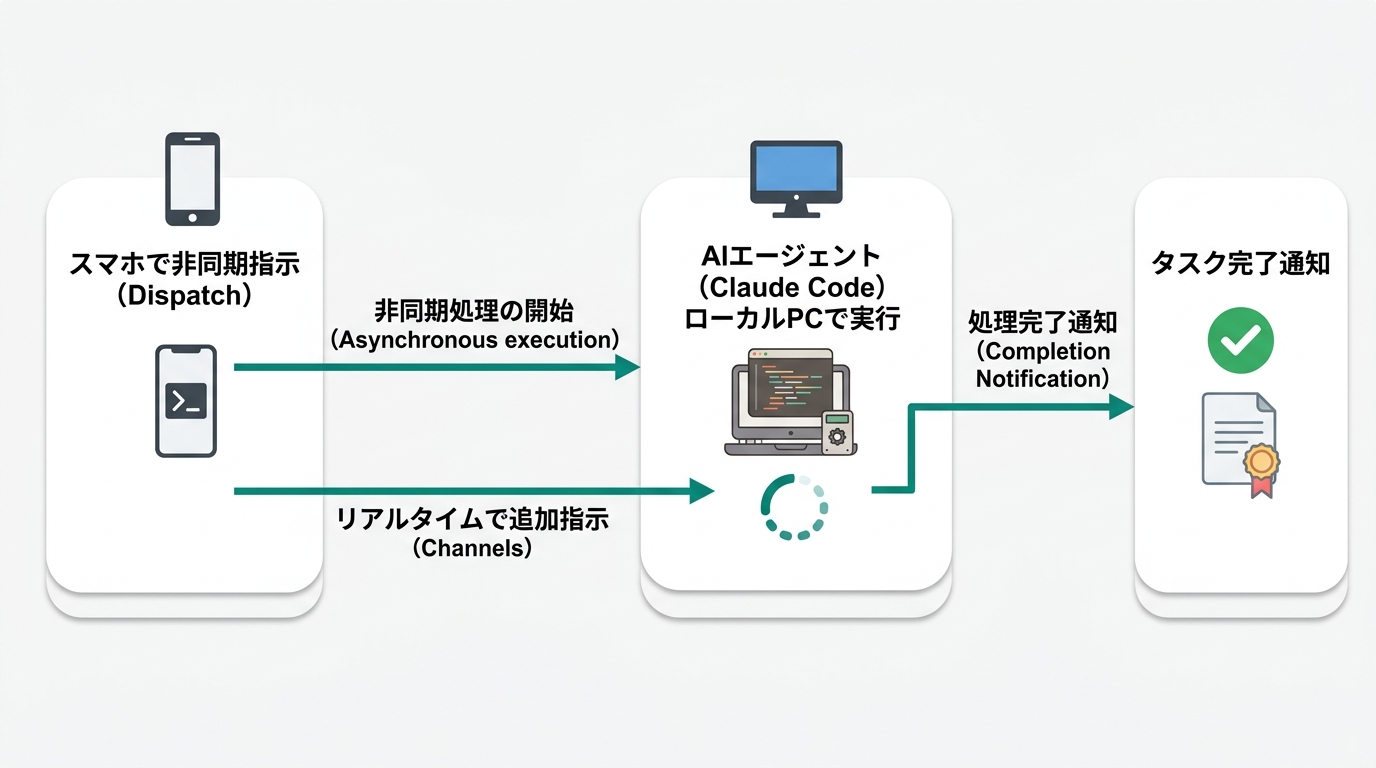
Claude Code Channels was released as a research preview in March 2026 (see Claude Code Official Documentation (Channels)).
To put it in one line: it’s “a feature that lets you remotely control Claude Code on your own PC from messaging apps like Telegram or Discord.”
Claude Code normally runs on your local PC. It’s a tool that gets AI to do work for you — writing code, editing files, operating git, and so on. But there’s been a constraint: you had to be at your PC to use it.
Channels solves exactly that. As long as a Claude Code session (working session) is running, you can deliver commands to Claude Code on your local PC just by sending a message from your phone via Telegram or Discord. Send “Write a draft of the report” from out and about, and by the time you get home, the work is done.
The setup steps are also relatively simple. The structure lets you link a Telegram bot with a single command, so there’s no need to build your own bridge. With existing tools like OpenClaw (OpenClaw is an open-source similar tool — a setup for running autonomous AI agents locally), you needed to configure your own server. Channels, being an official feature managed by Anthropic, is more stable.
What you’ll wonder here is “is the security okay?” You’re sending commands to your own PC through a messaging app, so it’s natural to worry.
In the current design, Claude only operates within a permission scope that’s pre-authorized. Access permissions can be controlled in detail through Claude Code settings, and you can choose whether to make it fully autonomous or insert a confirmation step. Because it’s in the research preview phase (at the time of this writing), more detailed permission management features are expected to be added in the future.
When you think about real use cases, the possibilities expand.
A marketer could send “Compile yesterday’s numbers and output them to CSV” while in transit. A freelance designer could use it like, “Read the memo from the client and create a revision list.” An engineer could issue an instruction like, “Read the pull request comments and summarize a response strategy.”
Incidentally, there have been reports that VentureBeat called Channels an “OpenClaw killer.” But in reality, the situation isn’t one of competition but of coexistence. Some engineers prefer OpenClaw; others choose the simplicity of Channels. Differentiated usage by purpose will continue to develop.
It’s no longer “AI you call” — it’s “AI you send to.” That’s the essence of Channels.
Dispatch: The Async Instruction Style of “Get It Done by End of Day”
Around the same time as Channels, there was a report about another instruction style: Dispatch. It’s the content CNBC reported on March 24, 2026.
Dispatch specializes in asynchronous workflows. “Asynchronous” means “without real-time back and forth” — picture it like email, where you fire off a message and the recipient processes it at their own pace.
Here’s how it concretely works. You send the instruction “Get this done by end of day” from your iPhone. Claude Code processes it in the background. When you get home and open your desktop, it’s waiting in completed form.
You’re probably wondering how to distinguish between Channels and Dispatch. Channels is suited for two-way communication where responses come back in real time. Dispatch is optimal for asynchronous processing like “let me know when it’s done.” Time-consuming tasks — organizing large volumes of files, summarizing web research, bulk data conversion, and so on — are well suited for Dispatch.
Try imagining how your daily workflow changes when you combine the two.
At 6 AM, while making coffee, you send “Compile today’s research” to Dispatch from your iPhone. On the train, you add an instruction via Channels: “Organize the memos into bullet points.” By 9 AM when you sit at your desk, Computer Use is putting the finishing touches on it. Even during hours when no human is present, pieces of work pile up.
Note that for Dispatch, as of this writing (2026-03-25), CNBC has reported on it, but a detailed specification disclosure on Anthropic’s official channels has not been confirmed. Feature details may be updated upon official release.
This is the workflow of the “top tier of AI users” in 2026.
Computer Use (macOS): Claude Looks at the Screen and Moves the Mouse and Keyboard
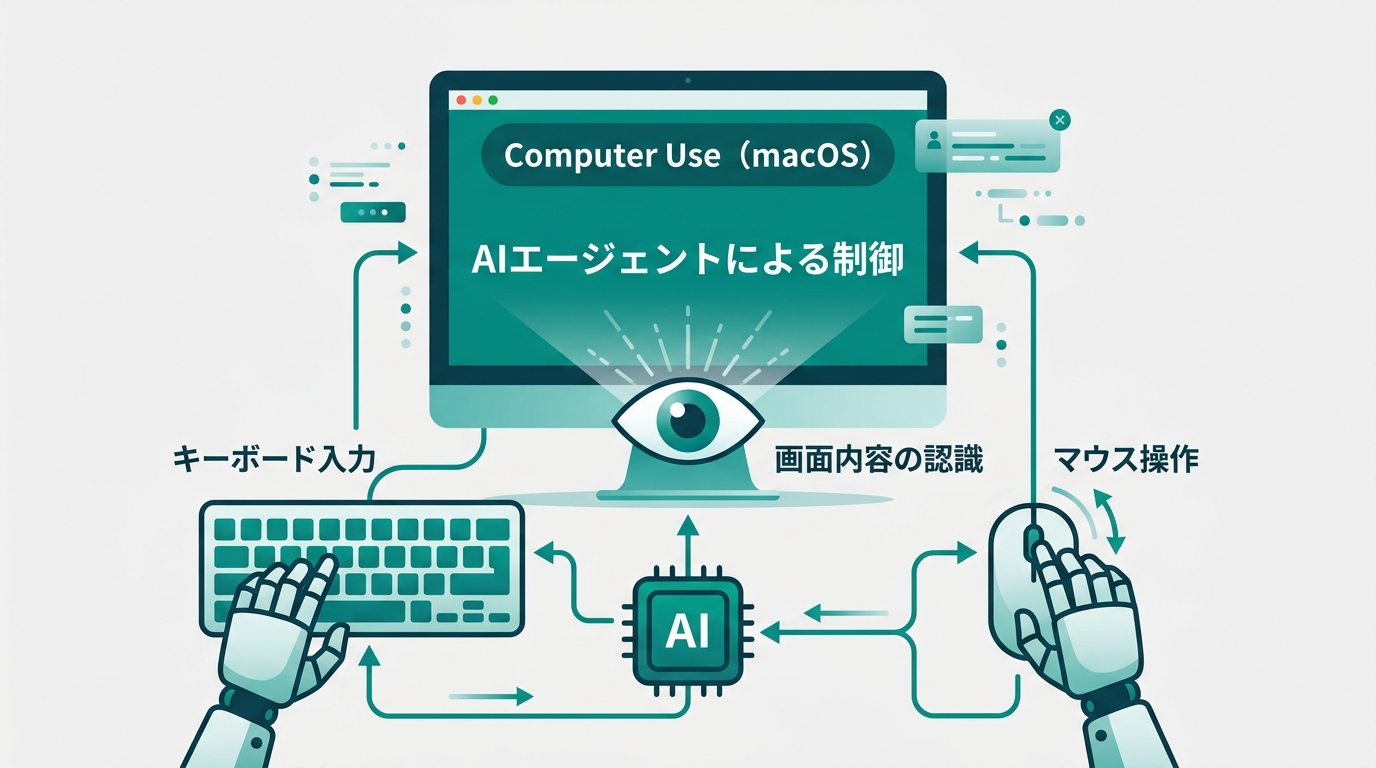
In March 2026, the macOS-compatible version of Computer Use was released. It’s the content SiliconANGLE reported on March 23, 2026.
Computer Use is a feature where the AI “looks at” the screen and “moves” the mouse and keyboard to operate the computer.
This is on a different layer from conventional “text generation AI.” The AI takes a screenshot (a still image of the screen) to recognize the current screen state, judges what to click next, and executes. It performs this whole sequence autonomously.
For example, if you say “use a formula in column B to aggregate the data in column A of the spreadsheet,” Claude checks the screen, clicks the cells, enters the formula, and runs it through to completion. It’s theoretically possible to have it fill in a specific form in a browser, or open a settings screen and change specific items.
Some of you may be thinking, “Isn’t that scary?”
Regarding safety design, Anthropic has put several measures in place. Each time access is requested for a new application, user permission is required on a case-by-case basis. Because it operates under macOS’s sandbox feature (a mechanism that restricts certain apps from accessing the territory of other apps), the risk of unintended operations spreading widely is limited.
That said, let me be honest. At the current research preview stage, this is more of a “give it a try” phase than something to use for important production work. Better to think of it as a stage where you learn while watching how the AI operates. Full operational use is wise after general release.
What’s interesting about Computer Use is that “you don’t have to write automation scripts.” Until now, automating repetitive PC tasks required RPA (Robotic Process Automation — automation tools where a robot operates the PC for you) or programming knowledge.
Because Computer Use reproduces the human action of “looking at the screen and operating it,” it can automate things even when an app’s API isn’t published. An API is a “connection point that links software to other software,” and many tools don’t publish them, which has been a wall for conventional automation.
This could be a major turning point especially for those who work no-code — people who combine SaaS tools to get work done without writing programming. “An era where you can automate without being able to program” is getting closer to reality.
Supported platforms are limited to macOS (as of March 2026). Support for Windows and Linux has not been announced as of this writing, so non-Mac users will need to wait for further official announcements.
What the Real-World Examples Show: What We Can Learn from gstack and PwC
Let me introduce two examples that show where Channels × Computer Use × Dispatch is headed.
gstack — A Configuration Set That Lets a Solo Developer Generate 600,000 Lines in 60 Days
There’s an open-source project called gstack, released by Garry Tan, CEO of Y Combinator (Y Combinator, the famous Silicon Valley startup accelerator) (GitHub: garrytan/gstack).
gstack is a configuration set that makes Claude Code function as a “virtual development team.” It defines agents with 15 different roles — CEO, designer, engineering manager, QA staff, and so on — and gets them to collaborate as a team.
The results are surprising. It’s said to have generated 600,000 lines of production code (actual product code that runs in a production environment) in 60 days. That’s a pace of 10,000 to 20,000 lines per day. It’s the content TechCrunch reported on March 17, 2026, and on GitHub it gathered over 19,000 stars and over 2,200 forks shortly after publication (at the time of this writing: 2026-03-25. GitHub star counts may fluctuate).
What this means is the reality that “even one person can have a team of AI agents.”
Until now, software development required multiple people. Designers, implementers, reviewers, testers — specialists in each area divided the work. By having agents take on each role, gstack demonstrates that a single developer can produce the productivity of many people.
This is relevant for non-engineers too. The same way of thinking applies fully to “running a marketing team as one person” or “running an editorial team as one person.” Run a research-responsible agent, a writing-responsible agent, and a review-responsible agent in parallel, and the human only handles direction.
In fact, I’m already running an autonomous workflow myself, combining Claude Code with MCP (MCP = Model Context Protocol, a standard for connecting AI agents with external tools) servers. I have a group of agents divide up the work from research through writing to review. With Channels × Computer Use × Dispatch added to the mix, I have a clear outlook on running this more seamlessly.
PwC’s Adoption Shows “Accumulated Trust”
“Research preview means you still can’t use it for production, right?” That’s a fair question. But major corporations are already on the move.
On February 24, 2026, PwC (PricewaterhouseCoopers, one of the Big Four accounting firms) announced an enterprise agent deployment contract with Anthropic. The content covers agent deployment using Claude Opus 4.6 / Sonnet 4.6 (Anthropic’s latest flagship models) for two domains: finance (AI Native Finance) and life sciences (Healthcare & Life Sciences).
Some of you may feel “this is different from a story about SMBs or freelancers.” However, technology adoption follows a certain pattern. Two to three years after a large enterprise integrates something into operations, individuals and SMBs reach a state where they can use it in earnest.
In other words, the fact that PwC is acting now means the stage when individuals and freelancers can use these tools in earnest is closer than you’d think. There’s plenty of value in getting your hands on them now.
“There’s no point touching it if you can’t use it yet” is wrong. By grasping how things work during the preview period, you can integrate it into actual work the moment of general release. The difference in this starting line is bigger than you’d think.
Another thing worth noting is the area of adoption. Compliance and auditing are operations where “accuracy and accountability” are demanded most strictly. The fact that PwC is integrating AI agents there means they’ve made the judgment that “there is sufficient trust in the precision and safety.” Beyond the question of tool preview status, this is evidence that trust in AI agents themselves has been accumulating.
The concept of “a solo operator having a team” is becoming reality.
What to Do Right Now: A Smart Approach to the Preview Stage
Currently (as of March 2026), Channels, Computer Use, and Dispatch are all in research preview. They’re at a stage where users on Claude Pro or Max plans ($20 / $100 per month) can try them, and the schedule for official general availability has not yet been announced.
Whether you say “then I’ll just wait and see” is the dividing line.
It’s precisely because it’s the preview stage now that it’s worth trying. There are three reasons.
You can learn the feel of operations with your body: New tools are learned fastest while using them. Even if you read the manual, there’s a lot you don’t understand until you move it. “How granular should my instructions be” and “where does the AI get stuck” only become clear once you touch it.
You can get ahead on workflow design: Touching it while thinking about “where would I use this in my work if I had this tool” dramatically speeds up your deployment when it’s officially released. You can do the preparation for production use during the preview stage.
You can join the community: Information sharing among users in the preview stage is dense. Workarounds for bugs and discoveries of useful ways to use it come out of the community. Becoming someone who “knows ahead” is overwhelmingly advantageous compared to those who come in later.
As for how to actually try it, first check the latest features on Claude Code’s official site (code.claude.com). For Channels, the simplest way to start is by linking with Telegram. Setup has fewer steps than Discord integration, so for first-timers, I recommend starting with Telegram.
For Computer Use, try starting with low-risk tasks. Get into the habit of confirming behavior in a test environment before handling important files. Just watching how the AI recognizes the screen will expand your ideas for future AI usage.
Let me also write the caveats honestly. Because it’s in the preview stage, there are situations where behavior is unstable. It’s wiser not to use it yet for important production work flows. Also, since Computer Use is macOS-only (as of March 2026), Windows and Linux users need to wait for the official announcement.
The most wasteful choice is “gathering information but not acting.” You have the information, but don’t try it. This is actually the pattern that misses the most opportunities. The feel of operation six months from now will definitely differ between those who tried it and those who didn’t. The experience of touching it during the preview stage moves your starting line forward after the official release.
Just knowing this puts you in the top 5%.
Conclusion: The Day “Always-On AI” Becomes Standard
Claude Code Channels, Computer Use (macOS), and Dispatch, released in rapid succession in March 2026. What these three features show is a fundamental shift in the relationship with AI.
Let me organize the points.
- Channels: Issue instructions to AI on your local PC from a messaging app. Work progresses even while you’re out
- Computer Use: AI looks at the screen and operates the mouse and keyboard. Automation that requires no scripts
- Dispatch: Request work asynchronously and receive it when complete. Work moves even while you sleep
The era of “AI you call when you need it” is over. Next, “AI that runs constantly and moves work forward” will become the standard. Both gstack’s 600,000 lines of production code and PwC’s enterprise adoption show the landscape beyond.
Open Claude Code’s official site right now and try setting up Channels. The more you think “it looks hard,” the more you’ll feel “it’s actually simple” once you touch it.
Stand on the side of those who can use AI well. The first step can be taken today.
References
- Claude Code Official Documentation (Channels)
- Claude Code Official Site
- SiliconANGLE (2026-03-23): Report on Computer Use macOS support
- CNBC (2026-03-24): Report on Dispatch
- GitHub: garrytan/gstack (TechCrunch report 2026-03-17)
- PwC official announcement (2026-02-24): Enterprise agent deployment contract with Anthropic
Image directives list (all 4):
- eyecatch: Issuing instructions to Claude from a smartphone → PC operates autonomously (opening)
- comparison: Comparison diagram of “AI you call” vs. “Always-on AI”
- illustration: Mockup of Telegram and local PC screen
- illustration: Enterprise AI usage scene in a modern office

AIを使いこなせない方は、この先どんどん差がつきます。僕はAIエージェントを毎日動かして、壊して、直して、また動かしてます。そういう泥臭い実践の記録をここに書いてます。理論は他の方にお任せしました。僕は動くものを作ります。朝5時に起きてウォーキングしてからコードを書くのがルーティンです。


