How Much Does a Solopreneur's AI Stack Actually Cost? I Rewrote My May 2026 Budget by ROI
After Claude for Small Business dropped May 13, I rebuilt my AI stack by ROI priority — what to buy first, later, and never. Three cost tiers + switching criteria.
What you'll learn in this article
- The key point to grasp before reading the full article
- How the issue changes practical decisions after reading
- Which follow-up article is worth opening next
I’ve been running my solo business for nearly two full years. Last week I was closing out the month’s expenses and stopped cold when I got to my AI subscriptions.
ChatGPT Plus. Claude Pro. Perplexity Pro. Notion AI. Midjourney. Suno. ElevenLabs. Somehow my monthly AI spend had climbed past ¥32,000 (~$210). “I use all of it for work,” which is technically true. But “do I need all of it?” — that one I couldn’t answer.
Then on May 13th, Anthropic announced “Claude for Small Business.” Toggle it on inside Claude Cowork and you get 15 workflows and 7 business tool integrations in one package (Anthropic official announcement). The details are covered in Nagi’s breakdown article.
Reading that, I admitted it to myself: it’s time to redesign my AI stack from scratch.
The problem with all the “top 30 AI tools” lists out there is that they’re useless for solopreneurs. Nobody running solo can drop ¥30,000–40,000 a month on AI. What we actually need is a priority map — what to buy first, what to buy later, and what to skip entirely.
That’s what I’m laying out today, built from my own spending data, sorted by ROI. I’ll cover three cost tiers (minimal, standard, expanded) and when to move between them. I’ll tell you what I kept and what I cut. Everything, on the table.
One note: tool selections and cost figures are based on my personal experience. Pricing is linked to official sources. The “effectiveness” judgments are mine — apply your own context.
Why Solopreneurs End Up Paying $200+/Month for AI
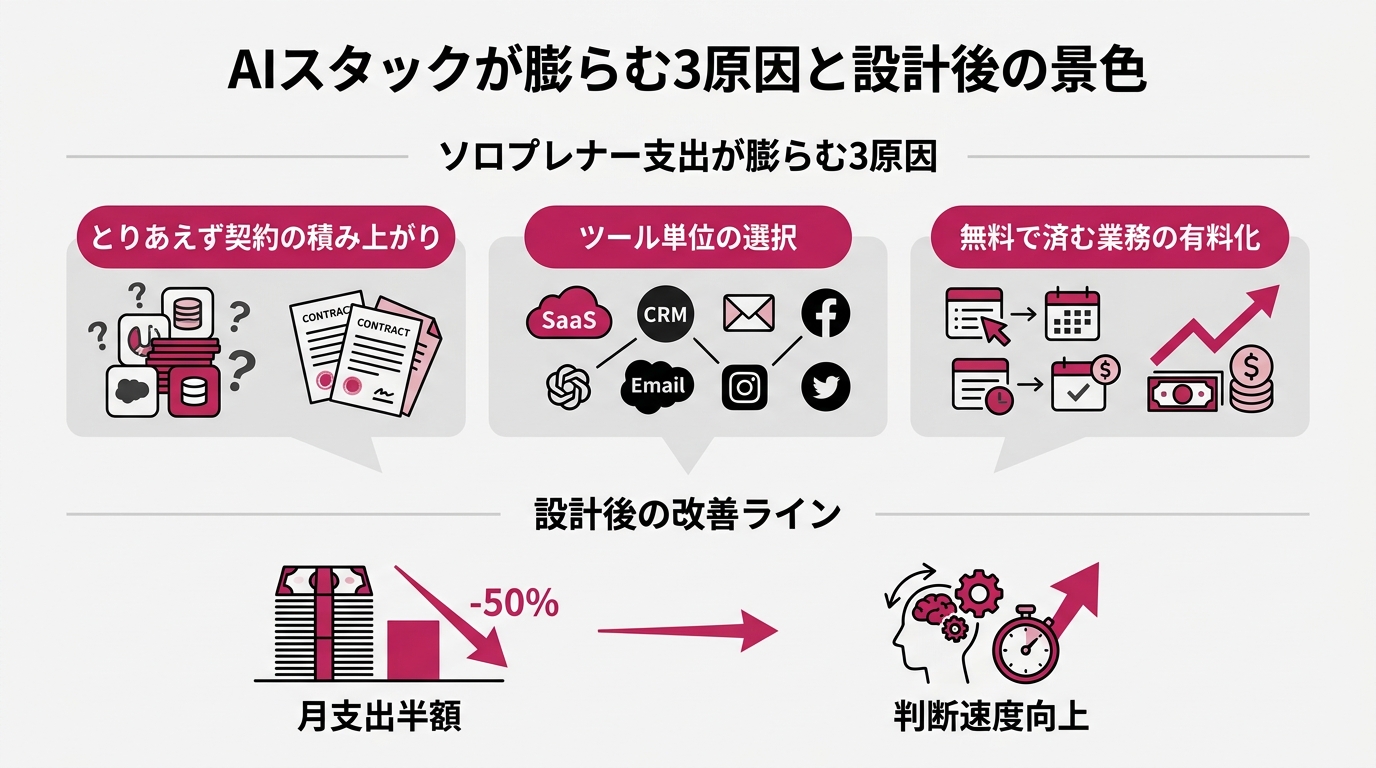
First, let’s name why solo AI spend balloons. If we can break it into three causes, we have a starting point for the redesign.
Cause one: the “let me just try it” pile-up. A new tool trends on social media, it’s only $20/month, you sign up. Three months later you think “I haven’t touched this in a while” — but canceling is annoying, so you leave it. Five or six of these stack up. Midjourney and Suno were exactly this for me.
Cause two: subscribing to tools instead of subscribing to jobs. The right approach is to identify what work needs doing, then find the best tool for that job. Instead, we follow what’s trending and subscribe tool by tool. Someone ends up running ChatGPT, Claude, Midjourney, and Canva in parallel for “image generation” — one job, four subscriptions. Three of them are redundant.
Cause three: paying for things free tiers cover. If you’re using something three to five times a month, you’re paying $20 for something you could get free. It’s like paying an annual premium membership to a store you visit once a year.
Kill these three causes and your monthly spend roughly halves. Mine dropped from ¥32,000 ($210) to ¥16,000 ($105). My productivity didn’t go down. If anything, having fewer tools clarified which tool to use for what, and my decision speed improved.
Before building a stack, write out every AI function your work actually needs. For most solopreneurs it comes down to seven: writing, research, image generation, code, data analysis, transcription/notes, and workflow automation. Cover those seven and you handle 80% of solo work.
The key insight: you don’t need a separate tool for each one. The coverage of general-purpose LLMs (large language models — massive AI systems trained on human language) expanded dramatically from 2025 into 2026. One Claude Pro or one ChatGPT Plus can now handle writing, research, code generation, and basic data analysis without breaking a sweat.
So the real design question is: how many tools do you need to cover your seven jobs? My answer is three. Three tools cover 90% of my work; the remaining 10% I handle with one-off, pay-per-use tools as needed. That’s what I consider the optimal solo stack as of May 2026.
The Highest-ROI Starting Point: The Minimal Stack ($20–40/month)
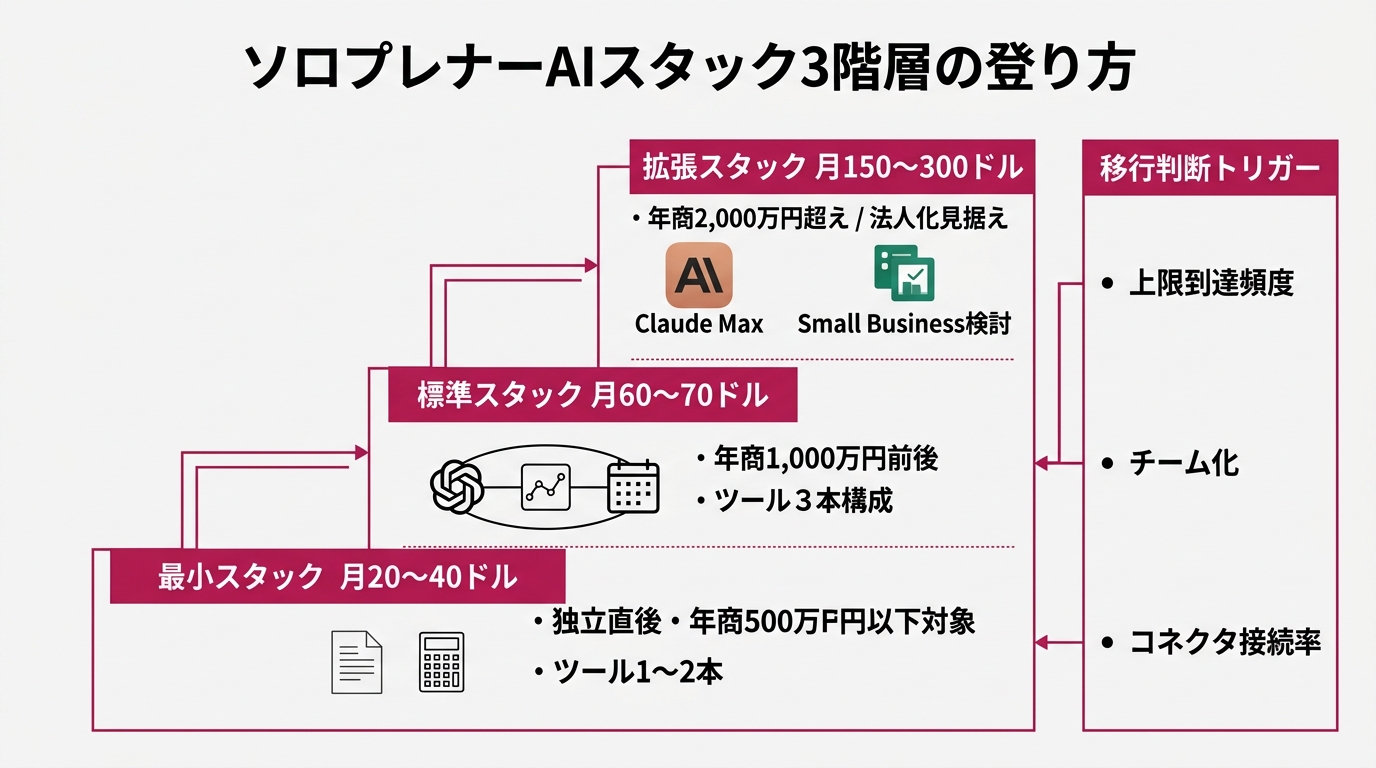
The minimal stack runs $20–40/month. This is where you should start if you’ve just gone independent, you’re in a side-hustle phase, or your annual revenue is under ¥5M ($33K).
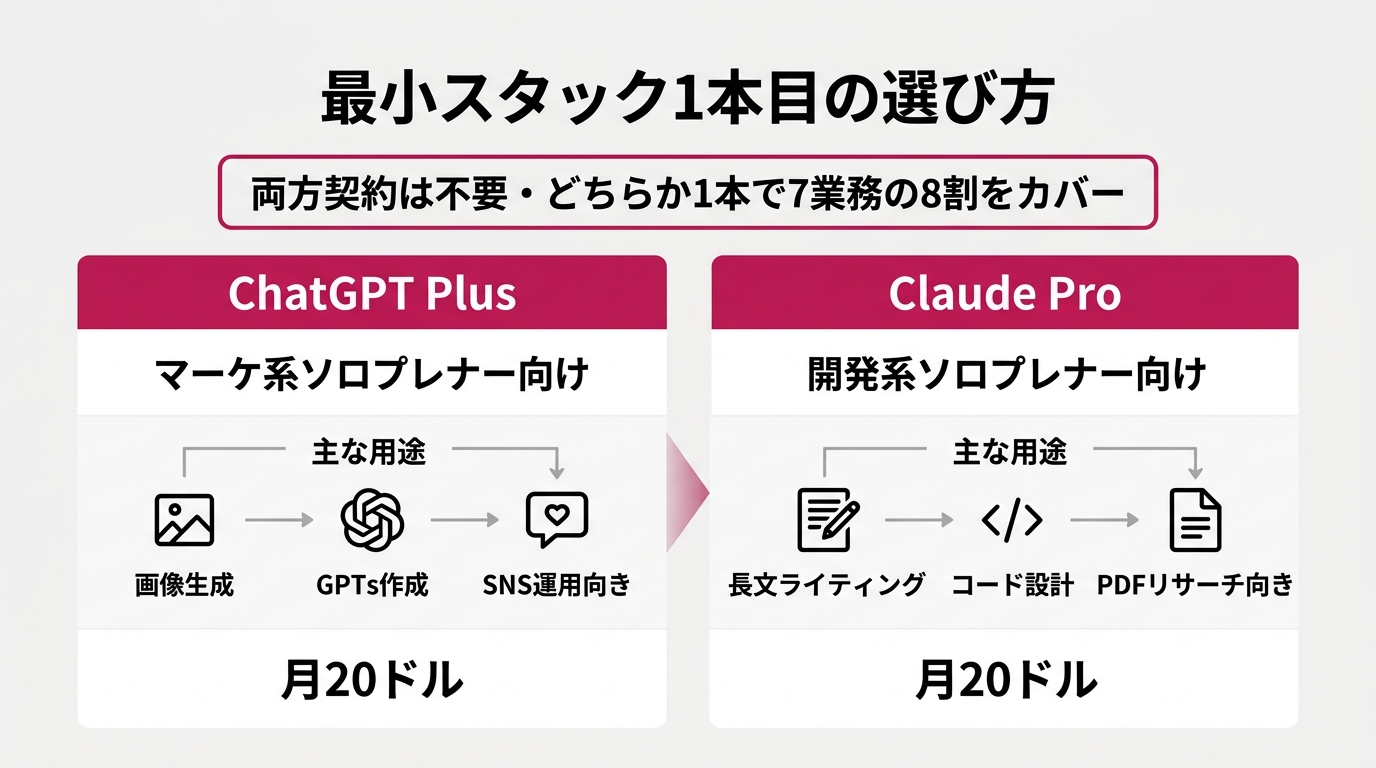
The minimal stack is one general-purpose LLM. Claude Pro is $20/month; ChatGPT Plus is $20/month — same price point (Anthropic official pricing). You don’t need both. Two reasons.
First: having both doesn’t lead to using both. I tried it. Over 90% of my work ended up going to one or the other. Paying $20/month for the 10% is poor ROI.
Second: general-purpose LLM quality differences barely show up in real work output. Blog structure, email drafts, proposal scaffolding, code review — in my experience, Claude Pro and ChatGPT Plus produce equivalent quality. Meaningful gaps only appear in narrow specialist territory: legal document phrasing, medical precision, fine-grained image analysis. Solopreneurs hit those edge cases less than once a week.
So which one? My deciding factor: does your work lean more toward image generation or code generation?
Choose ChatGPT Plus if you’re a marketing- or content-focused solopreneur. Social media post images, thumbnail sketches, diagram mockups. ChatGPT’s built-in image generation and the flexibility of GPTs (custom AI agents) are the differentiators.
Choose Claude Pro if you’re dev-, automation-, or long-form writing-focused. Claude’s strengths are structural comprehension of long documents, full-codebase design, and processing large research PDFs in one pass. I went with Claude.
The minimal stack’s optional second tool: Perplexity Pro at $20/month — but only if daily research is central to your work. Consultants, writers, and market researchers will get strong ROI. Perplexity sits between a search engine and a general LLM; it summarizes current information with citations. For work that requires “what happened this week,” it outperforms standalone LLMs.
Conversely, if research isn’t your core — designers, coaches, trainers — skip Perplexity Pro. That’s $20/month back in your pocket.
Minimal stack total: $20/month for one LLM, $40/month if you add Perplexity. For a solopreneur at ¥5M annual revenue, that’s under 1% of revenue. The ROI argument is self-evident.
When Revenue Grows: The Standard Stack ($60–70/month)
Move to the standard stack when you’re around ¥10M (~$66K) annual revenue — when monthly workload increases and you’re managing multiple concurrent projects.
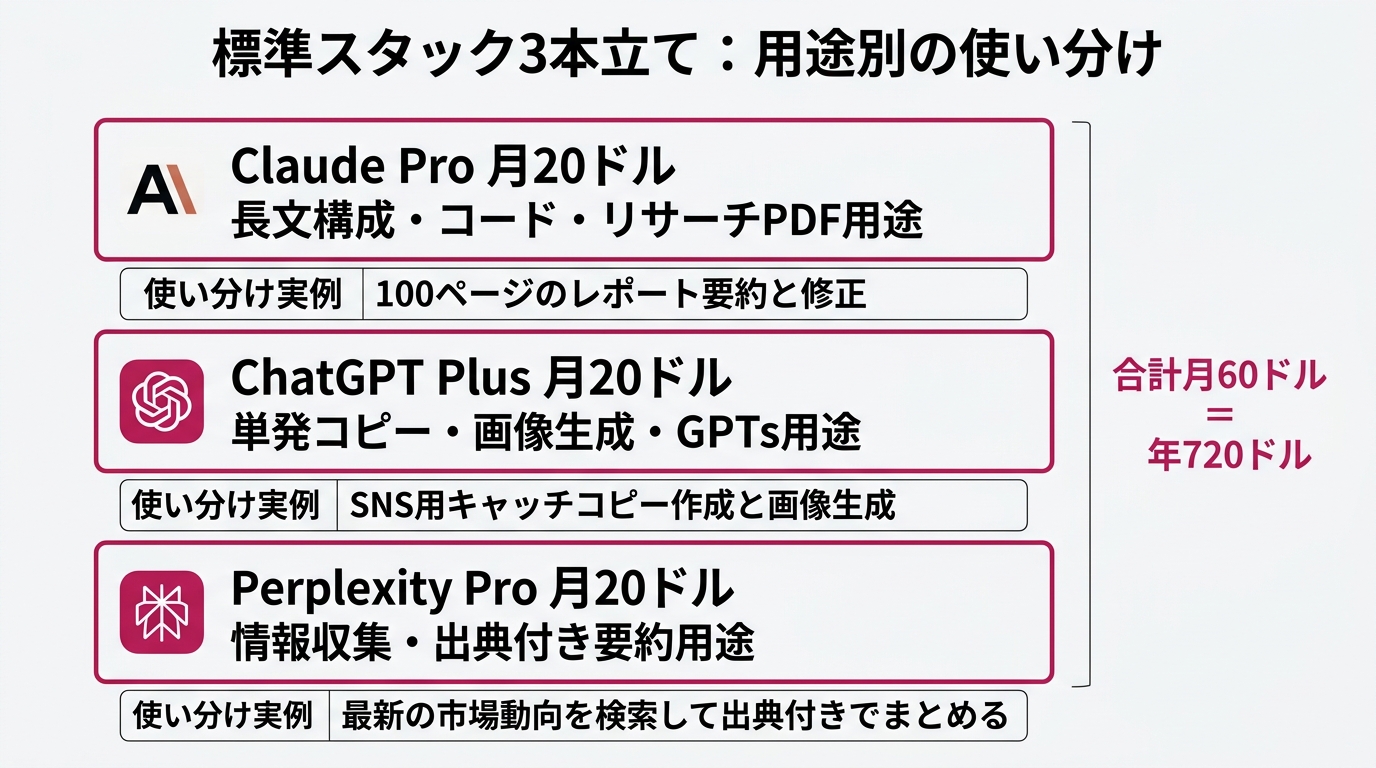
Standard stack: three tools. Two general-purpose LLMs plus Perplexity Pro. Specifically: Claude Pro $20 + ChatGPT Plus $20 + Perplexity Pro $20 = $60/month. About $720/year, roughly ¥110,000.
“You just said don’t buy both — so why are both in the standard stack?” Fair question. The answer: at higher workload levels, using them differently becomes habitual naturally.
At the minimal stack stage, throwing everything at one LLM is fine. If you’re running AI 15–20 times a day, one tool handles it.
At the standard stack stage, you’re using AI 40–60 times a day. At that point you start to feel in your gut: “Claude is faster for this one,” “ChatGPT lands better for this question.” I ended up routing long-form article structure to Claude and single-post social copy to ChatGPT — without thinking about it.
The important thing here is that the combined $40 for both isn’t redundancy — it’s insurance. When one service goes down, when one model suddenly feels degraded, when an account gets suspended. The more your work depends on AI, the more you need a backup general LLM as a lifeline.
The standard stack ceiling: optionally add Notion AI at $10/month, but only if Notion is already your primary work management tool. Auto-tasking, summarizing, and pulling related links from inside Notion only generates value once your workload is high enough for the density to matter.
If you’re running on spreadsheets or Trello, skip Notion AI. The time cost of learning a new tool outweighs the efficiency gain.
Total: $60–70/month, roughly ¥9,000–10,500. For a ¥10M-revenue solopreneur, that’s 0.1% of revenue. ROI is obvious.
The Expanded Stack for Pre-Incorporation Phase ($150–300/month)
Move to the expanded stack when annual revenue exceeds ¥20M (~$132K), or when you’re planning to incorporate within a year. This is when Claude Max and Claude for Small Business become worth considering for the first time.
According to the Anthropic pricing page, Claude Max comes in two plans: $100/month and $200/month (pricing page). That’s 5–10x the price of Claude Pro ($20/month), with substantially higher usage limits. Pair it with the remaining two standard tools (ChatGPT Plus $20 + Perplexity Pro $20) and the full expanded stack runs $140–240/month. Add Notion AI or other tools and you’re looking at up to $300/month. “If you’re hitting Pro usage limits three or more times a week” — that’s your signal to try the $100/month Max tier first.
Claude for Small Business is delivered as a toggle feature inside Claude Cowork (the team plan). Nagi’s article covers it in detail, but it includes the 15 workflows and 7 connectors announced May 13. Anthropic’s official materials state a minimum of 5 seats is required. My read is that this makes sense to pursue when you’re moving from solo to “solo + 1–2 assistants” — though that interpretation is mine, not stated in the official announcement. Three reasons I think so.
Reason one: the connectors require real operational commitment. The 7 connectors are QuickBooks, HubSpot, PayPal, Canva, Docusign, Google Workspace, and Microsoft 365. If you’re not actively using at least three of these as core business infrastructure, the Small Business package won’t deliver. Most solopreneurs max out at “Google Workspace + Canva.” For that, Pro is sufficient.
Reason two: the 15 workflows only create time savings when there’s someone else to run them. Payroll, monthly close, contract review — these workflows produce efficiency gains when you’re delegating execution. If you’re a true solo doing all of it yourself, the cost of setting up the workflows exceeds the savings.
Reason three: the security design becomes meaningful at team scale. Anthropic’s announcement describes three mechanisms: pre-send approval, existing permissions inheritance, and learning opt-out by default. For a genuine solopreneur, this is overengineered. A permission matrix only becomes necessary when multiple people are involved.
Three criteria for deciding whether to go expanded:
Criterion 1: Are you hitting your current LLM’s usage limits three or more times a week? If not, stay on Pro.
Criterion 2: Of Anthropic’s 7 connectors, are 3 or more core to your daily operations? If fewer than 3, Small Business is overkill.
Criterion 3: Do you have an assistant who will execute the workflows? If not, fewer than half of the 15 workflows will be practically usable for you.
If two or more of these are “yes,” seriously consider moving to the expanded stack. If only one or none are “yes,” stay standard and wait until the criteria shift.
The “Don’t Buy” Decision Is the Most Important One — 6 Tools I Cut
Last topic: what not to buy. The biggest source of AI stack bloat is the graveyard of “seemed useful” subscriptions. Here are the six tools I cut over the past year.
Cut #1: Midjourney ($10/month). Reason: ChatGPT Plus image generation reached practical quality. Outside of serious art applications, built-in LLM image generation is sufficient. Solopreneurs need genuine art-grade output less than once a month.
Cut #2: Suno ($10/month). Reason: I was only creating BGM for social content two or three times a month, and pay-per-use alternatives like Splice cover that just fine. I wasn’t using it enough to justify the monthly fee.
Cut #3: ElevenLabs ($22/month). Reason: I tested AI narration, then discovered my customers responded better to my actual voice. Self-assessment of when to invest and when to cut matters here.
Cut #4: Jasper ($49/month). Reason: Claude Pro now produces output equivalent to Jasper’s. Specialized writing tools’ advantages are being erased by the pace of general-purpose LLM development.
Cut #5: Notion AI ($10/month). Reason: I wasn’t using Notion as my primary work management platform. The value of a tool should be judged by how integrated it is with your existing stack — not by the tool itself in isolation. A lesson learned.
Cut #6: Copy.ai ($49/month). Reason: The copywriting-specific output couldn’t be meaningfully differentiated from Claude Pro’s. The $49/month delta had no clear value to justify it.
Total: $150/month freed up, $1,800/year, roughly ¥270,000 annually. That’s the impact of the “don’t buy” decisions.
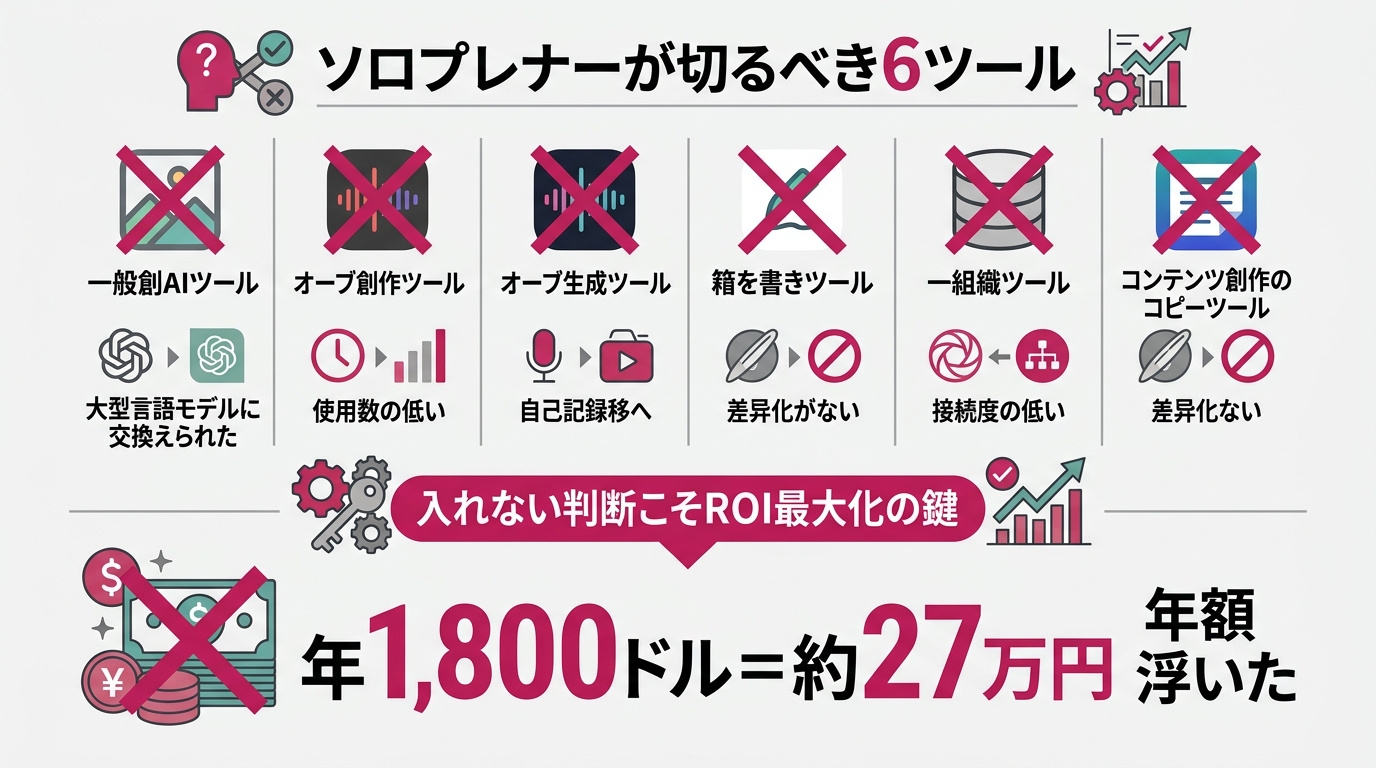
Three questions to ask yourself when deciding to cut. Run through these at your monthly subscription review and your stack will naturally stay optimized.
Question 1: How many times did I use this tool in the past 30 days? Under once a week means it’s a cancellation candidate.
Question 2: If this tool disappeared tomorrow, would my work stop? If not, you can cut it.
Question 3: Can I do what this tool does with something I’m already paying for? If yes, it’s redundant.
If two of the three lean toward “cancel,” cancel before the month is over. Open the subscription management screen. Hit the cancel button. Kicking it to next month costs another $20.
3 Actions to Take This Week: Audit, Decide, Execute
The map is drawn. Now: move.
Action 1: Audit your current AI stack. Open your subscription management screen (or your credit card statement) and list every AI-related service you’re currently paying for. Monthly cost, annual cost, signup date, times used in the past 30 days. Forty-five minutes, one table.
Looking at the audit results, you will almost certainly find two or three tools where your first thought is “wait, why did I sign up for this?” That’s your first cut group.
Action 2: Determine which of the three tiers you actually belong in. Use revenue range, workload volume, and team size to make the call mechanically. If you’re minimal-stack-level work but paying $200/month, that’s over-investment. If you’re standard-stack-level work but paying $20/month, that’s under-investment.
The overwhelming pattern is “minimal-stack workload, $200/month spend.” I was there. At that point you’re potentially wasting $250/year — or more like $3,000/year.
Action 3: Cancel and sign up simultaneously. Cut what should be cut this week. Add what’s missing this week. Don’t let these decisions roll over to next month.
If your subscription screen looks different this weekend than it did before reading this, the article did its job. If it doesn’t, you’ll see the same screen next weekend. Execution wins. This week.
Takeaway: AI Stack Design Is Subtraction, Not Addition
Designing a solopreneur’s AI stack is not about adding tools. It’s about deciding what not to include.
I’ve drawn the three-tier map: minimal stack $20–40/month, standard stack $60–70/month, expanded stack $150–300/month. Identify which tier fits where you are now, then adjust so you’re neither over-investing nor under-investing. That alone recovers ¥300,000 (~$2,000) a year in many cases.
On top of that, build the habit of regular cut decisions. At your monthly subscription review, ask three questions: usage frequency in the past 30 days, replaceability, and work impact. The people who habituate this are the ones who turn their AI stack into an asset. The people who let their subscription list bloat are building liabilities. That’s where the gap opens.
As Claude for Small Business signals, AI services have entered the corporate packaging phase. But that doesn’t mean solopreneurs should rush into the expanded stack — it means there’s now a richer set of options for when the timing is right. Just keep choosing the tier that fits your current phase.
I wrote earlier about the 55-year-old who launched an AI consultancy 24 hours after getting laid off — running six LLMs in parallel. That setup worked because she had 20+ years of deep industry experience to back it. If you’re in your late 20s, or newly independent, you don’t need to run six tools in parallel on day one. Start with one. Add a second when you genuinely need it. That’s plenty.
One more time: solopreneur AI stack design is subtraction, not addition. Cut a $210/month stack down to $46/month while maintaining work quality, and you’ve added ¥250,000+ (~$1,650) straight to your bottom line annually.
Use that money to invest in your next business move. Or build your financial safety net. How you use it is up to you. All I can provide is the map.
Execution is yours. This week. Open your subscriptions.
References
- Anthropic Official “Introducing Claude for Small Business” (May 13, 2026)
- Anthropic Official Claude Pricing (Claude Pro / Max / Team latest pricing)
- OpenAI Official ChatGPT Plus Pricing
- Perplexity Official Pro Pricing
- Claude for Small Business Plugin Page
- Nagi: Anthropic Just Gave SMBs 15 AI Agents
- A 55-Year-Old Launched an AI Consultancy the Day After Getting Laid Off

女性だからこそ、AIを使いこなさなきゃって思ってる。仕事も、副業も、推し活も、旅行も、全部やりたい。人生一度きりなのに時間は足りないじゃん?だからAIに任せられることは全部任せる。浮いた時間で本当にやりたいことをやる。それがあたしのスタイル。ここにはあたしが実際にやったことをまとめてるだけ。誰かのためになったらいいなって思って書いてるよ。


