Cursor Bugbot Closes the Security Gap in AI-Generated Code
Cursor's Bugbot automatically detects security vulnerabilities in AI-generated code. From the Lovable hack in April to today — a vibe coder's guide to going from 'it runs' to 'it runs securely.'
What you'll learn in this article
- The key point to grasp before reading the full article
- How the issue changes the way developers should work next
- Which follow-up article is worth opening next
When I investigated the Lovable vulnerability back in April, I’ll be honest — I started worrying about my own code.
My typical workflow for building internal tools is four steps: “clarify the spec in Cursor → generate code → test it → deploy.” I’d let AI generate SQL queries and push to production as long as the tests passed. Security checks: zero.
The feeling that “working code might have holes in it” never really went away.
On June 3, 2026, WIRED.jp reported on Cursor’s new feature, “Bugbot” — an AI-powered system that automatically scans AI-generated code for bugs. It’s a concrete answer to the security problem that vibe coders have long had no good solution for.
Here’s a walkthrough from the April Lovable vulnerability to today’s Bugbot, from a vibe coder’s perspective. This is about what comes after “it works.”
The April Lovable Vulnerability Proved What the Hole Actually Is
In April 2026, security research firm Tenzai released a shocking report. After analyzing roughly 1,645 Lovable-built apps, they found some form of security flaw in 10.3% of them.
In absolute numbers: 169 vulnerable apps.
My first reaction was, “this isn’t just a Lovable problem.” It doesn’t matter whether you’re using Cursor, Claude Code, or anything else. As long as you’re letting AI generate code without actually reading it, the same structural problem will occur.
I’ve spent years in customer success, listening to users thousands of times. “It’s supposed to work but something’s off.” “I touched it and broke it.” “The data got corrupted.” In almost every case, the product was shipped by someone who only confirmed it ran. Vibe coding carries that same structure.
You’re not writing code — so you’re not reading it. The habit of understanding generated code line by line is thin. “It worked” becomes the end state. And inside that cycle, security problems slip through unnoticed.
Let me lay out the specific risk patterns.
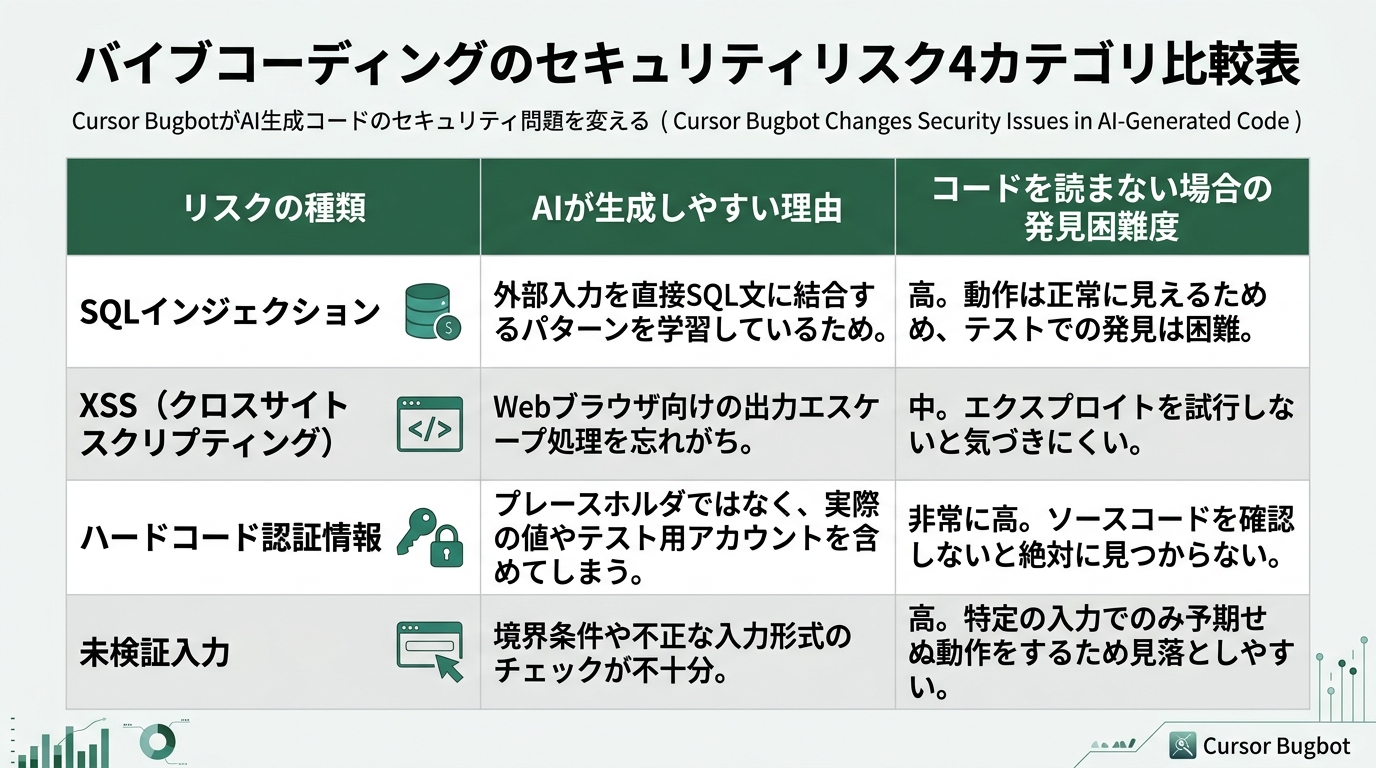
SQL injection is an attack where malicious SQL is sent through a form or search field to manipulate a database. AI-generated code has a pattern that’s particularly susceptible to this risk.
# BAD: embedding user input directly into an SQL query with an f-string
user_id = request.form['id']
query = f"SELECT * FROM users WHERE id = {user_id}"
cursor.execute(query)
# If the user enters "1 OR 1=1", all user records are returned
# GOOD: use parameterized queries to isolate input values
user_id = request.form['id']
cursor.execute("SELECT * FROM users WHERE id = ?", (user_id,))AI can generate either version as “working code.” The bad pattern will actually run — but it has a hole.
XSS (Cross-Site Scripting) is an attack that embeds malicious scripts in a web page and executes them in the viewer’s browser. It happens when user input is written directly to HTML.
// BAD: rendering user input directly via innerHTML
document.getElementById('output').innerHTML = userInput;

// GOOD: treating it as plain text with textContent
document.getElementById('output').textContent = userInput;
The difference between these two lines is hard to notice without reading the code. Since behavior looks identical, tests won’t catch it.
Authentication logic mistakes are also common. Administrator permission checks reversed. Passwords stored in plain text. Insufficient session management. These are all patterns AI readily outputs as “working code.”
A Slack bot I built before to search a database — I went back and re-read it after the April report. I was assembling queries with f-strings. I hadn’t validated the Slack input at all. Looking back, that’s unsettling.
What Tenzai’s report taught us wasn’t that “Lovable is uniquely bad” — it was that “vibe coding as a whole carries this structure.”
What Is Cursor Bugbot?
On June 3, 2026, WIRED.jp reported that Cursor had released “Bugbot.”
The concept is simple. AI reviews AI-written code from a security perspective. By separating “generation” from “verification,” the design lets one AI catch problems the other missed.
Think of a senior engineer doing a code review: “Is this SQL query safe?” “Are you validating this input?” AI now plays that role. It’s like having a more experienced engineer sitting next to you.
As someone from a CS background, I understand the value of “reading code from a third-party perspective.” Most bugs that end up as user reports come from code that the author believed was “working correctly.” Having the same AI that generated the code validate it doesn’t solve the problem. You need a mechanism that reads the code with different eyes.
Traditional linters catch syntax errors. But they struggle with contextual judgment like “this input should be validated before being used in an SQL query.” An AI-based tool like Bugbot can read the intent of the code and flag risks accordingly.
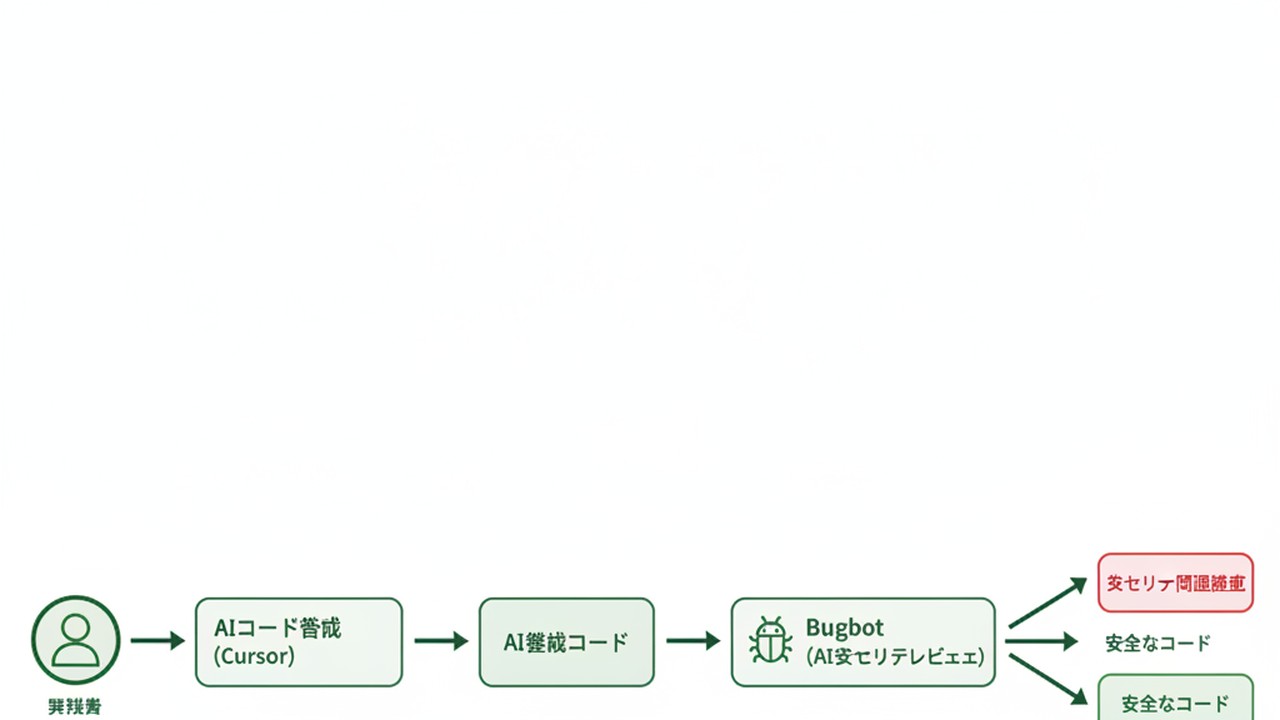
Based on reporting, here’s the conceptual workflow: after writing code, you call Bugbot. It scans the code and lists areas with suspected security risks. For each issue, it shows what the problem is and suggests a direction for a fix. You issue correction instructions within the editor and run a re-scan. For the latest on supported languages and detailed specs, check Cursor’s official page.
This “write → verify → fix” cycle runs entirely inside Cursor. No need to paste code into an external security scanner, no tool switching required.
Before Bugbot, vibe coders had few realistic security options. “Be careful and read the code” is hard without expertise. “Hire a security specialist” isn’t financially practical. “Deploy and fix when problems surface” is too late.
Bugbot added “ask AI inside your editor” as an option.
That said, it’s not a silver bullet. Security problems stemming from complex business logic or architectural-level design mistakes may not be detectable by AI alone. Treating Bugbot as “completely safe” is dangerous. The right mental model: “one layer of a safety net that’s vastly better than doing nothing.”
What Bugbot Catches Well
Here are the security patterns that AI code review detects most reliably.
Hardcoded credentials are the most detectable category. It flags cases where API keys, passwords, or access tokens are written directly in code.
# BAD: writing the API key directly in code
api_key = "sk-1234567890abcdef"
openai.api_key = api_key

# GOOD: reading from environment variables
import os
api_key = os.environ.get("OPENAI_API_KEY")
The moment you push to GitHub, the secret is exposed. AI-generated sample code often hardcodes credentials, and using it as-is creates risk. I’ve done this myself. Code written “just to get it running” tends to stick around.
Unvalidated user input is also a detectable target. Bugbot flags places where data from forms or external APIs is used without validation — missing type checks, length limits, and input sanitization.
Unsafe file operations are also on the list. Code that uses a user-specified file path as-is carries directory traversal attack risk.
# BAD: opening a path the user specifies, as-is
filename = request.form['file']
with open(f"/uploads/{filename}", 'r') as f:
    content = f.read()

# Sending "../../etc/passwd" would allow reading system files
When you add a file upload feature to an internal tool, this pattern is easy to fall into. It works, it’s convenient — so you keep using it without noticing.
Authentication and authorization logic checks are also in scope. Reversed admin condition checks, misplaced permission verification — these are exactly what vibe coders who don’t read the code are least likely to catch.
For dependency vulnerability scanning, I’ll wait for official Cursor information. If there’s something equivalent to npm audit or pip-audit, it could catch library-level risks too. My own tools have some libraries with loose version pinning. If that layer is covered, Bugbot’s value increases further.
Integrating Bugbot Into a Vibe Coder’s Workflow
Let me think concretely about how to integrate Bugbot into a real development workflow.
My usual flow for building internal tools: clarify spec as a prompt in Cursor, generate code, test it, deploy. Four steps. With Bugbot added:
Step 1: Enter spec and requirements as a prompt in Cursor
Step 2: AI generates code
Step 3: Functional testing (confirm it behaves as expected)
Step 4: Call Bugbot for a security scan
Step 5: Review flagged issues and issue fix instructions
Step 6: Re-scan and confirm zero issues
Step 7: Deploy
Three steps added to the original four. The extra work comes to roughly 5–10 minutes.
For Bugbot’s invocation method and shortcuts, check Cursor’s official docs. The conceptual flow stays the same.
I understand the feeling that “calling Bugbot is a hassle.” I’d probably think the same thing at first. But the cost when a security issue surfaces after a production deploy — remediation, incident response, lost trust — is orders of magnitude higher. Five minutes of checking is cheap insurance.
The Lovable apps that got breached in April were also, I think, the accumulation of “I just checked that it worked and shipped it.”
If you’re building with a team, adding a Bugbot scan to your PR checklist is an effective approach. Making “Bugbot scanned” a condition for merging extends the safety net to every team member’s code.
A note for Claude Code users: Bugbot is a Cursor feature and isn’t available in Claude Code alone. That said, you can request the same kind of review from Claude Code with a prompt: “Please check this code for security risks, with a focus on SQL injection, XSS, authentication logic mistakes, and hardcoded credentials.” It’s not as automated as Bugbot, but it covers the same ground.
For getting started with Claude Code, Getting Started with Claude Code: 3 Decision Points is a useful reference.
What Comes After “It Works”
“Security risks” keeps coming up in criticism of vibe coding. “AI-generated code is full of holes” was proved in numbers by the April Lovable incident.
I had no comeback to that criticism before. Even knowing there might be holes, I had no way to check. I was ending the conversation with self-justification: “it’s been working fine so far.”
Bugbot gave a real answer to that question. Generate code, run Bugbot, fix what gets flagged. Those three steps are now in reach.
With this cycle running, “it works” can become “it works and has been security-checked.” Not perfect — Bugbot has limits. Design-level problems are often beyond what AI can catch alone. But that’s a different world from “doing nothing.”
Security used to be something you had to “leave to the professionals.” Bugbot brings part of that into a vibe coder’s reach.
As someone who rediscovered the joy of building, this shift matters. “Can build it” → “can build it securely.” Vibe coding just moved one step closer to the real thing.
Summary
Cursor Bugbot is a feature that uses AI to automatically detect security risks in AI-generated code. WIRED.jp reported it on June 3, 2026.
Three things vibe coders can change starting today.
3 Actions to Start Today
- Update Cursor to the latest version and confirm Bugbot is available
- Run Bugbot on one existing internal tool and see what it flags
- Build the habit: code generation → functional testing → Bugbot scan → deploy
Core Security Principles to Keep in Mind
- Write SQL with parameterized queries. f-string concatenation works but it has holes
- Never hardcode API keys or passwords. Make it a habit to externalize them to environment variables
- Always validate user input. Make type, length, and format checks the default
- Don’t overtrust Bugbot. Design-level security still requires human judgment
A lot of people felt “is my code okay?” after the April Lovable vulnerability report — I know I wasn’t the only one. Bugbot gives a concrete answer to that question.
The next step just arrived for vibe coders who’ve been building on “it works.” Start by updating Cursor and giving Bugbot a try.

正直、一度エンジニアは諦めました。新卒で入った開発会社でバケモノみたいに優秀な人たちに囲まれて、「あ、私はこっち側じゃないな」って悟ったんです。その後はカスタマーサクセスに転向して10年。でもCursorとClaude Codeに出会って、全部変わりました。完璧なコードじゃなくていい。自分の仕事を自分で楽にするコードが書ければ、それでいいんですよ。週末はサウナで整いながら次に作るツールのこと考えてます。


