Is 171% ROI Only for Big Enterprises? 3 Steps for SMBs and Freelancers to Automate Workflows with AI Agents
When you saw the number '171% ROI,' did you think 'That's a story for big companies'?
What you'll learn in this article
- What AI agents mean in plain language and why the term matters now
- Which real-world workflow patterns are already becoming practical
- Which next article deepens pricing, rollout, or implementation context

When you saw the number “171% ROI,” did you think, “That’s a story for big companies”?
Hold on for a moment.
In March 2026, performance data on AI agent adoption was published at NVIDIA GTC (NVIDIA’s flagship event and one of the world’s largest AI technology conferences). The average ROI (return on investment: the ratio of return generated to the amount invested) reported in partner company sessions was 171%.
It would be a shame to skim past this number, because the “design philosophy” behind it can be replicated regardless of company size.
Looking at industry trends, AI agent adoption is accelerating from 2025 into 2026. The biggest driver is cost.
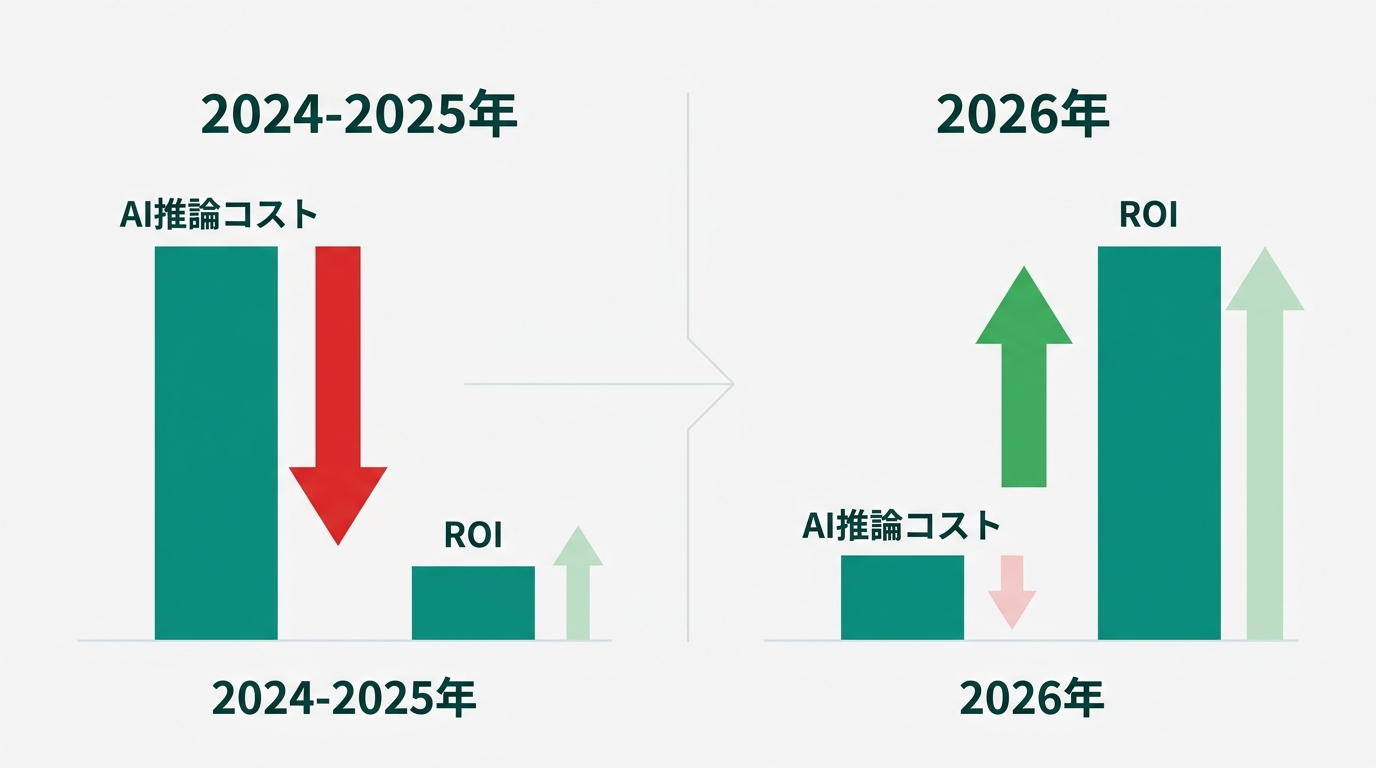
In 2026, AI inference costs (the cost incurred each time an AI executes a task) have dropped significantly depending on the conditions. NVIDIA has published technical comparisons showing that on the Blackwell architecture, the cost per token improved by up to 10x compared to the previous generation under specific workload conditions (blogs.nvidia.com). Cases where “automation projects that didn’t quite pencil out cost-wise” are crossing the profitability line this year are increasing rapidly.
In this article, I’ll translate enterprise AI agent case studies into something usable for SMBs and freelancers, and distill it into 3 steps you can start today. I’ll answer the question “What should I automate, and how?” with specific tool names and concrete numbers.
NVIDIA GTC Showed 171% ROI — The Only Difference Between Big and Small Is “Scale”
At NVIDIA GTC 2026, partner companies reported their results from deploying AI agents in the enterprise. The average ROI aggregated across multiple sessions was 171%. In other words, a company that invested 1 million yen got on average 2.71 million yen of impact (the combined total of cost savings, revenue gains, and time savings) in return.
NVIDIA’s “State of AI 2026” report contains numbers that are even more directly verifiable. Among companies actively using AI agents, 88% report a positive impact on annual revenue and 87% report annual cost reductions. 64% of companies are actively running AI in production, and 86% said they plan to increase their AI investment budget in 2026.
“But if these adoption stories are from big enterprises, isn’t this out of reach for SMBs?”
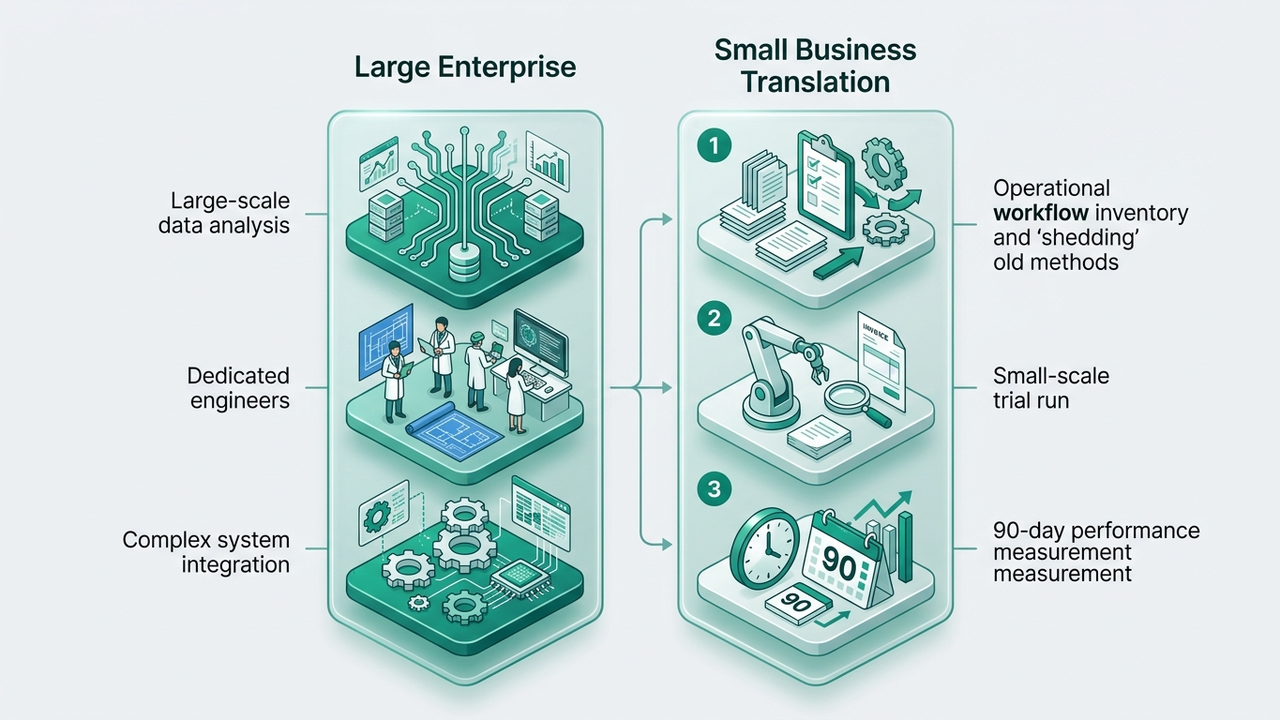
That’s a fair question. Deployment scale, budget, the availability of dedicated engineers — the conditions between large enterprises and SMBs are too different. You can’t use the same playbook.
That said, the “design philosophy” producing 171% ROI is reproducible. If you break down what big companies are doing, three structural patterns emerge.
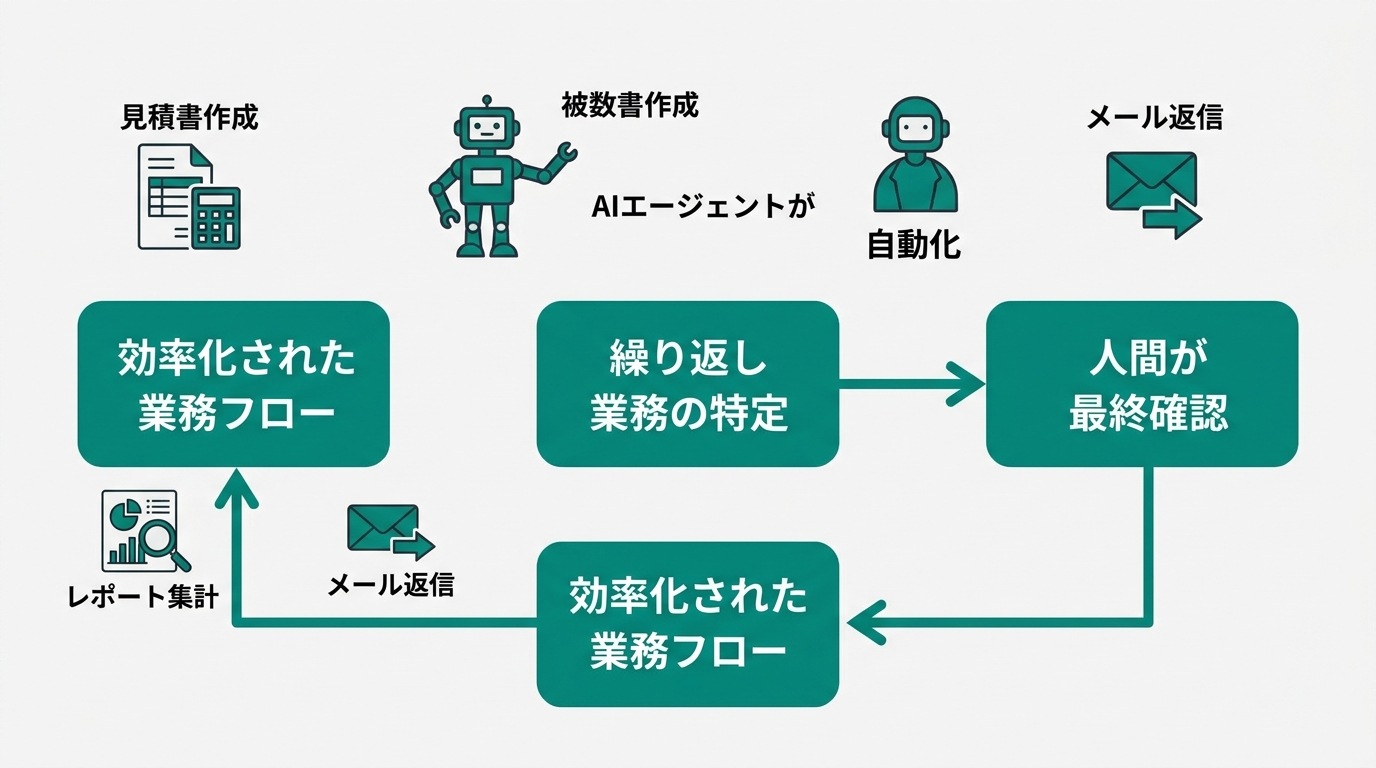
Structure 1: Identifying repetitive work Big enterprises use huge volumes of data to precisely analyze automation candidates. For SMBs, this can be substituted with the question, “Which tasks am I doing the same way every week?”
Structure 2: Commitment to partial automation Most of the cases featured at GTC are not 100% task replacements. They are hybrid designs that automate 70–85%, with humans checking and judging the remaining 15–30%. Going in thinking “let’s leave it all to AI” is a recipe for failure.
Structure 3: Immediate ROI measurement Big companies have dedicated measurement tools, but for SMBs a simple calculation of “(benefit − cost) ÷ cost × 100” is enough.
If you nail these three points, the design philosophy of big enterprises can be reproduced at SMB scale.
Why 2026 Is the “Right Time to Start” for SMBs
Let me dig a little deeper into the cost reduction I mentioned earlier.
AI inference cost refers to the API cost (the usage fee paid through the connection point that lets applications talk to each other) incurred every time an AI answers a question or executes a routine task. NVIDIA has released official comparison data showing that on the Blackwell architecture, under workload conditions optimized for a specific open-source model, the cost per token (the unit of text processing) improved by up to 10x compared to the previous generation (blogs.nvidia.com, 2026). Not every case sees a 10x improvement, but the broader trend of falling inference costs is confirmed across the industry.
A more accurate way to put it: “The money spent per task is dropping dramatically depending on the conditions.”
What does this change? Automation projects that were dismissed in 2024–2025 as “not cost-effective” are crossing the profitability line this year. If the cost of automating 100 monthly email replies becomes a fraction of what it was, the ROI math changes completely.
In the workflows I actually run, I felt API costs drop to roughly 1/3 to 1/5 from late 2025 into early 2026. There are several automation projects I now feel finally make economic sense.
One more thing worth clarifying: the difference between SMBs and freelancers.
SMBs (anywhere from a few to a few dozen people) tend to do well by automating one task and then rolling it out across the organization. Freelancers and sole proprietors benefit from designs specifically aimed at cutting their own working hours. The 3 steps in this article work for both, but you’ll want to substitute the unit of ROI measurement between “labor cost savings” and “your own hourly rate” as appropriate.
2025 was the “evaluation phase,” and 2026 is the “implementation phase” — that’s how this year feels to me. Let’s get into the specific 3 steps.
Step 1: Take Inventory of Repetitive Tasks That Take 5+ Hours per Week
The first step is deciding “what to automate.” Skip this and start with “let’s just try some AI tool” and you’ll almost certainly come up empty.
The inventory method is simple. Paper or a spreadsheet — either works.
Write down the tasks you’ve done in the past week, and mark any that meet the following criteria:
- Tasks you perform with the same procedure 3+ times per week
- Tasks where the output format is fixed
- Tasks you keep putting off “for later” but that end up eating your time anyway
Typical examples that come up:
- Drafting the boilerplate portions of quotes and proposals
- Sending standard replies to inquiry emails
- Preparing social media or blog posts (assembling the outline)
- Aggregating numbers for weekly or monthly reports
- Cleaning up meeting notes after meetings
- Transcribing customer information or order data between systems
What I want you to be careful about here is how you set “priority.”
Tasks with high automation impact are those that score high on “frequency × fixed format.” Automating something you only do once a month takes too long to show positive ROI. Target “routine work you do multiple times per week” first.
Let me share an actual case.
The research task I did every morning — checking industry news, summarizing the key points, and posting them to Slack — took me 3+ hours a week. After turning it into an agent, I compressed it to about 30 minutes a week, just for review and edits. I freed up the 2.5 hours I saved for writing articles, and the perceived ROI is over 300%.
Once you have your inventory list, score it by “frequency × format-fixedness” and pull out the top 3–5 tasks. In Step 2, you’ll pick one of these and actually put it into motion.
The inventory itself can be done in 15–30 minutes. You can do this tonight.

Step 2: Pick One Task You Can “70% Automate” and Run It with a No-Code Tool
Once you’ve picked the first task to try from your inventory list, it’s time to implement.
What I want to emphasize here is the concept of “70% automation.”
As was repeatedly stressed in the NVIDIA GTC case studies, aiming for 100% task replacement from the start leads to failure. AI-generated output will always carry the possibility of human-style errors. By designing the final check to be performed by a human, you can control quality risk while maximizing ROI. A setup that automates 70–85% and has a human check the remaining 15–30% is, at this moment, the design with the highest ROI.
Here are three no-code tools (tools that let you set up automation and integrations without writing code) you can use to achieve “70% automation.”
Zapier The most widely adopted no-code integration tool. It substantially beefed up its AI agent features from 2025 into 2026. The free tier covers 100 tasks per month (as of March 2026). Supports Japanese. You can set up connections like “auto-classify specific Gmail messages and notify Slack” or “auto-reply to inquiries submitted via a form” — all without code. If you want to try a single use case first, I recommend starting here.
Make.com A no-code automation tool that supports more flexible conditional branching than Zapier. The free tier covers 1,000 operations (executions) per month. Suited to complex business flows — multi-step processing such as “form input → spreadsheet entry → confirmation email → notification to the responsible person.”
n8n An open-source (publicly available for free use) workflow automation tool that’s free if you self-host (run it on your own server). The cloud version starts at $20/month. It has a rich library of templates, so non-engineers can give it a try, but the learning curve for configuration is higher than Zapier’s. With high customizability, it’s a good fit when you want to build complex AI agent workflows.
The guideline for choosing among the three is simple.
| Condition | Recommended Tool |
|---|---|
| Just want to try one use case as fast as possible | Zapier |
| Need complex conditional branching | Make.com |
| Minimize cost + comfortable with the technical side | n8n |
Steps to Set Up “Form Inquiry → Auto-Reply” with Zapier
The most practical first use case is “auto-reply to inquiry form submissions.” Here are the concrete steps to set this up with Zapier.
- Sign up for Zapier (zapier.com). You can start on the free tier.
- From the dashboard, click ”+ Create Zap”
- Set the trigger (the condition that fires the Zap): Select “Google Forms” → set the event to “New Response in Spreadsheet”
- Select the Google Spreadsheet linked to your form and connect it
- Add an AI step: Select “AI by Zapier” or “OpenAI” → pass the inquiry content into the prompt to generate the draft reply
- Set the action (what gets executed): Select “Gmail” → “Send Email” or “Create Draft”
- Link the recipient to the “email address field” in the form and insert the AI-generated text into the body
- Run a test send to verify it works, then activate it for production
I recommend starting with “Create Draft” rather than “Send Email.” Designing it so that a person reviews the AI-generated text before sending brings quality risk close to zero. Once you’re comfortable, switch over to auto-send. This two-stage approach is a textbook example of “70% automation.”
The setup itself takes 30–60 minutes once you’re used to it. If you used to spend 20 minutes on each of 10 weekly inquiries, the monthly time savings come out to 3+ hours total.
After you’ve implemented it, run it for about a week. Keep a record of “whether it’s working as expected” and “how many corrections came up during the human check.” This record becomes the raw material for the ROI measurement in Step 3.
Step 3: Measure ROI Over 90 Days, Then Pick the Next Automation Candidate
Think of the post-deployment measurement period as a single 90-day cycle.
Many companies feel a measurable improvement within 90 days of deployment. Flip that around, and if you don’t see results in the first 90 days, that’s a sign to revisit your design.
The ROI formula is simple.
(Benefit from savings − Tool cost) ÷ Tool cost × 100 = ROI (%)
The benefit from savings is calculated as “hours saved × hourly rate.” The tool cost is the monthly subscription fee for Zapier, Make, etc. Calculate these two numbers, then plug them into the formula.
Let me run through a concrete example.
- Target task: Semi-automating quote creation (20 quotes per month)
- Before: 30 minutes per quote
- After: Review and edit the auto-generated draft → 8 minutes per quote
- Time saved: 22 minutes × 20 = 440 minutes per month (about 7.3 hours)
- Benefit (at an hourly rate of 3,000 yen): 7.3 hours × 3,000 yen = 21,900 yen per month
- Zapier Pro plan cost: $29/month (about 4,350 yen, as of March 2026)
- ROI: (21,900 − 4,350) ÷ 4,350 × 100 ≈ 403%
For freelancers, replace the hourly rate with “your own effective hourly rate.” If you earn 400,000 yen per month working 160 hours, that’s 2,500 yen per hour.
Keep doing this calculation for 90 days to confirm “whether the first automation is really paying off.”
If the ROI is positive, move on to the next automation candidate. Pick the second task from your inventory list and repeat the same process.
If the ROI isn’t positive, check for two causes. One is “the wrong task was chosen” — the frequency or format-fixedness may have been too low. The other is “the automation rate was too low” — what you thought was 70% automation might have actually only achieved 30%. Either can be addressed by improving the design or switching tasks.
Stack up 1–2 automations per 90-day cycle, and within six months you can free up dozens of hours per month for core work. The 171% ROI figure is what lies at the end of this accumulation. It’s not a number you produce in a single day, but if you follow the right process, you’ll steadily close in on it.
In 2026, There’s No Longer a Reason Not to Start with AI Agents
Let me restate, one more time, why 2026 is special.
The downward trend in AI inference costs. The flood of companies publicly reporting that they’re feeling the impact of their AI investments. The “design philosophy of producing ROI through partial automation” that big enterprise case studies have proven — these are not separate stories. They’re structurally connected.
Falling costs push more projects across the profitability line. Profitability draws more companies to adopt. More adoption means know-how spreads. Spreading know-how makes tools easier to use.
This virtuous cycle is starting to spin in earnest in 2026.
Reading the Gartner analysis, the share of companies leveraging agents is projected to rise rapidly going forward. Time to get comfortable with the tools, time for know-how to accumulate inside the organization, time to run ROI measurement cycles — on every one of these, the side that starts earlier comes out ahead.
If you decided in 2024–2025 that “the costs don’t pencil out” and passed, the underlying conditions have shifted. I recommend taking another look this year.
AI agents are tools. Whether they get used effectively comes down to people — that’s my stance. But to use them well, putting them in motion at least once is where it all starts.
Summary
Let me wrap up the 3 steps for getting started with AI agents in 2026.
Step 1: Inventory List 3–5 repetitive tasks that take 5+ hours per week. The selection criterion is “3+ times per week × fixed format.” The inventory itself takes 15–30 minutes. You can do it tonight.
Step 2: Try One Use a no-code tool (Zapier, Make.com, or n8n) to 70%-automate your first task. Don’t aim for 100% replacement. If you want to try as fast as possible, start with Zapier. For your first run, operate in “Create Draft” mode and design the workflow to preserve a human check — this is the safe path.
Step 3: 90-Day Measurement Calculate ROI with “(benefit − cost) ÷ cost × 100.” If it’s positive, move on to the next task. If it’s negative, revisit your task selection or design.
The 171% ROI figure shown at NVIDIA GTC is “evidence of a design philosophy.” It’s not a number that exists only because of company size — it’s the number that comes out at the end of a correct process. The design is reproducible regardless of scale.
The one thing you can do today is to create your inventory list.
Just knowing this changes the density of your work six months from now. It’s a gap only the people who actually do it get to feel.
(Reference sources)
- NVIDIA State of AI 2026 (nvidianews.nvidia.com, March 2026)
- NVIDIA Blackwell Inference Cost Comparison (blogs.nvidia.com, 2026)
- Zapier / Make.com / n8n official sites (as of March 2026)

AIを使いこなせない方は、この先どんどん差がつきます。僕はAIエージェントを毎日動かして、壊して、直して、また動かしてます。そういう泥臭い実践の記録をここに書いてます。理論は他の方にお任せしました。僕は動くものを作ります。朝5時に起きてウォーキングしてからコードを書くのがルーティンです。


