Do You Really Think 'AI Means Lower Rates'? A Survey of 110 Web Designers Proves the Paradox—and How to Raise Your Price
'AI is taking our jobs.'
What you'll learn in this article
- The key point to grasp before reading the full article
- How the issue changes practical decisions after reading
- Which follow-up article is worth opening next

“AI is taking our jobs.”
You’re sick of hearing it by now, right? Open social media and you’ll find post after post saying “designers are obsolete thanks to AI.” If you’ve just started designing as a side gig, it’s hard not to feel anxious.
I felt the same way at first. “What if a client tells me ‘why hire a designer when AI can make this?’”—that fear was real.
But when I looked at the actual data, it turned out to be the exact opposite.
In January 2026, Japan Design Inc., the company behind the web design school “Desa-Suku,” ran a survey of 110 freelance and side-gig web designers (PR TIMES).
The results flipped the “AI means lower rates” assumption on its head. In this article, I’ll dig into that data to dissect why AI is actually pushing rates up—and break it down into concrete steps you can use to raise your own price starting next week.
The fact 110 designers confirmed: over 60% saw rates GO UP with AI
Take a look at the numbers.
The survey targeted people who’d “taken on a paid design project within the last 3 months”—so these are the voices of working freelance and side-gig designers, 110 of them.
Change in project volume (2024 → 2025)
- “Significantly increased”: 21.8%
- “Somewhat increased”: 52.7%
Combined, about 74% reported an increase. The “AI killed my work” narrative isn’t showing up anywhere.
Change in project rates
- “Went up”: 62.7%
- “Stayed the same”: 37.3%
- “Went down”: 0%
Let me repeat that. “Went down” is zero.
To everyone who said “AI is going to drive prices down”—how do you explain this number?
Of course, a sample of 110 isn’t a large-scale study, and there may be a bias toward people enrolled in a design school. But as a snapshot of how working designers actually feel on the ground, the fact that zero respondents saw their rates drop is impossible to ignore. That’s plenty to break the assumption, right?
Why fewer revisions thanks to AI translates into higher rates
The mechanism behind “rates went up” is what’s really interesting.
The same survey asked about “changes that came with AI adoption,” and here’s what came back.
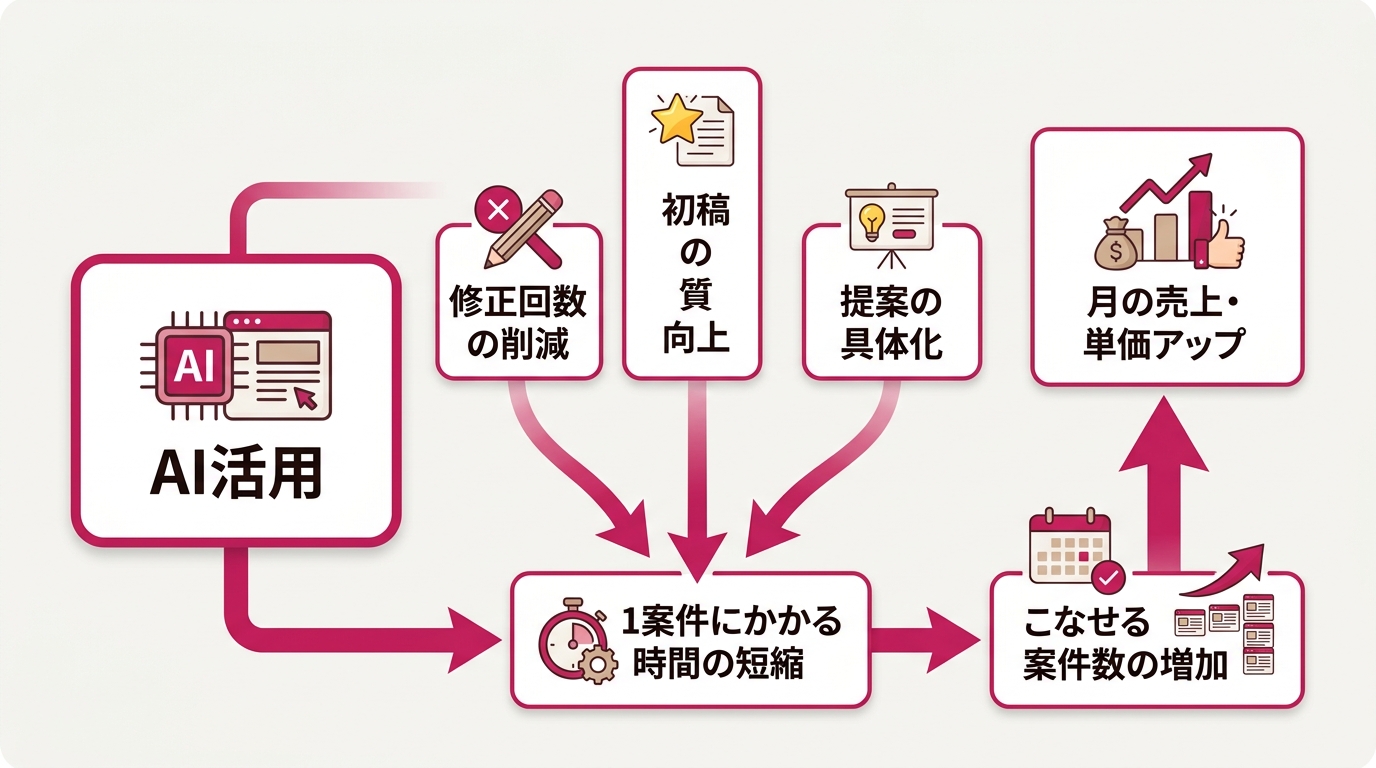
- “Fewer revisions”: 63.2%
- “Higher deliverable quality”: 47.2%
- “Proposals get accepted more easily”: 43.4%
“Fewer revisions” tops the list. That’s the key.
For freelance design work, revision cycles are the single biggest enemy of profit. Every revision burns 30 minutes to an hour. Three revisions, three hours. On a 50,000-yen project, five rounds of revisions turn your effective hourly rate into something miserable.
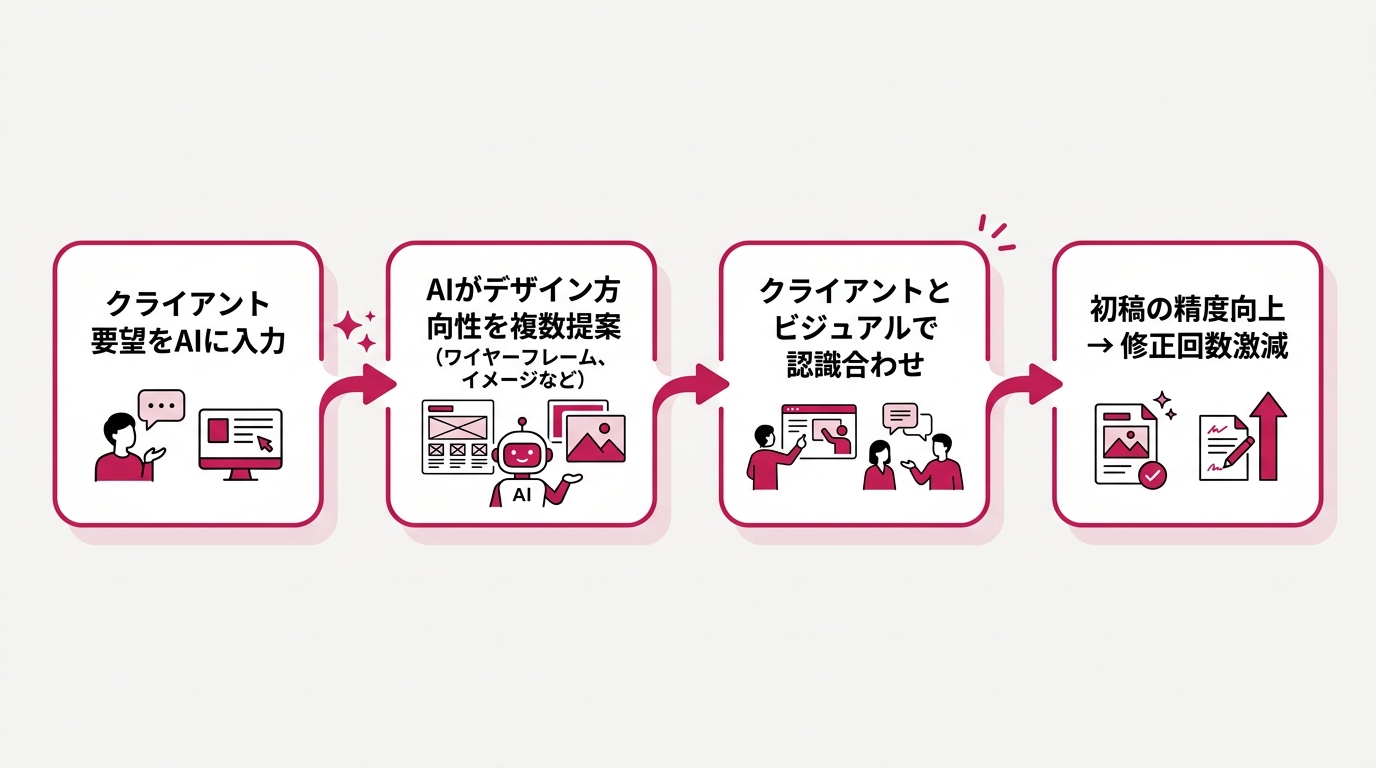
What AI changed is “first-draft precision.” Concretely, it goes like this:
- Feed the client’s requirements into AI and generate several directions for the design
- Show “is this the vibe?” visually—the verbal mismatches drop way down
- The first draft already lands close to the client’s expectations
- One or two revisions and you’re done
Fewer revisions → less time per project → more projects in the same time → higher monthly revenue. That cycle is what’s producing the 62.7% “rate UP” number.
I have a consulting client—a woman in her 30s doing landing page design as a side gig. Five revisions per project used to be the norm for her. Once she started using AI to draft wireframes, her average dropped to 1.5 revisions. With the freed-up time, she picked up new projects and her monthly revenue grew 1.8x. The 110-respondent data and the on-the-ground reality line up perfectly.
The 43.4% who said “proposals get accepted more easily” is also significant. The quality of the proposals themselves is going up. Proposal accepted → project landed → portfolio grows → leverage for rate negotiation. The virtuous cycle kicks in.
The 47.2% who said “deliverable quality improved” matters too. AI expands your design vocabulary. You discover layouts and color palettes you’d never have thought of alone. Clients start thinking “this designer has range.” Higher quality leads to word-of-mouth and higher repeat rates. That feeds directly back into rate increases.
Don’t confuse “AI is taking jobs” with the situation for artistic freelancers
Here’s an important contrast worth drawing.
In January 2026, the Japan Freelance League surveyed about 25,000 artistic-field freelancers. Illustrators made up 54.2% of respondents—a large-scale study (ITmedia AI+).
The results were grim.
- About 87% said “AI is a serious threat to my livelihood”
- About 93% said they “feel anxious about their work”
- 9.3% of all respondents reported income drops of 10–50%
Looking at just these numbers, you’d think “see, AI really is a threat.”
But pay attention: the majority of respondents are illustrators and manga artists. Work that involves “creating images from scratch” competes head-on with image-generation AI. So the impact lands hard.
Web design isn’t the same thing. You listen to a client’s business problem, design the information architecture, design the user experience, and translate it into visuals. AI doesn’t “replace” that work—it “accelerates” it.
The interview-and-problem-definition part is something only humans can do. AI is a tool that speeds up the “hands-on execution” that follows. Not a rival.
Even within “creative work,” the relationship with AI is completely different depending on what you do. You don’t need to take the “AI kills creators” headlines on social media and apply them to yourself. For web designers, AI isn’t an enemy—it’s the strongest assistant you can have. That difference in perspective is exactly what separates the people who can raise their rates from those who can’t.
In 2026, designers should focus on “proposal skills” and “negotiation skills”
The Desa-Suku survey had another interesting data point.
“What I want to focus on most in 2026”
- “Improve proposal and planning skills”: 29.1%
- “Build the negotiation skills to raise my rates”: 22.7%
A combined 51.8% are focused on “proposals” and “negotiation.”
Not “polish design skills.”
This is symbolic of where things are. AI has accelerated the actual production work. As a result, what a designer is valued for has shifted. From “speed of execution” to “the ability to decide what to build.”
The clients I meet through consulting say the same thing: “Design quality has gone up across the board. What sets people apart now is the substance of their proposals.”
So how do you actually train proposal and negotiation skills? Let me share the frameworks I teach in consulting.
3 actions to level up your proposal skills
- Use AI to analyze the client’s competitors: Just hand competitor URLs to ChatGPT or Claude. 10–15 minutes, zero cost. The free tier of ChatGPT is plenty. Claude Pro is $20/month, but it pays off because you can also use it for copywriting and brainstorming. Try “compare the top pages of these 3 competitors and analyze the strengths and weaknesses of their design.” It’ll break down color palette, layout, and CTA placement. Add one page of this analysis to your proposal and the client’s reaction shifts to “wow, you really did your homework.”
- Get into the habit of putting design intent into words: “It just looks cool” isn’t going to fly. Can you explain “I chose this color for the CTA (call-to-action button) because…”? Even just brainstorming with AI works as practice. Try asking Claude “give me 3 reasons why this header image’s color palette works.” Take what the AI articulates and rewrite it in your own words. Do this for one week and your proposals will feel completely different.
- Track outcome numbers: Things like “CVR (the percentage of site visitors who converted) improved 1.5x.” Numbers like these change the persuasion game entirely. Build the habit of asking clients “what were the results?” Don’t end at delivery—follow up by email a month later with “how did the LP we sent over perform?” When numbers come back, put them in your next proposal. Just writing “Previous LP project improved CVR from 1.2% to 1.8%” changes how your quotes land.
3 frames you can use for rate negotiation
- Price on “outcomes,” not “hours”: Drop “X yen per design page.” Say “I’ll architect this LP to generate X qualified leads per month.” The moment you shift to outcome-based pricing, the ceiling on your price falls away. Try converting “50,000 yen for one LP” into “150,000 yen for an LP designed to deliver 10 leads per month.” For the client, that’s a 15,000-yen-per-lead investment. If each lead generates 30,000 yen in profit, 150,000 yen is cheap, right?
- Quantify the drop in revisions: “By leveraging AI, the precision of my first drafts went up and revisions dropped from 3 rounds to 1.” You can use this script starting today. Tell them the time saved goes into planning and design, which means a higher-quality deliverable.
- Offer a 3-tier “good/better/best” menu: Build three tiers: “Minimum design,” “design + proposal,” and “competitive analysis + proposal + outcome measurement.” For LP work, you might set them at 50,000 / 120,000 / 250,000 yen. Most people pick the middle, so make the middle tier your target price. I’ve seen consulting clients raise their average order value 1.4x just by switching to a 3-tier offering.
Why I tell side-gig designers “start using AI right now”
I can already hear someone saying “but I don’t get AI at all.”
Don’t worry. To use AI in the context of web design, you don’t need any programming knowledge.
According to a survey by GMO Internet Group (GMO press release), about 1 in 4 freelancers are already using AI. Another 46.1% say “not yet, but I want to start.” In other words, nearly half are “want to but haven’t yet.”
Flip that around: if you start using AI today, you’re already ahead of half the field.
Three AI uses any side-gig designer can start today.
1. Use Canva AI to draft a design in 3 minutes
Canva’s “Magic Create” feature spits out a rough draft from just a text prompt. Don’t use it as-is—use it to confirm direction. You can show it to the client early on, which slashes the rework loop.
2. Use ChatGPT to brainstorm copy
Spending hours stuck on LP (a single-page web page designed to drive sign-ups) copy is a waste. Try typing into ChatGPT: “target is women in their 30s, product is organic skincare.” It’ll give you about 10 variations. Picking and polishing from those is way faster than starting from scratch.
3. Automate competitor research with AI
How many hours do you spend on competitor research before a proposal? Just ask Claude “list 5 competitor sites and analyze their strengths and weaknesses.” Done in 15 minutes. Pour the freed-up time into planning, and your proposal quality jumps.
All of these can be done today with just a phone or a PC. “Don’t learn AI—use AI.” That mindset is what matters.
When I first touched AI, I was skeptical. “Does this really work?” But the first time I drafted something in Canva and showed it to a client, they instantly said “this is exactly what I had in mind, please proceed.” I’ll never forget the shock—it was the first time I’d ever completed a project with zero revisions.
The people I see getting results aren’t deeply understanding how AI works. They’ve just developed the judgment to say “this is faster if I let AI handle it.” And that judgment sharpens the more you use it. The early movers absolutely have the advantage.
Let me knock down the “reasons not to do it”
Finally, let me kill three “reasons not to” that I hear often.
“Won’t the client find out I used AI and mark me down?”
It’s the opposite. The Desa-Suku survey shows 43.4% reported “proposals are getting accepted more easily.” Client satisfaction is actually going UP when designers use AI. In 2026, almost no clients are going to balk at “I use AI” if you say it honestly. More often, they’ll think “this designer can also wield AI”—and that’s a positive impression.
“Isn’t 110 respondents kind of small? Can I really trust it?”
Sure, it’s not a large-scale study. But the key is that respondents are narrowed to “people who took on paid work in the last 3 months as working professionals.” Hobbyists aren’t in the mix, which makes it pretty trustworthy as a read on what’s actually happening in the field.
As mentioned earlier, this survey skews toward people who are positive about AI. But honestly, I see opportunity there. “The optimistic crowd is already getting results” means that if you move now, you can join them. With early movers still relatively few, there’s still tons of room to become an AI-first designer.
“I’m not a designer, so this doesn’t apply to me”
This is what I most want you to hear. The mechanism I covered in this article isn’t limited to designers. “AI accelerates your work → first-draft precision goes up → revisions drop → you can raise your rates.” That structure works in any profession.
If you’re a writer, generate 3 outline options with AI and let the client pick one. If you’re a video editor, auto-generate caption drafts with AI and cut editing time in half. If you’re a marketer, use AI to analyze competitors’ social posts and improve report quality. “Accelerate the prep with AI → focus on the core proposal → rates go up” is a virtuous cycle that applies to every role.
The gap between people who use AI and people who don’t is starting to show up in income. It’s not just the 110 from Desa-Suku. I’m seeing it in my consulting clients too. In the last six months, “the quality of my projects changed after I started using AI” has gone from rare to common.
In the end, the people who try win. You don’t need to “do everything.” Pick just one of the three things I listed and try it today. If you try one and think “oh, this is easier,” move on to the next.
Not “AI is taking my work” but “AI is raising my price.” Just flip the perspective and what you should be doing becomes completely different. I was scared at first too. But the data proves it—the people who moved are winning.
References
- Survey of 110 web designers on 2026 AI adoption and rate outlook (PR TIMES / Japan Design Inc.)
- Artistic-field freelancers including illustrators answer “Did generative AI increase or decrease your income?” (ITmedia AI+)
- Majority of freelancers predict AI will have a “positive impact” on their work (GMO Internet Group)
- Japan Freelance League: Generative AI and the Future of Japanese Creators—a survey on the actual situation (PR TIMES)

女性だからこそ、AIを使いこなさなきゃって思ってる。仕事も、副業も、推し活も、旅行も、全部やりたい。人生一度きりなのに時間は足りないじゃん?だからAIに任せられることは全部任せる。浮いた時間で本当にやりたいことをやる。それがあたしのスタイル。ここにはあたしが実際にやったことをまとめてるだけ。誰かのためになったらいいなって思って書いてるよ。


