You Don't Have to Do Word and Excel Yourself Anymore—Now That Claude Is in M365, the Solo CEO's Work Is About to Change Completely
I know you're thinking, 'What does the Goldman Sachs story have to do with a solo CEO?' Let me explain properly.
What you'll learn in this article
- Where pricing and adoption questions around Claude Code stand right now
- Which plan or rollout stage fits the reader's situation
- Which follow-up article to open next for setup, cost, or bigger-picture context

Let me be straight with you—you scrolled past the “AI is now in M365” news, didn’t you?
You thought, “That’s a big-enterprise story” or “I work alone, this doesn’t apply to me.” But honestly, that’s a wasteful call to make.
On March 9, 2026, Microsoft announced Copilot Cowork Wave3. Claude—the large language model developed by AI company Anthropic—has been integrated into M365 apps. M365 is short for Microsoft 365: Microsoft’s cloud service that bundles Word, Excel, and other apps. That M365 now turns into an AI agent (an AI that can autonomously chain together multiple tasks) right out of the box.
And there’s one more piece. Goldman Sachs used Claude to automate trade reconciliation and KYC/AML reviews (identity verification and anti–money laundering checks). After a six-month implementation, client onboarding (the full new-customer registration workflow) was shortened by 30%, and developer productivity rose by over 20% (Source: Reuters, Yahoo Finance, 2026-02). That same principle—“pass repetitive work to AI”—is now landing in the hands of M365 users.
The same “principle” that took Goldman Sachs six months to implement has just arrived in your Word and Excel. This fact alone should tell you that scrolling past this news is a bad move.
In this article, I’ll lay out exactly what Copilot Cowork Wave3 changes, from the perspective of solo CEOs and solopreneurs (people running businesses on their own). For anyone thinking, “Great, another new tool to learn”—let me tell you upfront: this time, you don’t have to learn anything. That’s the single biggest point of all this.
The “Automation Principle” Goldman Sachs Implemented Has Now Landed in M365
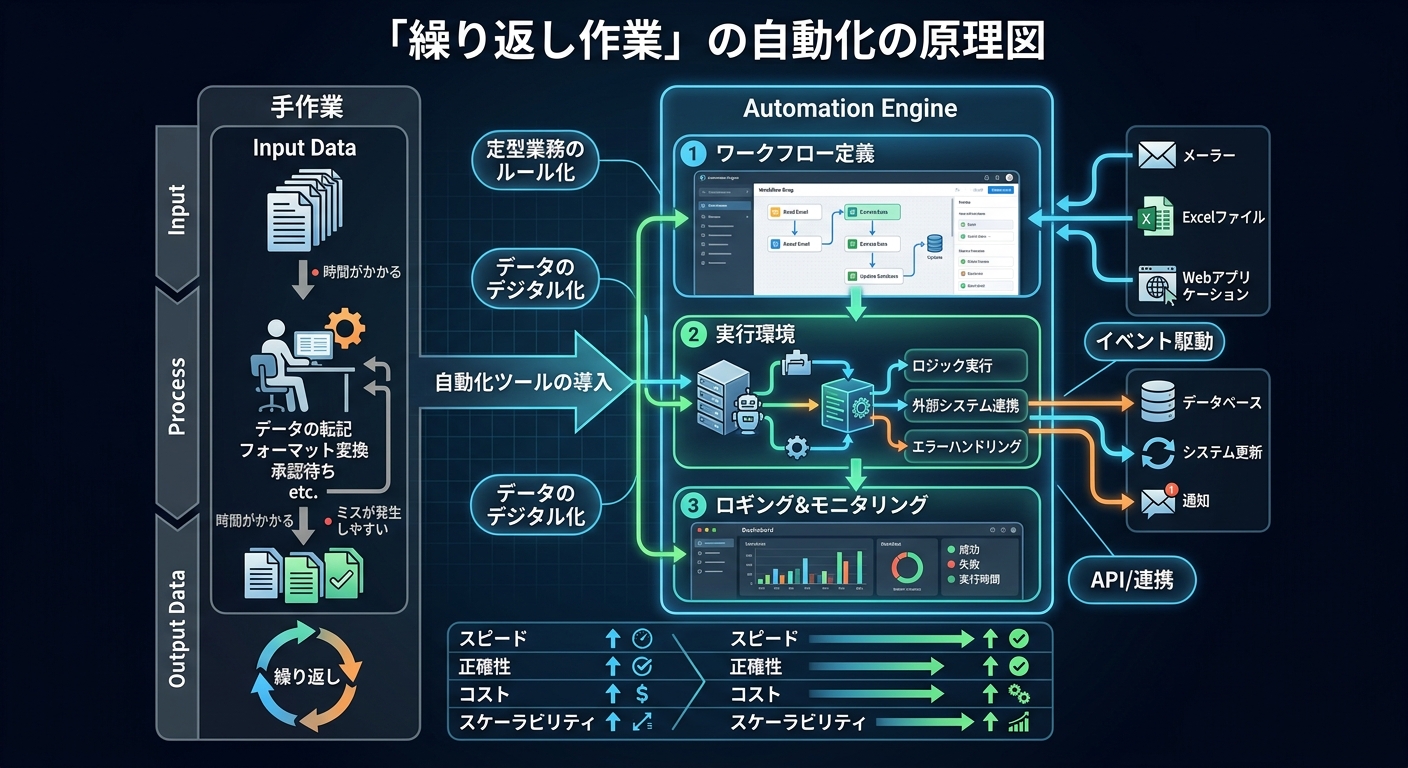
First, I know you’re thinking, “What does the Goldman Sachs story have to do with a solo CEO?” Let me explain properly.
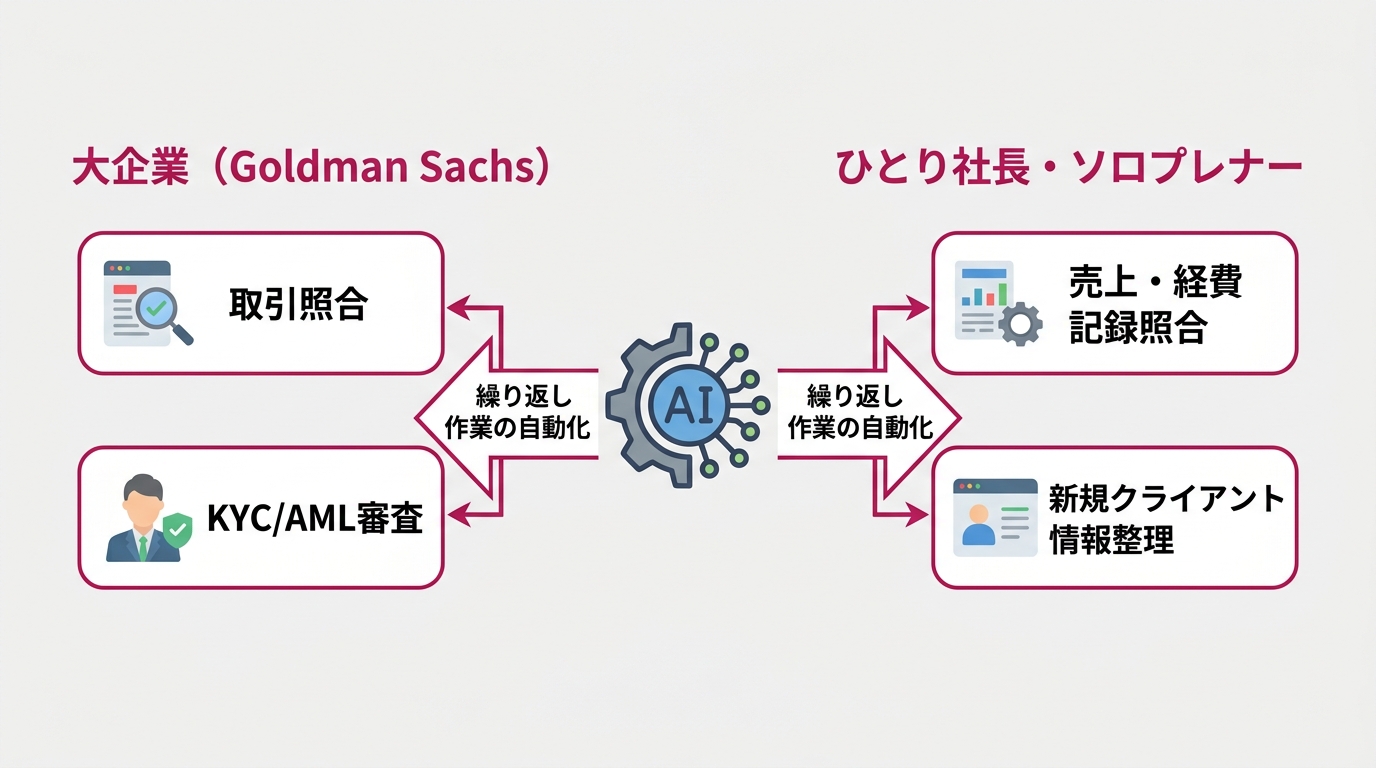
Goldman Sachs used Claude to automate trade reconciliation (matching trade records against the books for accuracy) and KYC/AML reviews. In short, they passed a massive daily volume of repetitive document processing to AI. The result: client onboarding time dropped by 30% (Source: Reuters, Yahoo Finance, 2026-02).
If you hear that and think, “Sure, but only a giant enterprise could pull that off,” wait a second. When you break down what Goldman Sachs is doing, structurally it’s the same as what a solo CEO does every day.
The two traits of “easily automatable work” are: it’s repetitive, and the steps are fixed. Goldman Sachs’s trade reconciliation and your monthly sales aggregation both check both boxes. The scale is different, but viewed as “work you can hand off to AI,” they’re on the same plane.
- Reconciling sales and expense records
- Organizing new client info and verifying documents
- Handling repetitive standard work “accurately, the same way every time”
The scale is different. But the core—“pass repetitive paperwork to AI”—applies to solo CEOs as-is.
According to a survey by Japan’s Small and Medium Enterprise Agency, small business operators spend an average of over 15 hours a month on accounting and admin work. For freelancers and solo CEOs, all of that lands on you. Fifteen hours a month, or roughly 180 hours a year. What if you could spend that time on client work or product development? Wave3 makes that question very real.
ServiceNow (a business management system aimed at large enterprises) adopting Claude in the context of AI agent development is part of the same wave (Source: ServiceNow official announcement, 2026-03). The phase of “building AI in as just another tool” is now reaching ordinary business people, too.
So What Exactly Is “Copilot Cowork”?
Let me restart from the basics.
Microsoft Copilot was originally the AI feature embedded in M365. The previous version was a chat-style “ask a question, get an answer” model. Same usage pattern as ChatGPT. You ask, it answers, you copy-paste the result into your own work.
What changed with Wave3? In one phrase: it now acts autonomously.
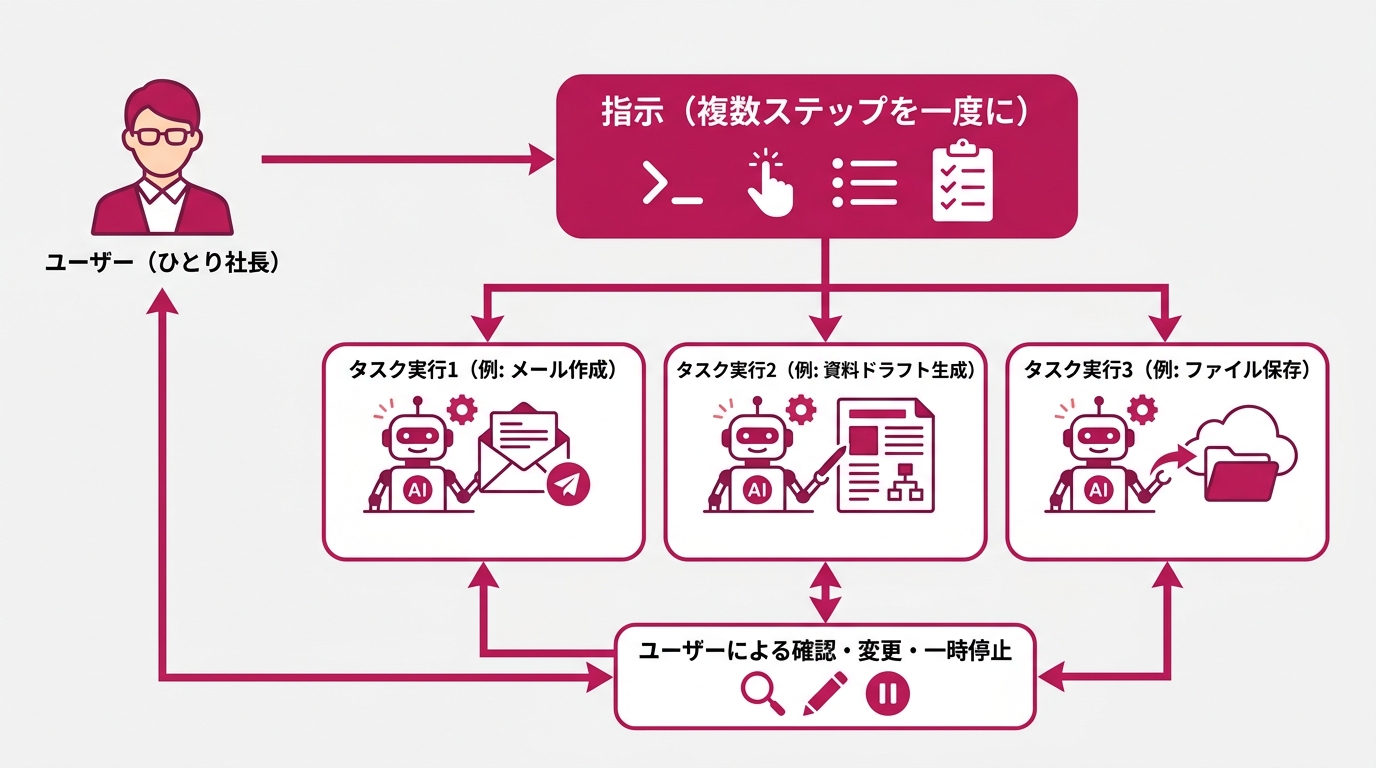
Copilot Cowork (Wave3’s flagship feature) works as an AI agent. Give it a multi-step instruction once—“Check my email, draft replies to anything unanswered, save the drafts to a folder”—and it handles everything in the background. The user can check in, change course, or pause partway through. It’s designed for “hands-off but still under your control.”
To make the difference from chat-style more concrete:
- Chat-style (old): I give an instruction → AI answers → I copy-paste → I give the next instruction → repeat…
- Agent-style (Wave3): I give one instruction → AI works through multiple steps autonomously → I just check in along the way
You can probably imagine how this changes the efficiency of admin work.
Anthropic’s Claude was integrated into M365 as of the March 9, 2026 announcement (Source: Microsoft 365 Blog 2026-03-09, Computerworld). Frontier program users can call Claude directly from Copilot Chat. The design lets you pick Claude alongside OpenAI’s models.
It’s currently in early-rollout phase, with broader rollout planned for late March 2026 (Source: VentureBeat 2026-03). This is about to land in every M365 user’s hands.
Word, Excel, Outlook, PowerPoint, Teams—Here’s Exactly What Changes in Each App
“I get the concept. But what can it actually do?” Let me break it down app by app.
What Changes in Word
“Draft a proposal for me. Use yesterday’s meeting notes and last month’s performance data as reference.” That one line kicks off the background work. It looks at past documents, builds the structure, and comes back with a draft ready to go.
Until now, you had to do the hardest phase—“start from a blank page”—yourself every time. That phase is gone. You can step in as “the editor” instead.
Pasting meeting notes into Word and saying, “Make minutes and a next-actions list” is another classic use case. Within five minutes of ending a client video call, you’ll have a clean set of minutes in hand.
What Changes in Excel
The monthly sales aggregation, cash flow management, and expense categorization that solo CEOs do every month can be handed over as-is.
“Compare last month’s and this month’s sales, and tell me the line items with the biggest variance.” A quick instruction like that produces an analysis. Can’t build a pivot table on your own? Doesn’t matter. Tell Excel how to aggregate, and it does it for you.
On top of that, recurring tasks like “aggregate into this format automatically at the end of every month” run on their own once you set them up. Work you have to do by hand keeps shrinking.
What Changes in Outlook
Reply drafts for inquiry emails get generated automatically.
“Reply politely declining this email, and add one alternative suggestion.” That instruction completes a draft. All you do is review and send.
When a quote request email arrives, it references your past correspondence and writes a response. The “I’ve been retyping the same kind of message over and over” work disappears.
For solo CEOs, email handling quietly eats up the day. The situation where “I knew I had to reply, and suddenly it’s evening” may finally disappear.
What Changes in PowerPoint
“Build a client-facing proposal deck using March’s sales data.” With that one instruction, the skeleton of the slides appears.
PowerPoint hell is one of the quiet pain points for solo CEOs. It’s not unusual to lose 30 minutes staring at a blank slide wondering where to start. That’s gone. Cowork builds the structure, fills in content, and hands you a draft. You only do the review and fine-tuning.
Cross-app work like pulling month-over-month numbers from Excel and reflecting them in slides can also be automated. Your brain gets to focus on “what to convey” instead of “making the materials.”
What Changes in Teams
If you use Teams for meetings, things change here too.
Right after a meeting ends, you say: “Organize today’s meeting, and list each person’s action items with deadlines.” Cowork uses the meeting transcript to automatically generate minutes and a task list. The vague “someone will write up minutes later” state goes away.
“After a meeting I can’t remember who’s doing what”—that’s a classic solo-CEO problem. When you’re juggling multiple clients in parallel, per-project progress tracking quietly piles up. Ten monthly meetings means ten meetings’ worth of organizing waiting for you every time. Now it becomes “one instruction after a meeting and you’re done.”
You can actually focus on the other person during the meeting. The homework of “I have to clean this up later” hits zero by the end of the day. You can also do cross-meeting checks: “List every action item from the last three meetings with Client X.” Cowork answers it.
You can organize using Teams history without needing a separate project management tool. The “where did we talk about that?” problem that comes from piled-up chats stops happening. What used to take 1–2 hours a month for minutes cleanup turns into just a quick review pass. For a solo CEO whose client list is growing, this change is quietly huge.
Notice what all of this has in common: it works across apps. You can drive cross-app flows with a single instruction. Outlook email → Word proposal → Excel cost estimate → PowerPoint for sharing—that flow now just runs.
This is the essence of an “AI agent.” Not a single Q&A. The power to chain multiple steps autonomously.
Picture an “Ideal Morning” as a Solo CEO
Here’s a concrete picture of how a solo CEO’s morning changes with Wave3.
You open your PC at 9 a.m. You tell Outlook: “Check today’s unanswered emails and draft replies in priority order.” Copilot Cowork starts working in the background.
Meanwhile, you toss last week’s sales data into Excel. “Aggregate last week’s sales and put together a simple report with month-over-month comparison.”
You also want to clean up yesterday’s client meeting. “Turn yesterday’s Teams meeting into minutes, and pull out just my action items.” Five minutes later, you have organized minutes and a list of actions. The “re-read and clean up” time after a meeting goes to zero.
Ten minutes later, you check in: three draft replies are lined up in Outlook, and a sales comparison report is sitting in Excel. Work that would have taken you 1–2 hours yourself has been reduced to review and send.
You might think, “That’s too idealistic.” But right now, Goldman Sachs is running this very structure for real. Only the scale is different—the essence of the mechanism is the same. A solo CEO can replicate this flow too.
Why “Zero Tool Switching” Is Revolutionary
Please don’t skip this part.
Articles introducing AI tools almost always read like this: “Sign up for this tool,” “Start with the free plan,” “Download this app.” Every suggestion is correct, but there’s always a “first friction” you have to overcome.
You have to learn a new interface. Change your workflow. End up regretting “I tried it but didn’t stick with it.” The reason so many people couldn’t keep using AI tools they tried is exactly that—the switching cost is too high.
What makes Wave3 revolutionary is that the switching cost is essentially zero.
If you’re an M365 user, you can use Copilot Cowork right inside the Word you already have open (a Copilot M365–capable license is required—more on this later). No new app to install. No need to open a separate ChatGPT tab. No browser switching.
Word stays Word. Excel stays Excel. Cowork just rides on top.
The mental load is completely different. “Use a new tool” and “the Word you already use now has extra features” are not the same mental hurdle.
After the Wave3 announcement, existing SaaS company stocks reportedly lost a combined $285 billion in market value (Source: estimates from multiple US media outlets, 2026-03). SaaS refers to subscription-based online business software broadly. The market read this as “M365 is going to absorb almost every feature.” The forecast that specialty tools won’t sell anymore started spreading.
Industry insiders are seriously betting that “Wave3 replaces the existing tools.” That’s the magnitude of impact we’re talking about.
One more thing. Cowork has “hands-off but still under your control” built into its design.
You may worry that AI does too much on its own and creates problems. But because you can check, change, and pause along the way, it’s not fully automatic. You can use it with the feeling of “delegated, but I’m still watching.” For solo CEOs, the fact that you can ease into it incrementally—even if you’re afraid to hand everything over—is an important point.
Three Things Solo CEOs Should Do Right Now
“Got it, I want to use it. So how do I start?” If you’ve read this far, here’s the next move.
But I have to be honest. As of right now (March 2026), Copilot Cowork Wave3 is still in the “Frontier program” (early-rollout phase). Broader rollout is planned for late March 2026 (Source: VentureBeat). Not everyone can use it today.
That’s exactly why “the people who start using it the moment it arrives” and “the people who’ll think about it after it arrives” will diverge. There are three things you should do in the meantime.
Prep 1: Check your M365 plan and license
To use Copilot Cowork, you’ll need a Microsoft 365 Copilot license. You can check whether your current M365 plan is Copilot-compatible from the Microsoft account settings page.
For reference, here’s the current main pricing structure for M365 Copilot.
| Plan | Monthly (per user) | Target |
|---|---|---|
| Microsoft 365 Business Basic | ~¥900 | Basic plan for individuals and small businesses |
| Microsoft 365 Business Standard | ~¥1,880 | Standard plan including the apps |
| Microsoft 365 Copilot (add-on) | ~¥4,500 | Copilot feature add-on (added to a Business plan) |
- Please check the latest pricing on Microsoft’s official site. Rates can change due to currency or revisions.
If ¥4,500/month gets you Cowork, and you can shave even one hour off your 15 monthly admin hours, the hourly rate makes it pay for itself. Get a sense of the cost, then consider the upgrade.
Prep 2: Make your own “repetitive work list”
Cowork hits its stride on “routine × multi-step” work. It matters to think ahead about what you’ll hand over the moment you can use it. Open up Excel or a notes app right now and write down the work you repeat weekly or monthly.
For example:
- End-of-month sales aggregation → simple report → client email
- First-draft replies to inquiry emails
- Drafting meeting minutes and next-action lists
- New client info compilation and proposal drafts
- Auto-generating weekly progress reports from past data
- Checking invoice content and listing payment due dates
The list contents change by industry. But basically any work that’s “repetitive” and has “fixed steps” is a candidate. Just clarifying this up front makes a huge difference in how fast you can start using Cowork.
One tip for building this list: be specific about each task’s “input” and “output.” “Email handling” is too vague. A task you can describe as “email from the inquiry form (input) → reply draft (output)” is easy to hand to Cowork.
Without a list, you’ll end up “trying it out but having no idea what to use it for.” The people who already know “I’m starting here” will pull ahead first.
Prep 3: Bookmark Microsoft’s official information sources
Wave3 general rollout is planned for late March. Official info gets updated regularly on Windows Blog Japan (blogs.windows.com/japan). Bookmark it so you can move the moment the rollout starts.
In addition, Anthropic’s official learning platform “Anthropic Academy” (anthropic.skilljar.com) offers free courses on using Claude Cowork (Source: Analytics Vidhya, 2026-03). The content is English-based, but even just watching the videos gives you a feel for “what kinds of uses are possible.”
Wrap-Up—The Day Solo CEOs Stand Alongside Goldman Sachs, With Zero Switching
Let me summarize.
- March 9, 2026: Copilot Cowork Wave3 announced. Anthropic’s Claude was integrated into M365 apps (Source: Microsoft 365 Blog)
- Broader rollout planned for late March. The Word, Excel, Outlook, PowerPoint, and Teams you already use become AI agents as-is
- The “automation of repetitive work” principle Goldman Sachs implemented is landing in M365 users’ hands
- Zero tool switching and near-zero learning cost is the biggest differentiator this time
- What you can do right now: “check your M365 plan and license,” “build a repetitive work list,” and “bookmark official sources.” Three things.
If you scrolled past this thinking “it’s a big-enterprise story,” that’s the most losing call you can make. For solo CEOs, time is the single biggest asset.
If you’re spending 15–20 hours a month on admin work, that’s 180–240 hours a year. What if you could spend that time acquiring new clients or developing products? That’s becoming a real conversation.
The first step is making your “repetitive work list.” The people who already know what to hand over the moment Cowork arrives will pull ahead first.
The gap between people who use AI well and people who don’t isn’t a skill gap. It’s the gap between “have you thought about what to hand off, or not.” That alone is something you can start today.
While we wait for the tool, get the prep done. So you can move the second it arrives. Late March is coming up fast.
- Information in this article is as of March 21, 2026. Please check Microsoft’s official site for the latest details on Copilot Cowork Frontier program enrollment, license details, and pricing.
Related Articles
- Why Solo CEOs Who Made AI Their Subordinate Move Faster Than Big Enterprises (previous article)

女性だからこそ、AIを使いこなさなきゃって思ってる。仕事も、副業も、推し活も、旅行も、全部やりたい。人生一度きりなのに時間は足りないじゃん?だからAIに任せられることは全部任せる。浮いた時間で本当にやりたいことをやる。それがあたしのスタイル。ここにはあたしが実際にやったことをまとめてるだけ。誰かのためになったらいいなって思って書いてるよ。


