Can You Spot 'Works But Broken'? 3 Vibe Coding Pitfalls I Found After Testing All 5 Major AI Coding Tools
The Vibe Coding Certification officially launched last week. We've entered an era where 'having AI write your code' gets recognized as a formal credential.
What you'll learn in this article
- The key point to grasp before reading the full article
- How the issue changes the way developers should work next
- Which follow-up article is worth opening next
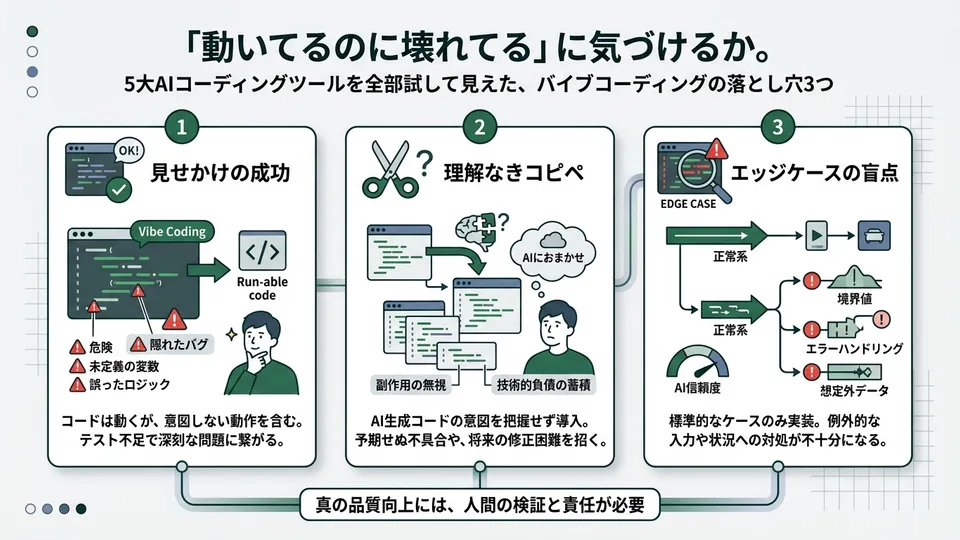
Vibe Coding Now Has a Certification. But Are We Talking About Quality?
The Vibe Coding Certification officially launched last week. We’ve entered an era where “having AI write your code” gets recognized as a formal credential.
Honestly, it made me shudder.
Not out of joy—out of fear. Because for the past six months or so, I’ve been the kind of person who barrels forward with an “if it runs, it’s fine” mindset. A certification existing means there’s now a line drawn between right and wrong ways to use these tools. Which side does my code fall on? Suddenly I got anxious.
I work in CS (Customer Success), and I started building internal tools with AI about a year ago. At first I just used Cursor for autocomplete. Once I started pairing it with Claude Code, my development speed shot up. Spreadsheet integrations, Slack bots, internal dashboards. The feeling of watching everything I wanted to build come to life, one after another, was incredible.
But looking back, I had completely deprioritized quality control.
So this time, I tried comparing the five major AI coding tools. Claude Code, Cursor, GitHub Copilot, Windsurf, and Devin. I used all five extensively while reviewing the code I’d written in the past. The result? Three clear pitfalls emerged.
If I had to name the concept, I’d call it the “works but broken” syndrome. Tests pass. The screen renders. No user complaints. But peek inside and you’ll find security holes, or logic nobody can explain. On the surface it looks healthy, but an X-ray reveals cracks in the bones.
TechRadar’s 2026 vibe coding tool comparison also flagged the trade-off between quality and security as a major issue. Even specialist media that evaluates tools is starting to confront the risks lurking behind the speed.
In this article, I’ll share three pitfalls and how to handle them, based on my own painful experiences. At the end, I’ll also introduce a new approach called VibeContract. Whether you’re planning to take the certification or you’re still at the “I just want to make something that works” stage, please read on.
Pitfall 1: Security Holes You Can’t See
The first pitfall: code generated by AI can contain security issues. And these are the kind you’ll never catch by just running it.
Let me share my actual experience. Six months ago, I was building a Slack bot. I asked Claude Code to build a feature that saves inquiry content to a database, and it returned beautifully working code. The data saved correctly. Search worked. I thought it was perfect.
Three months later, a security-savvy colleague took a look and said one thing: “This has no protection against SQL injection (an attack where malicious SQL is slipped into user input).”
The blood drained from my face.
# Code generated by AI (dangerous example)
# User input is embedded directly into the SQL statement
query = f"INSERT INTO messages (content) VALUES ('{user_input}')"
cursor.execute(query)

# The safe way (parameter binding)
# Using placeholders automatically escapes the input
query = "INSERT INTO messages (content) VALUES (%s)"
cursor.execute(query, (user_input,))
Pro engineers who can read code might say “well, that’s obvious.” I get it. But the vibe coding world is full of people like me—folks who once stepped away from code. We’ve forgotten what parameter binding even is. Or worse, never knew in the first place.
The real problem isn’t that “AI writes dangerous code.” It’s that “vibe coders lack the knowledge to judge whether something is dangerous.” That’s the gap.
And it’s not just SQL injection. Cross-site scripting (XSS, where malicious scripts get embedded in web pages) is another one to watch. Hardcoded API keys are a classic risk. In my Slack bot, I later realized the API key was written directly into the code. Moving it to an environment variable is trivial—but without the knowledge, it would have sat there indefinitely.
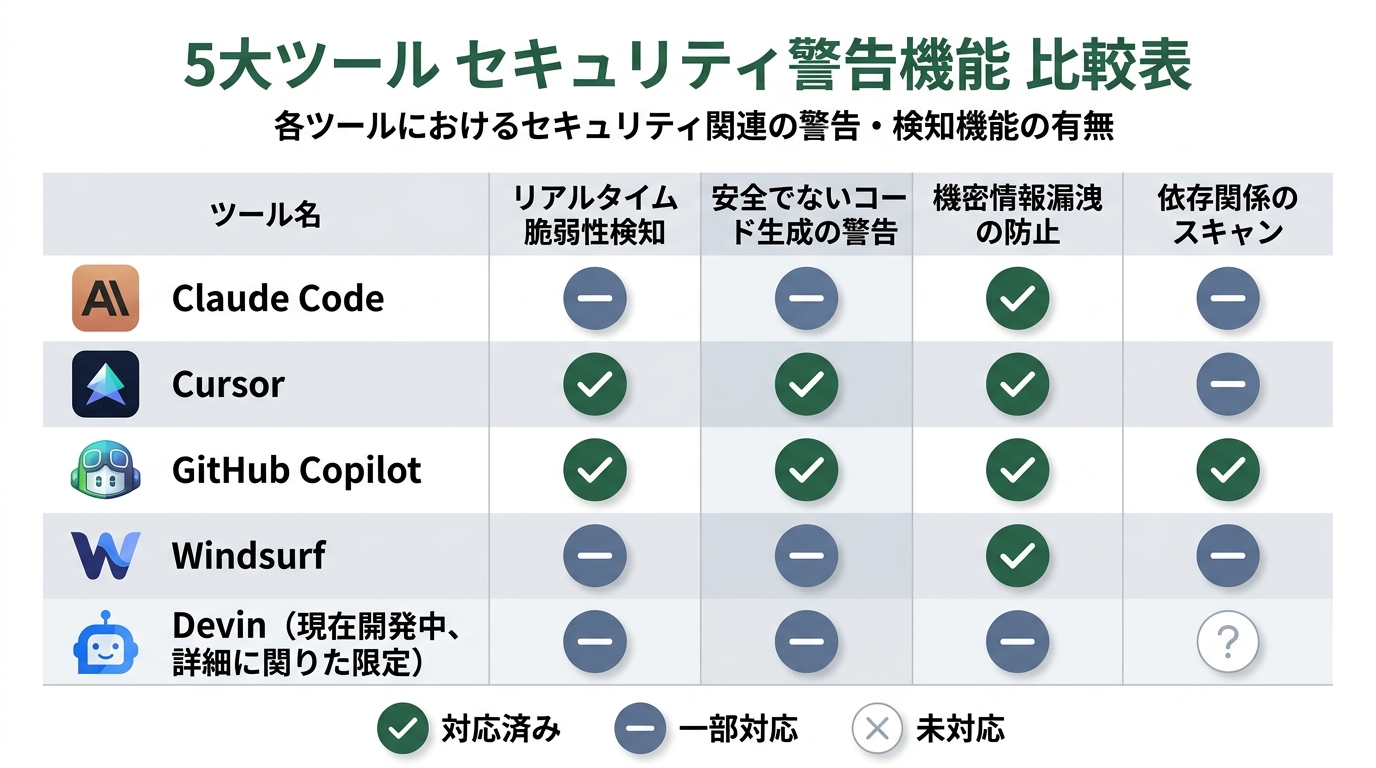
According to TechRadar’s comparison article, the latest agent-style tools are starting to ship with security warning features. Claude Code and Cursor are gaining the ability to flag risks during generation. But not all tools support this at the same level yet.
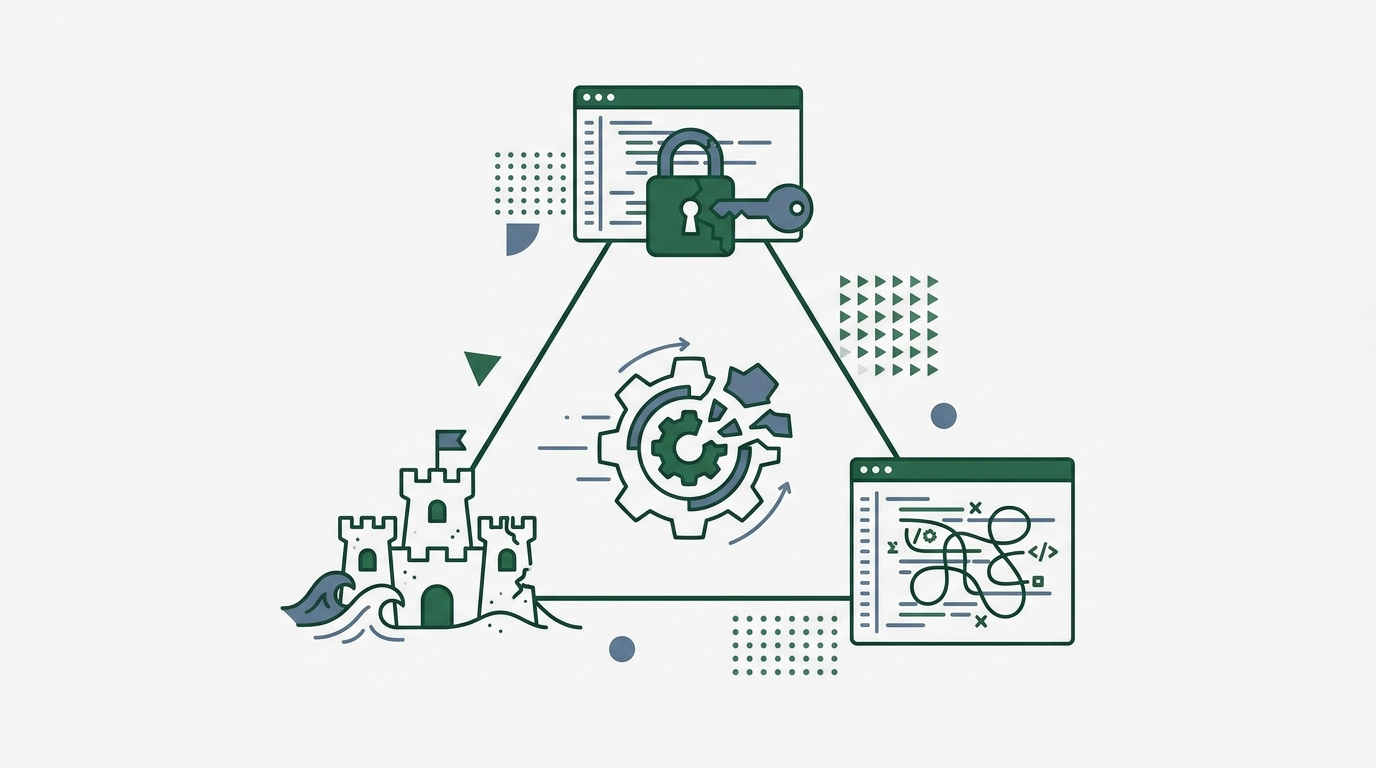
Solution: Split Generation and Review Into Separate Sessions
Let me get the gotcha out of the way first. Asking the AI to “security-check this code” in the same conversation doesn’t work well. AI tends to treat the code it just wrote as “what was intended.” It’s like grading your own paper—you go easy on yourself.
Here’s what I do. After generating the code, I start a fresh session and ask: “Point out three security risks in this code from an attacker’s perspective.” Just separating the context produces surprisingly harsh feedback.
In Claude Code, use /clear to reset. In Cursor, open a new Composer window. In GitHub Copilot, switch to a different chat panel. This technique works across all tools.
Pitfall 2: A Growing Pile of Code That Works—But You Can’t Explain Why
The second pitfall. Personally, this one scares me the most.
The AI-generated code runs. The tests pass. But when someone asks “why is this logic written this way?”, the person who built it can’t answer. That state.
For me, the internal dashboard was where I got burned. I asked Cursor to write the sales data aggregation logic. Three months later, the aggregation rules needed to change—and I was completely stuck.
The code was over 200 lines. The comments were English ones the AI auto-generated. Function names were generic things like process_data and calculate_result. There was no way to trace what was processing what.
Coming from CS, I recognize the pattern. It’s the same structure as customers forgetting how to use a tool. “I understood it when I built it” but “time passes and I’m a different person now.” Even though I (well, technically the AI) wrote the code, three-months-later me couldn’t read it.
# Bad pattern: the overly generic code AI tends to generate
# Three-months-later you won't know what this means
def process_data(data):
    result = [x for x in data if x['status'] == 'active']
    return sum(item['amount'] for item in result)

# Improved pattern: leave behind the "what and why"
# Monthly revenue aggregation: scope will change with April 2026 rule revision
def calculate_active_monthly_revenue(transactions):
    # Aggregate only active transactions (exclude cancelled and pending)
    active_deals = [t for t in transactions
                    if t['status'] == 'active']
    return sum(deal['amount'] for deal in active_deals)
This is the textbook “works but broken” case. Right now it runs. But the moment you try to change it, you realize you have no idea how—and that’s when it breaks. Technical debt (the future maintenance cost that piles up when you skip quality) is quietly accumulating.
For reference, GitHub Copilot’s new metrics API lets you measure PR throughput and merge time. We’re now in an era where you can track the adoption rate of AI-generated PRs. With these indicators, monitoring “whether unexplainable code is sneaking into production” is starting to feel realistic.
Solution: Write Comments to Your “Three-Months-Later Self”
After the AI generates code, add comments in your own words. This alone dramatically improves things.
The trick is to write the “business reason” rather than “what the code does.” Leave behind “why this processing is necessary,” “when changes are anticipated,” and “who uses this feature.” It doesn’t have to be the kind of technical comment a pro engineer would write. Coming from CS, I write comments like I’m preparing a handoff document.
For Claude Code, instruct it: “Add comments in English that include the business logic background.” For Copilot, use inline chat to say “Explain the purpose of this function in one line of English.” Even when tools change, prompt tweaks make it work.
Pitfall 3: The “Sandcastle” You Build Without Tests
Number three. The pitfall where I made my most spectacular mistake.
The most satisfying moment in vibe coding is when features keep stacking up. “Build a login feature.” “Add a dashboard.” “Throw in CSV export.” Each ask to the AI adds another screen. The sense of progress is overwhelming.
But you’re not writing tests. You manually confirm “it works, OK” and immediately move to the next feature.
This is a sandcastle. You keep stacking things on top without checking if the foundation is stable. One day, I tweaked the login feature’s validation slightly, and somehow CSV export broke. Tracking down the cause took over half a day.
Half a day. Building one feature takes 30 minutes, but debugging took 24 times that long. The “if it works, it’s fine” spirit was actually stealing my own time.
In the engineering world, they say “code without tests is legacy code.” I had walked away thinking I couldn’t compete with pro engineers, but now I understand that phrase viscerally. Code without tests is code you can’t muster the courage to modify. Code that’s scary to touch.
Solution: Make “One Feature, One Test” a Habit
You don’t need to aim for perfect test coverage (the percentage of your code verified by tests). Asking that of vibe coders means nobody would write code anymore.
My rule is: “When you add one feature, ask for at least one test.”
# Prompt example when adding a feature
# Key point: include "and the tests" from the start

# Bad: only ask for the feature
# → "Build a user registration feature"

# Good: specify the test conditions in the request
# → "Build a user registration feature.
#     Also write tests at the same time.
#     The tests should verify:
#     1. Normal registration works
#     2. Duplicate email addresses return an error
#     3. Empty required fields return an error"
Just this turns a sandcastle into a brick castle. With tests in place, when you add another feature, you can automatically verify “did the part that was just working break?” My half-day could have been prevented by a single extra line in the prompt.
With Claude Code, running tests seamlessly in the terminal is a real plus. With Cursor, just add “Run the tests and show me the results.” With Copilot, open the test file and hit “Run.” The bar for writing tests has dropped significantly across every tool.
VibeContract: A New Way to Protect Vibe Coding Quality Through “Contracts”
Reading this far, you might be thinking: “Got the three pitfalls. But self-checking every time is a pain.” I felt the same way.
That’s where I want to introduce the idea of VibeContract. It’s a technique that treats “intent” written in natural language as a “contract” for the code. Proposed in the researcher community, this approach takes a head-on shot at the quality problems specific to vibe coding.
It works in four steps.
- Write “what this feature should do” in natural language (create the contract)
- Have the AI generate the code
- Verify whether the generated code aligns with the “contract”
- Continuously monitor for contract violations via tests and runtime checks
“How is that different from requirements definition?” you might ask. I felt that way at first too. The difference is clear. Traditional requirements are documents for humans to read. VibeContract is a structured contract that AI uses for verification. The key is that “what’s written and what the code does match” can be checked automatically.
Trying It Out: VibeContract for a User Registration Feature
Let me show you concretely. Here’s an example I actually tried.
First, write the contract in natural language.
# vibecontract.yaml
# Contract for the user registration feature (written in natural language)
feature: User Registration
contracts:
  - "Email addresses must be unique. Return an error on duplicates"
  - "Passwords must be 8+ characters with mixed letters and numbers"
  - "Send a welcome email on successful registration"
  - "Only use queries with SQL injection protection"
  - "Retrieve API keys from environment variables. Never hardcode them"
Then give the AI its instructions. This is the key.
Following the contract in vibecontract.yaml,
implement the user registration feature.
Generate tests for each contract item at the same time.
Include a check function that verifies there are no contract violations.
You then cross-check the AI-generated code against the contract file. If email uniqueness checking isn’t implemented, it gets flagged as a “contract violation.” The SQL injection protection I missed in my Slack bot wouldn’t have slipped through if I’d written it into the contract.
The biggest value of this method is protecting “quality” without killing the “speed” of vibe coding. Writing the contract takes 5 minutes. But those 5 minutes prevent a half-day of debugging three months from now. The ROI is obvious.
The Surrounding Infrastructure Is Catching Up Too
The good news: the technical foundation supporting VibeContract is maturing.
Microsoft Agent Framework reached RC1 (first release candidate). It bakes in session management and fault-tolerant design patterns. Claude and Copilot are integrated as first-class providers. As the agent-side infrastructure matures, automating contract verification becomes realistic.
GitHub Copilot’s new metrics API is also worth a look. The February 2026 update enabled measurement of PR throughput, merge time, and the adoption rate of AI-created PRs. On April 2, the legacy API is being retired and fully migrated to the new Usage Metrics API. It’s proof that the era of discussing quality in numbers—not feelings—is arriving in earnest.

Wrap-Up: Beyond “If It Works, It’s Fine”
Let me review the three pitfalls of vibe coding.
- Security holes you can’t see: Split generation and review into separate sessions. Asking for review from an attacker’s perspective is effective
- Code that works but you can’t explain: For your three-months-later self, leave behind the reasoning for business logic in English comments
- The sandcastle with no tests: For every one feature added, at least one test. Just including “with tests” in the prompt changes things dramatically
And the fourth weapon: VibeContract. Write your “intent” as a contract in natural language. That alone lets you protect AI-generated code quality through a system.
I was the kind of person whose motto was “if it works, it’s fine.” That feeling hasn’t changed even now. Aiming for perfect code from the start is wrong, and it would mean never building anything. That’s putting the cart before the horse.
But “if it works, it’s fine” and “you can ignore quality” are different things—that’s what I learned over the past six months. If you leave “works but broken” alone, one day what you built will betray you. I experienced that firsthand with my dashboard three months back. I still remember the panic of that half-day fix.
The fact that vibe coding has a certification now is proof that “writing code with AI” has earned social recognition. That’s exactly why I want to grow quality management as part of the skillset too.
The feeling of a top-tier engineer inhabiting you is real. The technology I once thought I could never match is now in my hands through AI. But turning that inherited power into unbreakable code ultimately comes down to your own judgment and habits.
Beyond “if it works, it’s fine” lies “code you can trust.” That’s where I’m walking, one step at a time. Whether you’re taking the certification or just started getting your hands dirty, please try the solutions I shared today.
The failure that cost me half a day—you, reader, can avoid it in three minutes. The moment you can spot “works but broken,” that’s already proof of growth. Let’s keep at it together.

正直、一度エンジニアは諦めました。新卒で入った開発会社でバケモノみたいに優秀な人たちに囲まれて、「あ、私はこっち側じゃないな」って悟ったんです。その後はカスタマーサクセスに転向して10年。でもCursorとClaude Codeに出会って、全部変わりました。完璧なコードじゃなくていい。自分の仕事を自分で楽にするコードが書ければ、それでいいんですよ。週末はサウナで整いながら次に作るツールのこと考えてます。


