The Day the 'Approve' Button Disappeared in Claude Code Auto Mode: The Unit of Engineering Work Is Starting to Change
'Approve? (y/n)'
What you'll learn in this article
- Where pricing and adoption questions around Claude Code stand right now
- Which plan or rollout stage fits the reader's situation
- Which follow-up article to open next for setup, cost, or bigger-picture context

“Approve? (y/n)”
If you’ve used Claude Code, you’ve seen this prompt. Every time it edits a file, every time it runs bash, you hit y. Honestly, at some point I was just hammering y on autopilot.
On March 24, 2026, Anthropic announced “Auto Mode” — a system that lets the AI automatically execute actions it judges to be safe. (TechCrunch)
Some of you probably thought, “Finally.” Others probably thought, “Isn’t that scary?” I get both reactions.
In this article, I’m not just going to introduce Auto Mode’s features — I want to dig into how the “unit of work” for engineers is changing. As a former failed engineer, I’ll share my own before/after experience.
Anthropic Proved with Numbers That “93% Could Be Auto-Approved”
Before we get into Auto Mode, let me share one data point.
The rate at which users press y to approval prompts is 93%. (Anthropic official blog)
Out of 100 prompts, users approve 93. Only the remaining 7 were “actions that should have been stopped.”
Looking at this number, I had to laugh at my own usage patterns. I’d probably been hitting y about 98% of the time. Almost reflexively.
Anthropic apparently recognized this pattern. Automate the 93% of routine approvals, and only block the dangerous actions. It struck me as a sensible design philosophy.
How It Differs from the Three Existing Permission Modes
Claude Code originally had three permission modes.
- default: Asks for approval on every action
- acceptEdits: File edits are automatic, bash requires approval
- plan: Read-only. No changes whatsoever
Auto Mode is the fourth option added to the lineup. You can switch with Shift+Tab. (Claude Code official docs)
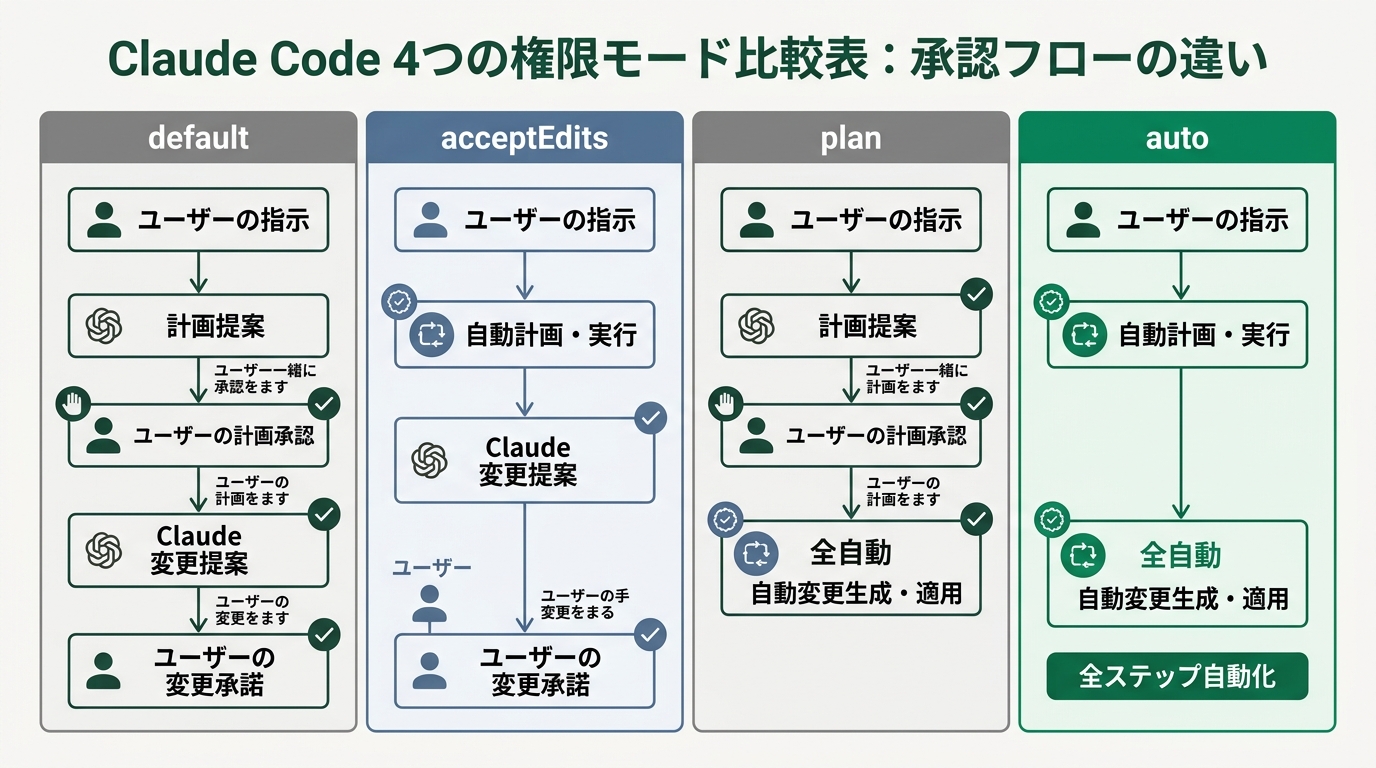
The key thing here is that it’s not “skip everything.” --dangerously-skip-permissions has existed for a while. That’s literally a dangerous mode that skips all approvals. Auto Mode is fundamentally different.
A “Classifier” Working Behind the Scenes Judges Danger on Your Behalf
The heart of Auto Mode is the AI classifier running in the background.
Before an action executes, a separate AI model evaluates it. The mechanism compares the conversation context against the planned operation. It checks three categories. (The AI Insider)
- Scope deviation: Is it going beyond the requested scope of work?
- Untrusted infrastructure: Are there connections to unknown external services?
- Prompt injection: Has it been influenced by malicious instructions?
For example, say you ask “fix the tests in src/.” If it suddenly tries to run rm -rf /, it gets stopped. That might sound obvious.
But implementing a system that “stops the obvious obviously” — having it built into an AI coding tool is a big step.
When the Classifier Repeatedly Blocks
One more point worth knowing. When the classifier repeatedly blocks the same action, Auto Mode prompts the human.
It’s designed to be “nearly unattended,” not “fully unattended.” It only calls on you when needed. This is well done, I think.
It reminds me of my CS (customer success) days. I once designed an escalation flow. Automate first-line response, route only the judgment calls to humans. Auto Mode has exactly the same structure.
My Dev Workflow Before/After. The Feel Is Completely Different
Now to my actual experience using it.
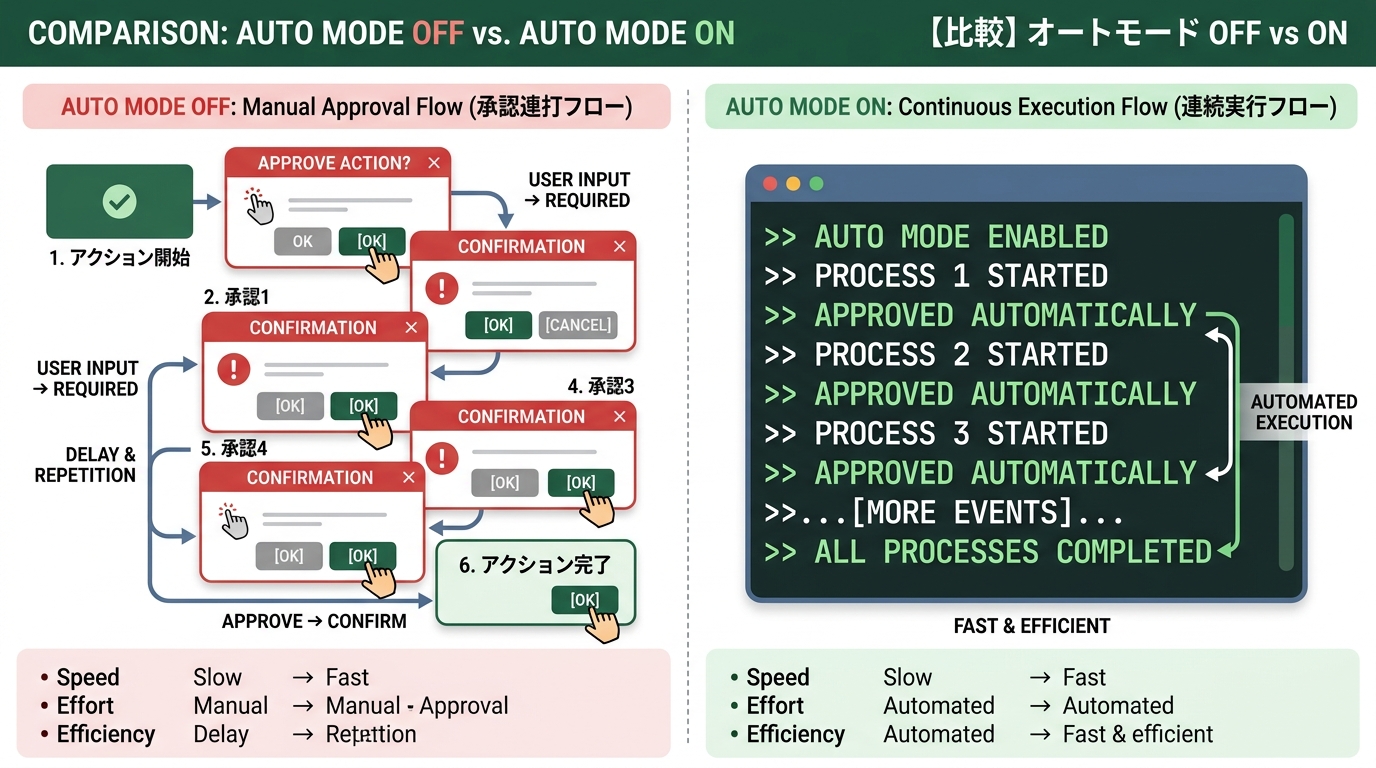
Before: Days of Hammering Approve
This was when I was doing a Slack Bot refactor as a side project. I gave Claude Code this instruction: “Unify error handling, and add tests.”
The actions that executed looked like this.
# Things like this come up endlessly (illustrative)
Edit file src/handlers/message.ts? (y/n)  # y
Edit file src/handlers/reaction.ts? (y/n)  # y
Run: npm test? (y/n)  # y
Edit file src/handlers/message.ts? (y/n)  # tests failed, re-fixing → y
Run: npm test? (y/n)  # y
# ...repeats about 20 more times
30 minutes of hammering y through fix → test → fix loops. I wanted to go grab a coffee but couldn’t step away. Subtly stressful.
What’s tricky is that every y comes with a split-second of thought. “Is this action really okay?” After thinking, 99% of the time I just approve it anyway. But when that “0.5 seconds of thought” piles up 20 times, focus breaks.
After: Auto Mode Changes the “Flow”
I tried the same work with Auto Mode. Enabling it from the CLI is simple.
# Enable Auto Mode at launch
claude --enable-auto-mode

# Or switch with Shift+Tab while running
# default → acceptEdits → plan → auto
After giving the instruction, watching the terminal, you can feel the change. File edits and test runs proceed one after another without approval. When tests fail, it auto-fixes and re-runs. Having this loop run unattended feels completely different.
Let me share the gotcha I hit first.
A pattern where Auto Mode stops that I experienced was an external API curl command. When I tried to generate a script that hits the Slack API, the classifier judged it as “untrusted infrastructure” and blocked it. Manual approval was needed here.
I think this is correct behavior. Communication with external services carries data exfiltration risk. I’m grateful it stopped.
By the way, npm install and npm test went through fine. Commands that stay within the repo tend to be trusted. You get a feel for these criteria as you use it.
Felt Productivity Changes
It’s hard to put in numbers, but let me write honestly about how it feels.
- Refactoring: 30 minutes of approval hammering completed in 15 minutes of leaving it alone. I used the free time to clear Slack messages
- Test-fix loops: 3–5 fix-loop cycles fully automated. I can actually grab a coffee mid-task
- Quality of focus: Shifted from “press y → check → press y” to a 2-step “instruct → check results”
You might think, “Isn’t that a trivial improvement?” But the essence of vibe coding lies elsewhere. It’s about the human not intervening in code details. Auto Mode realizes that philosophy at the permission-model level.
One caveat. Auto Mode isn’t a panacea. Anthropic explicitly states they “continue to recommend use in isolated environments.” Rather than applying it directly to production, it’s safer to use it on feature branches or in sandboxes. (BuildFastWithAI)
Enterprise Self-Serve Release: From “Individual Toy” to “Team Standard”
Around the same time as Auto Mode, there was another move. The self-serve release of the Enterprise plan. (Anthropic official)
Until now, Enterprise required a contract through the sales team. SSO, role-based access control, compliance APIs. The features were there, but the adoption barrier was high.
With self-serve, admins can now purchase seats directly. They also added functionality to distribute Claude Code policies across the entire organization.
What This Means
For individual users, this is a “nice, more convenient” story. But at the organizational level, the landscape changes.
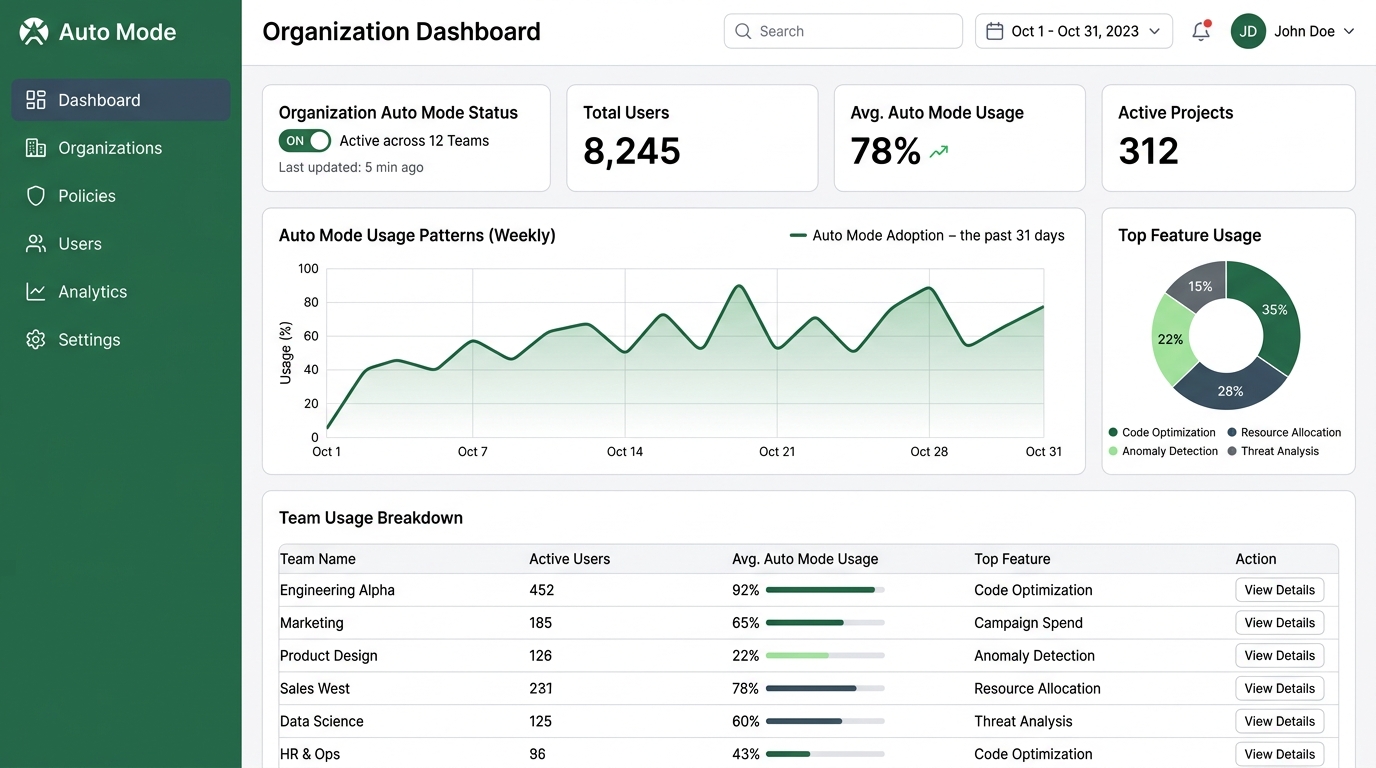
Admins can apply Auto Mode policies across the entire organization.
For example, banning Auto Mode on production branches. Allowing it on feature branches. You can set rules like that all at once. There’s also a dashboard visualizing the volume of AI-assisted code included in PRs. Measuring adoption impact becomes straightforward.
From my CS experience supporting tool rollouts, here’s what I can say. Explaining “what’s the value of this tool” to leadership is hard. An admin dashboard that shows usage and outcomes is the best weapon a champion can have.
Pricing: Seats Plus Usage-Based
The Self-Serve version is a seat-based model plus API rate usage charges. (Anthropic pricing page)
A pay-for-what-you-use structure. It avoids the “we rolled it out to everyone but no one uses it” scenario. From a CS background, this was a “they really get it” moment.
It reminds me of supporting SaaS rollouts at my previous job. Clients holding huge volumes of unused licenses on annual contracts. I saw company after company in that spot. Situations where users who didn’t open the tool once a month were still being charged every month. I have experience proposing usage-based models as a way out. Anthropic’s Self-Serve feels very close to that ideal form.
The “Minimum Unit” of Work Humans Should Do in the Auto Mode Era
Now to the main topic. How does engineering work change with Auto Mode?
Looking across the industry, this direction is accelerating. At NVIDIA GTC 2026, Jensen Huang called it an “agent inflection point.” CLI agents are entering the mainstream of development, and the era when vibe coding becomes a certifiable skill is coming. Auto Mode is what pushes that current one step further.
A tool for the transition from “adoption phase” to “operational standard phase.” That framing fits best for me.
From “Writing Code” to “Designing Instructions”
The nature of work was already changing with conventional vibe coding. The shift from “writing code” to “giving instructions to AI.” What happens with Auto Mode is the change beyond that.
“Give instructions → check” becomes “design instructions → verify.”
“Giving instructions” and “designing instructions” are similar but different.
“Giving instructions” is one prompt. “Designing instructions” is defining a chunk of work that Auto Mode can autonomously complete. Picture entrusting 10 steps.
What Specifically Changes
Before (pre-Auto Mode):
- “Fix error handling in message.ts” → approve → check
- “Add tests” → approve → check
- “Tests are failing, fix them” → approve → check
After (post-Auto Mode):
- “Unify error handling across 2 files, add tests, fix until tests pass” → leave it alone → final verification
The first is three steps of “instruction-giving.” The second is one act of “instruction-designing.” This difference scales with the size of the work.
Multi-file refactors, dependency updates, test fixes. Where Auto Mode shines is routine work that stays within the repository. (BuildFastWithAI)
What Work Remains for Humans
I organized the areas you can’t hand off to Auto Mode.
- Design decisions: What architecture to implement. You can’t dump this on AI
- External connection decisions: Which APIs to connect to and what to send. The area the classifier blocks
- Translating business requirements: Distilling user experience into code specs. My strength as a CS alum
- Final verification: The “last check” that the generated output matches intent
Conversely, “writing,” “fixing,” and “making tests pass” can all be left to Auto Mode.
Let me dig into “design decisions” a bit more. Take the Slack Bot I’m building as a side project. The spec: “Use a reaction as a trigger to forward to a specific channel.” This is a requirement that only emerges from understanding the business context. Auto Mode can’t decide this.
But “implement that spec in TypeScript” is its strong suit. “Add error handling and write tests” is no sweat. The human who thinks up the spec, and the AI that implements it. I feel like Auto Mode has drawn that line of role division for the first time.
Wrapping Up: The View Beyond the Disappearing Approve Button
Auto Mode isn’t just a convenience feature. It’s a turning point that changes the granularity of engineering work.
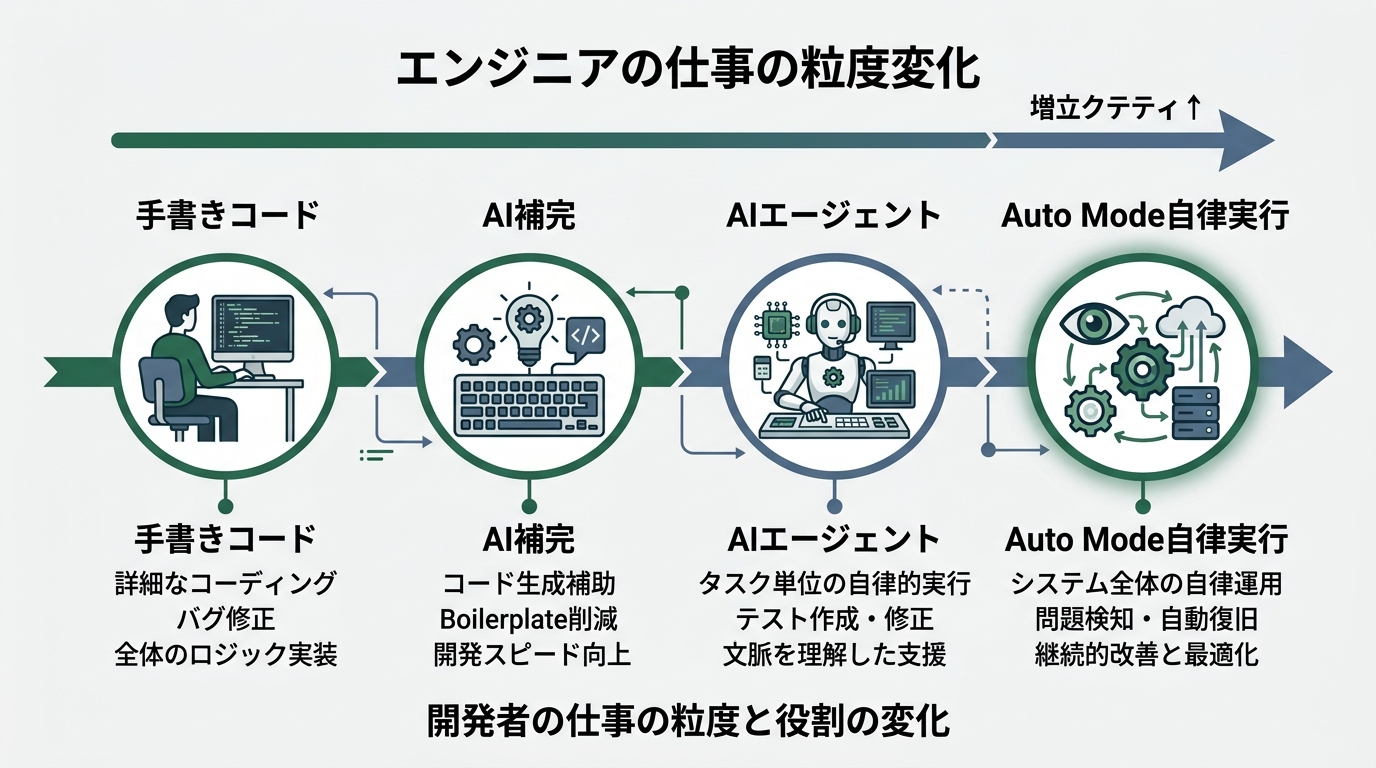
Looking back, the wall where I felt “I can’t beat the pros” was code quality and speed. Cursor came and completion got faster. Claude Code came and I got the feeling of “an ace engineer taking up residence.”
Auto Mode is the start of the phase where that ace engineer acts on their own judgment.
If you ask “isn’t it scary,” honestly, it’s not zero. The feeling of code I don’t understand being generated automatically takes getting used to.
But the classifier safety net is there. Dangerous actions get stopped. The final verification is mine. With this structure, I’ll use it.
CLI agents have entered the mainstream, certifications have emerged, and Auto Mode has arrived. I can confidently say AI coding has completely left the “hobby stage.” Prove your knowledge with certifications, lift your productivity in real work with Auto Mode. That era has already begun.
For those who haven’t tried it yet. You can enable it with claude --enable-auto-mode. Start with a small refactor on a feature branch.
When the time you spent pressing y for 93% of prompts disappears, you’ll start to see what work you should really be doing.
Sources:
- TechCrunch: Anthropic hands Claude Code more control, but keeps it on a leash
- Anthropic official blog: Auto mode for Claude Code
- Claude Code official docs: Permission modes
- The AI Insider: Anthropic Introduces ‘Auto Mode’ for Claude
- Anthropic official blog: Claude Enterprise, now available self-serve
- Anthropic pricing page
- BuildFastWithAI: Claude Code Auto Mode 2026 Guide

正直、一度エンジニアは諦めました。新卒で入った開発会社でバケモノみたいに優秀な人たちに囲まれて、「あ、私はこっち側じゃないな」って悟ったんです。その後はカスタマーサクセスに転向して10年。でもCursorとClaude Codeに出会って、全部変わりました。完璧なコードじゃなくていい。自分の仕事を自分で楽にするコードが書ければ、それでいいんですよ。週末はサウナで整いながら次に作るツールのこと考えてます。


