Why 906 Engineers Switched in 8 Months: Decoding the Pragmatic Engineer Survey's 'Claude Code 46% vs Cursor 19%'
Let's start by laying out what the survey covered.
What you'll learn in this article
- Where pricing and adoption questions around Claude Code stand right now
- Which plan or rollout stage fits the reader's situation
- Which follow-up article to open next for setup, cost, or bigger-picture context

In last week’s article, I wrote about how “the real cause of vibe coding burnout wasn’t the tool.” Several readers reached out asking, “So what should I actually use, then?”
And right around that time, a piece of data dropped that caught my attention.
Pragmatic Engineer, a tech newsletter read by engineers worldwide, published a survey of 906 developers (released March 2026). The results were pretty striking.
The #1 spot for “favorite AI coding tool” went to Claude Code at 46%. Cursor came in at 19%, and GitHub Copilot at 9%.
Claude Code launched in May 2025. In just 8 months, it had flipped the script on Cursor by a margin of more than 2x.
But what really caught my eye wasn’t the “46% vs 19%” numbers themselves. It was why people switched.
In this article, I’ll set aside the “which one is better” debate and instead break down—through the survey data—the three axes that explain why these 906 developers made the move. By the end, you should have a clearer framework for picking the right tool for your own situation.
An 8-month flip: What is the Pragmatic Engineer survey?
Let me start by laying out what the survey covered.
Pragmatic Engineer is one of the most widely read newsletters for software engineers worldwide. The author, Gergely Orosz, is a former Uber engineer known for his detailed breakdowns of engineering org dynamics at companies like Uber, Booking.com, and Microsoft.
The readership skews toward “professional developers.” This particular survey (AI tooling in 2026) was conducted from January 27 to February 17, 2026, with 906 respondents.
Here are the headline numbers:
| Tool | ”Favorite” share |
|---|---|
| Claude Code | 46% |
| Cursor | 19% |
| GitHub Copilot | 9% |
| Others | 26% |
Claude Code launched in May 2025. By the end of that year, it was already generating industry buzz, but this survey was the first to put hard numbers on the flip.
The overall AI usage data is also interesting. 95% of respondents said they use AI “at least once a week,” and 75% said they use AI for “more than half of their engineering work.” Developers who code without AI are already in the minority—that was the survey’s starting point.
What’s more, 70% use 2–4 tools concurrently, and 15% use 5 or more. The real question on the ground isn’t “Claude Code or Cursor?” but “how do you combine them?” I’ll dig into this more later.

Factor 1: How deeply can you “delegate” a task?
The first axis that emerges from the survey data and field feedback is “depth of task delegation.”
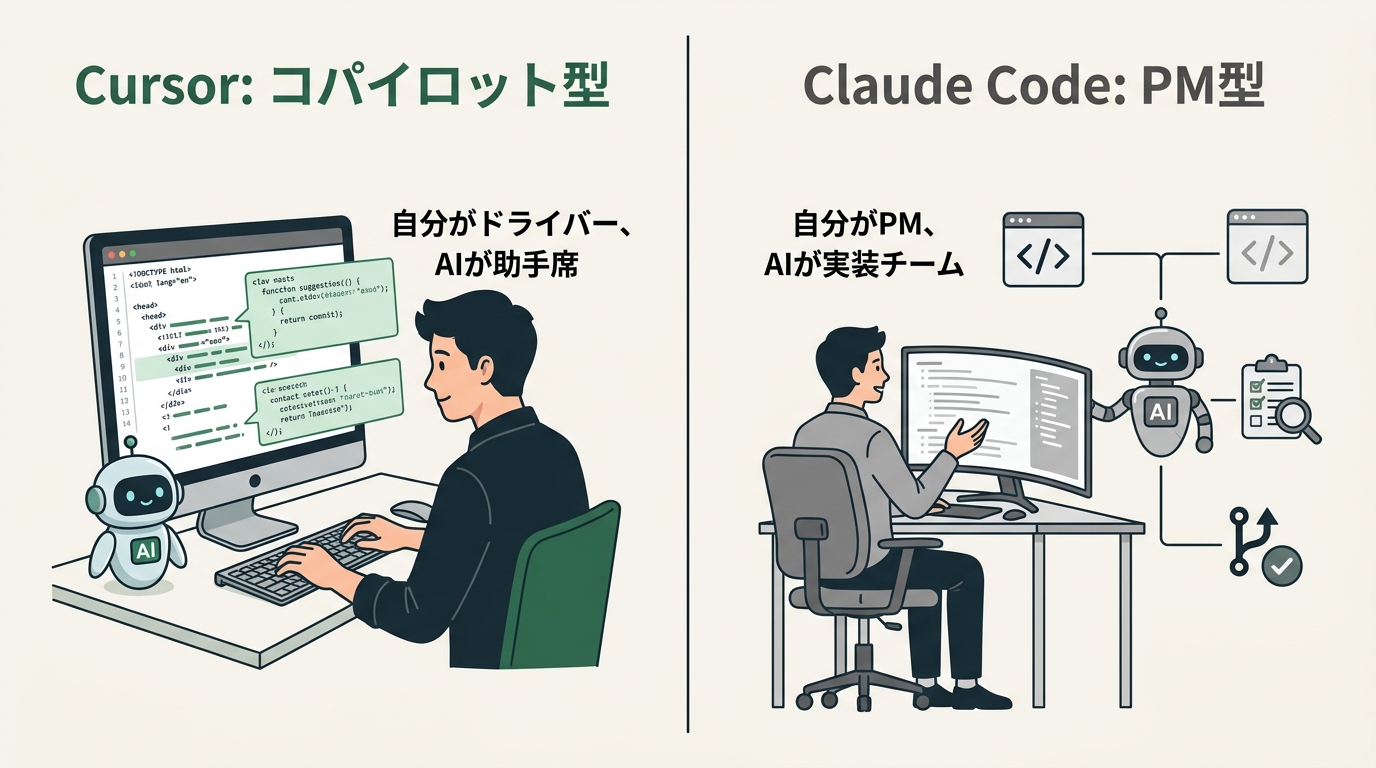
Cursor is an AI coding assistant built into VS Code (the editor). You receive code suggestions, review the diff, and accept or reject them with one click. The visual feedback loop is central—it’s designed to “speed up the code you’re writing.”
Claude Code is an AI agent that runs in the terminal (command line). It doesn’t just write code—it autonomously runs git commits, executes tests, and even handles deployments. The design is closer to “hand off a task and wait for completion” rather than “assist while you code.”
This distinction radically changes how the tools feel in use.
When I’m using Cursor, it feels like having a “copilot.” The AI sits next to me suggesting things, and I decide whether to accept them. I’m the driver, the AI is in the passenger seat.
With Claude Code, the feeling shifts. I type “implement this feature” into the terminal and go grab a coffee. When I come back, the code is written and the tests are passing. It’s like I’m the PM (project manager) and the AI is the implementation team.
This “depth of delegation” is what divides preferences between the two tools.
For people who want to “stay hands-on with the code” and “control quality by reviewing every diff,” Cursor’s visual feedback fits well. For people who want to “hand off a task and just receive the result” or “let the AI handle file structure and git operations too,” Claude Code’s terminal integration is the strength.
As a recovering-burnout engineer, I’ll be honest—the first time I used Claude Code, it was a little scary. “Do everything in the terminal” was the world my past self struggled with. But once I actually started using it, I realized I didn’t have to operate the terminal myself—and that actually lowered the barrier.
Below is a sample showing the typical instruction flow in Claude Code. If you’re not comfortable with terminals or code, feel free to skip this part. You just need to come away with the image of “write an instruction, get a working result.”
# A typical instruction flow in Claude Code
# Just launch claude in the terminal and write your instruction in natural language

$ claude

# Example prompt:
# "Add a user delete endpoint to src/api/users.ts.
#  Match the style of the existing CRUD implementation, and write tests too.
#  When done, also do a git commit."

# → Claude Code automatically implements, tests, and commits
For someone like me whose stance is “working code beats perfect code,” the experience of “give an instruction, get something that runs” was the most powerful experience for re-entry engineers like myself.
Factor 2: The reality of token costs. 33,000 vs 188,000
The second axis gets a bit technical, but it’s about “token efficiency.” You really only need to take away the numbers.
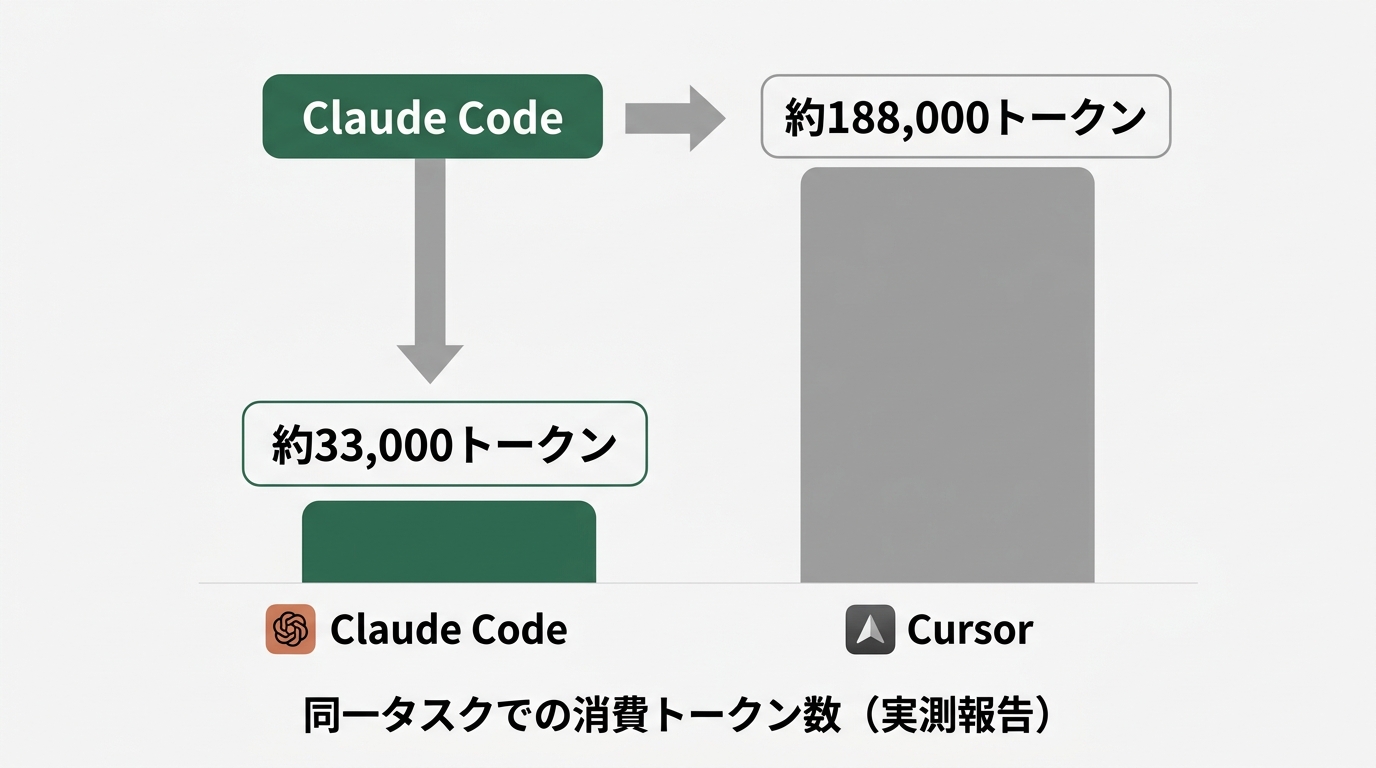
According to a comparison test that made the rounds in the developer community, the same task consumed about 5.5x more tokens in one tool than the other. Claude Code used about 33,000 tokens, while Cursor used about 188,000 tokens. (These figures come from community measurements, not an official benchmark. Treat them as ballpark numbers.)
A “token” is the unit AI uses to process text (think of it like character count). When you use AI through an API, cost scales with the number of tokens consumed.
What causes the difference?
Because Cursor is embedded in the IDE, it tends to send the entire content of the files you have open to the AI. By design—“suggest while showing you the code”—it keeps shipping more context (background information) than strictly necessary.
Claude Code runs in the terminal and decides for itself “what’s needed right now,” processing with minimal context. Its context window goes up to 1 million tokens, which is huge, but it doesn’t burn through it wastefully.
For individual developers and startups paying API costs directly, this difference hits the wallet. Whether the Claude Code Pro subscription (monthly) or pay-as-you-go API usage works out better depends on your workflow, but for “batching heavy tasks together,” Claude Code tends to be more cost-efficient.
One more thing about context length.
When working with a large codebase (an implementation spread across multiple files), it matters whether the AI can respond with the whole project in mind. The longer the context, the better it can answer questions like “where is this file referenced?” or “how is this function used across the project?”
From my own work building internal tools, for something the size of a Slack bot wired up to a spreadsheet (a few files), there’s no big difference between Cursor and Claude Code. But when I was building an internal dashboard that talks to multiple APIs, Claude Code’s “answers from a whole-project understanding” was visibly more helpful.
The next code snippet is an example of requesting an edit across multiple files. Skip this if code isn’t your thing. Just take away the idea that “you can hand it multiple files at once.”
// Example: requesting an edit that spans multiple files

// Instruction to Claude Code:
// "Read src/components/Dashboard.tsx,
//  src/hooks/useAnalytics.ts, and
//  src/api/metrics.ts together, then
//  add an API response caching strategy."

// → Claude Code understands files holistically and
//   returns a consistent implementation

// For Cursor:
// It's excellent on the file you have open, but for
// "whole-project understanding" across files, Claude Code has the edge
It’s not “which one is better”—it’s that cost efficiency shifts depending on the size of project you’re working on.
Factor 3: Company size determines “fit.” Why 75% of startups choose Claude Code
The third axis is company size and use case.
This was the most interesting split in the survey. (The numbers below are reported trends from the Pragmatic Engineer survey broken down by respondent attributes. Keep in mind these can shift based on how company size is defined and how responses are distributed.)
| Company size | Claude Code | Cursor | Copilot |
|---|---|---|---|
| Small startups | 75% | 42% | low |
| Enterprises (10K+) | low | medium | 56% |
75% of startups pick Claude Code, and 56% of enterprises pick Copilot. Why?
Enterprises have information security and management requirements. GitHub Copilot integrates with GitHub’s enterprise contracts and lets admins monitor team-wide usage. It’s set up in a way IT departments can approve. In environments that value “manageability at the org level,” Copilot is strong.
Startups prioritize speed and flexibility. There’s a culture of “whoever can use the best tool, uses it.” Claude Code runs from the terminal with minimal setup. It’s easy for individual developers who “just want to get their hands moving” to adopt on their own judgment.
The nature of the work also matters.
In enterprise development, a lot of the work is “making changes to an existing large codebase.” There’s a strong code review culture and processes built around carefully checking diffs. Cursor’s design—“visually review the diff and approve with one click”—fits this workflow nicely.
In early-stage startup development, the phase is often “building something from scratch.” You build a working prototype fast and fix it as you go. Claude Code’s “hand off the task and wait for completion” design fits this loop.
In my case, building internal tools for customer success is mostly a “one-person project.” I don’t have a colleague reviewing my code. Rather than “approval workflows,” what matters is “whether something runnable comes out”—and Claude Code’s design fit my situation.
I imagine many of you are thinking, “I work at a big company, but I want to use Claude Code.” In practice, plenty of people are running it on personal laptops or sandbox environments. That said—if your code touches business data, always check your company’s security policy before handing it to any AI.
The next snippet is a typical example of internal tool development. Skip it if code isn’t your thing. Only read on if you want to see what kind of code Claude Code generates from a natural-language instruction.
# Typical internal tool: Google Sheets → Slack notification bot

# Instruction to Claude Code:
# "A script that reads values from a specific column in Google Sheets
#  and sends rows matching a condition to a specific Slack channel.
#  Read credentials from a .env file.
#  Running locally is fine—no deployment needed."

# → Generates code like the following

import os
from google.oauth2.credentials import Credentials
from googleapiclient.discovery import build
from slack_sdk import WebClient
from dotenv import load_dotenv

load_dotenv()

def check_sheet_and_notify():
    # Initialize the Google Sheets API
    creds = Credentials.from_authorized_user_file('token.json')
    service = build('sheets', 'v4', credentials=creds)

    # Pull data from the sheet
    sheet = service.spreadsheets()
    result = sheet.values().get(
        spreadsheetId=os.getenv('SPREADSHEET_ID'),
        range='Sheet1!A:E'  # Columns A through E
    ).execute()

    values = result.get('values', [])

    # Check the condition (e.g., column D is "Needs follow-up")
    slack_client = WebClient(token=os.getenv('SLACK_BOT_TOKEN'))

    for row in values[1:]:  # Skip the header row
        if len(row) > 3 and row[3] == 'Needs follow-up':
            message = f"[Needs follow-up] Inquiry from {row[0]} ({row[2]})"
            slack_client.chat_postMessage(
                channel=os.getenv('SLACK_CHANNEL_ID'),
                text=message
            )

if __name__ == '__main__':
    check_sheet_and_notify()
Whether you can experience “working code came out” massively changes how you evaluate a tool. For the first steps of internal tool development, Claude Code’s “hand over the whole task” style is a great fit.
So which one should you use? A 3-axis decision framework
“OK, I get the three factors—but which one should I actually pick?”
There’s no clean answer to “which is better.” Even looking at the survey, Claude Code was simply the “favorite” tool for the 906 developers who switched—it doesn’t mean Cursor is bad.
If you sort out your own situation along three axes, the decision gets easier.
Axis 1: What kind of work do you do most?
If it’s mostly “adding to or modifying existing code,” Cursor’s “review-the-diff-then-one-click-approve” workflow is easy to use. If it’s “building new features from scratch” or “handing big multi-file implementations to the AI,” Claude Code is a better fit.
Axis 2: Do you want to watch the code as you work?
If you want to preserve the “I’m the one writing the code” feeling, Cursor fits. If you’re someone who thinks “I don’t care about the process as long as the finished thing comes out,” Claude Code will be less stressful.
Axis 3: Your editor and work environment
If you’re using VS Code and developing on a team, Cursor lets you reuse almost all your VS Code settings. If you’re working solo and aren’t attached to a specific editor, Claude Code is easy to set up because it lives entirely in the terminal.
If your workplace security policy bans “any AI tool that isn’t GitHub Enterprise,” Copilot is your only option. If you’re free of that constraint—an individual developer or in a startup—you have room to choose along these three axes.
Before picking “which one,” it’s better to check “your situation.” The 906-person survey is reference information about “which situations led developers to pick Claude Code”—it’s not “if you don’t use Claude Code, you’ll fall behind.”
The reality of multi-tool strategy: 70% use 2–4 tools
There’s another number in the survey that’s easy to miss.
70% use 2–4 tools concurrently, and 15% use 5 or more. The premise of “pick one or the other” is slightly out of step with what’s actually happening on the ground.
In fact, multiple respondents in the survey said “the ideal is to combine Claude Code and Cursor.” Cursor’s speed is great for everyday coding (small edits and autocompletion in the IDE), and Claude Code shines when you’re “tossing a big task over the fence” or “asking it to think through a complex design.” That’s the split.
That’s exactly how I work too.
I keep Cursor as my main editor, then switch to Claude Code only when “designing this feature from scratch sounds like a hassle.” Cursor handles 90% of day-to-day work fast, and Claude Code takes on the heavy 10% of tasks. Small edits are dramatically faster in Cursor, and there are moments when I want to watch with my own eyes how the AI changed a specific piece. Conversely, for larger tasks where I just want to hand off the spec, Claude Code is easier. Once you settle into this split, going back to just one feels limiting.
To unify settings across IDEs in this kind of setup, the recent trend is the two-file strategy of CLAUDE.md and AGENTS.md.
# Example CLAUDE.md (place in project root)

## Project overview
Internal dashboard for customer success.
React frontend + FastAPI backend.

## Coding rules
- TypeScript strict mode ON
- Components use function declarations (no arrow functions)
- Validate API responses with zod

## Tech stack versions
- React 18.3.1
- FastAPI 0.115.0
- Python 3.12

## Common commands
- Start dev server: npm run dev
- Run tests: pytest tests/ -v
- Type check: npx tsc --noEmit

## Notes
- Never hardcode .env values in code
- Always retrieve API keys via os.getenv()
If you drop a CLAUDE.md in your project root, Claude Code reads it automatically on startup. Cursor and GitHub Copilot have similar mechanisms in .cursorrules and .github/copilot-instructions.md.
Setting things up so that “the rules of this project” can be communicated consistently regardless of which tool you use lowers the cost of switching between them.
What I’ve learned from a multi-tool strategy is that “the tools aren’t competitors—they can divide labor.” Cursor’s “speed of IDE integration” and Claude Code’s “deep reasoning and autonomous execution” suit different kinds of tasks. Combining their strengths actually boosts development velocity more than committing to just one.
That said, subscription costs add up. Using both Claude Code Pro and Cursor can run anywhere from several thousand to over ten thousand yen per month. Whether “one is enough” is something worth deciding by trying them out. Both offer free trials and some level of free tier.
Wrap-up: This is about “choice,” not “switching”
What the 906-person survey shows isn’t “you should switch to Claude Code.”
It’s data on “which developers, in which situations, chose Claude Code, and why.” I’ve broken those reasons down into three axes: depth of task delegation, token efficiency, and company size and use case.
In last week’s article, I wrote that “vibe-coding burnout was a design problem, not a tool problem.” If the design problem isn’t solved, switching tools won’t end the burnout. But while you’re working on the design problem, it’s still worth keeping the lens of “picking the right tool for your situation.”
The conclusion I’ve reached from actually using it is this: “Claude Code is gentle on recovering-burnout engineers.”
Even with my “I’m scared of the terminal” baggage, the experience of “write an instruction, get something that runs” softened my aversion to the terminal. The realization that “I can compensate for not knowing the code through how I phrase the instruction” became my restart point for vibe coding.
Cursor is a tool that “speeds up someone who can already code.” Claude Code is a tool that “gives you the experience of creating working software even if you can’t write code.” That’s roughly how I split them in my head.
Three things to try this week
- Write down one moment when you felt “this is frustrating” in your current tool (Cursor/Copilot). Things like “checking each suggestion is annoying,” “multi-file edits are painful,” or “building from scratch takes too long”—the more pinpoint the description, the clearer your next step gets.
- Throw that “frustrating task” at Claude Code (free tier or Pro). Start small for the first try. Something like “write a script to clean up data from a spreadsheet” keeps the cost of trying it low.
- Compare not the result but “the feel of how it received your instruction.” That’s the real starting point for choosing a tool.
Rather than “46% picked it, so I should switch too,” I think the most practical framing is “another option is now available that could make my work easier.”
Because I’ve been through burnout, I know better than most how heavy “this looks hard” can feel. But once you’ve had even a single experience of “if I just give an instruction, something working comes back,” that feeling absolutely shifts. What the 906-person dataset proves isn’t the superiority of one tool—it’s “which tool clicks for which kind of person.” Take a look at your own situation through the three axes.
References:

正直、一度エンジニアは諦めました。新卒で入った開発会社でバケモノみたいに優秀な人たちに囲まれて、「あ、私はこっち側じゃないな」って悟ったんです。その後はカスタマーサクセスに転向して10年。でもCursorとClaude Codeに出会って、全部変わりました。完璧なコードじゃなくていい。自分の仕事を自分で楽にするコードが書ければ、それでいいんですよ。週末はサウナで整いながら次に作るツールのこと考えてます。


