Tired of Vibe Coding? It's Not Cursor's Fault. KDDI's Reversal to '80% Design'
A few weeks after adopting Cursor, code certainly gets written faster. I tried Claude Code too. The feeling of 'I can build business tools myself' came back.
What you'll learn in this article
- The key point to grasp before reading the full article
- How the issue changes the way developers should work next
- Which follow-up article is worth opening next
A few weeks after adopting Cursor, code certainly gets written faster. I tried Claude Code too. The feeling of “I can build business tools myself” came back.
But somehow, I’m tired.
I feel busier than before. I’m losing time debugging AI-generated code. “It should work but doesn’t” keeps happening more often. Is it just me?
I’m a former engineer who returned to development through vibe coding from a CS (customer success) role. After a break of more than 10 years, I rediscovered the joy of writing code alongside AI. That’s exactly why this feeling of “exhaustion” bothered me. As I looked into it, I realized this wasn’t just my personal problem.
In this article, I’ll introduce the true nature of vibe-coding burnout and the prescription KDDI is putting into practice. Let me give the conclusion upfront. The problem isn’t Cursor or Claude Code. It’s in the design process.
The truth behind “AI made me faster, yet somehow I’m exhausted”
The first week after installing Cursor is exhilarating. Completion accuracy is high. When you tell it in chat “I want this kind of feature,” it writes the code. Prototyping a business tool becomes a single day’s work.
Around week two, however, the weather changes.
The code AI generates increasingly fails to behave as intended. When you throw errors at the AI, it fixes them, but problems pop up elsewhere. The whole picture of the code becomes hard to see, and just figuring out “what connects to what” eats up time.
Before you know it, you’re busier than you were before vibe coding.
This feeling is actually backed up by data.
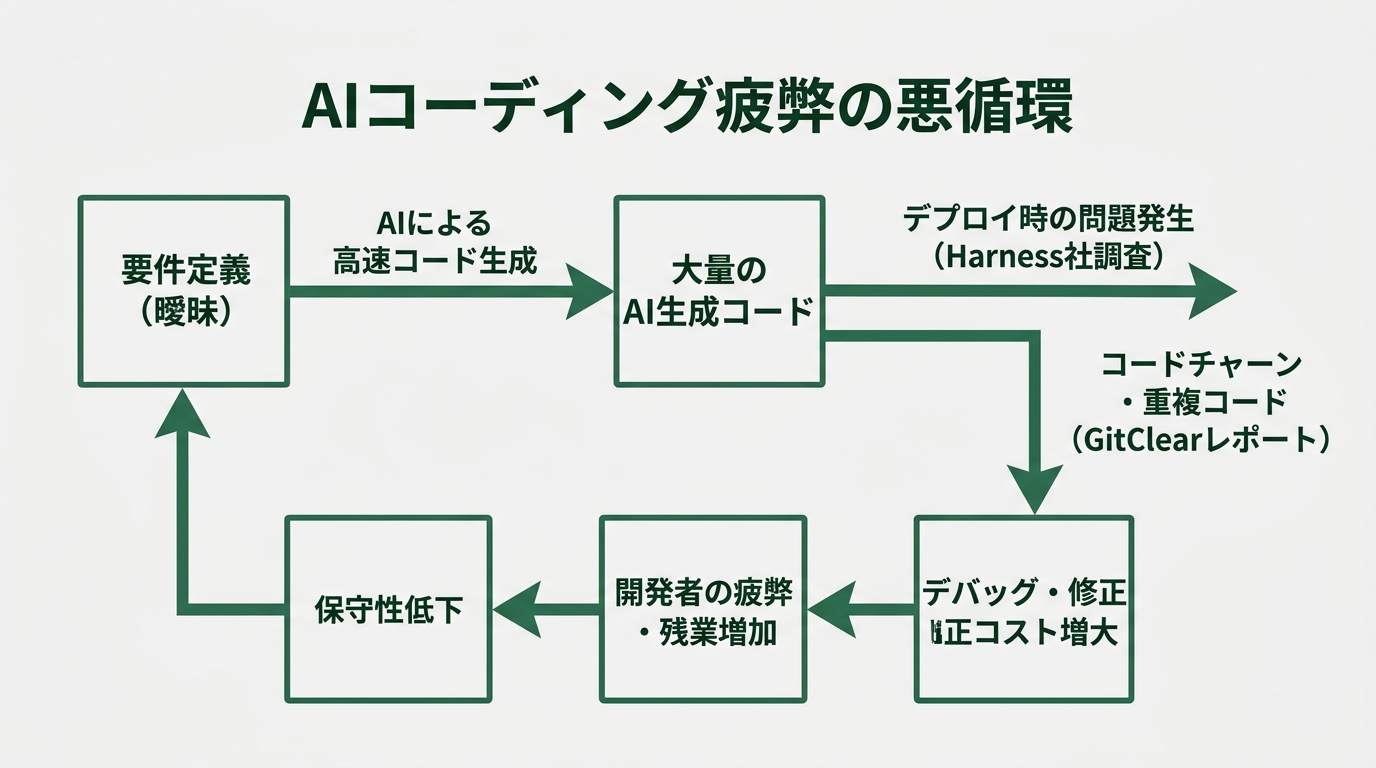
According to a survey conducted by Harness in February 2026 (700 developers across the US, UK, Germany, France, and India), 96% of heavy AI users are being pulled into nighttime and weekend emergency response, showing that development load is increasing. 69% answered that “problems frequently occur when deploying AI-generated code.” AI code generation has indeed become faster. But the downstream DevOps (the chain of development → testing → deployment) process can’t keep up. That’s the survey’s conclusion.
Problems are also occurring on the code quality side. GitClear’s 2025 report, which analyzed 211 million lines of code, reports an increasing trend in code churn (the ratio of code being rewritten shortly after it was written). A sharp increase in duplicate code blocks is also pointed out, revealing a structure where the increase in code volume driven by AI pushes up maintenance costs.
“The volume written has grown, but so has the volume rewritten.” This situation is by no means an individual problem.
# The vicious cycle of vibe-coding burnout

Requirements remain vague → Request code generation from AI
    ↓
Code that runs, but is slightly off from intent, gets generated
    ↓
Manual fix → again slightly off → fix again
    ↓
Understanding of the whole codebase can't keep up
    ↓
Debugging drags on → exhaustion
A lot of people will probably recognize themselves in this cycle.
What the “AI makes you 19% slower” data tells us
In 2025, METR (a benchmark research institute for machine learning evaluation) conducted a randomized controlled trial (RCT) and announced a shocking result.
According to METR’s paper (arxiv.org), 16 experienced developers tackled 246 tasks both “with AI” and “without AI.” The result: with AI, they were 19% slower.
The developers’ own prior prediction was “24% faster.” There’s a 43-point gap between prediction and measurement.
A lot of people will think, “Why?”
A caveat: the targets of this experiment were large-scale OSS repositories with 22,000+ stars and over a million lines of code. Conditions differ from everyday scripting or small projects. Still, the fact that “AI isn’t necessarily fast against large existing codebases” is worth keeping in mind.
What this study shows isn’t that “AI isn’t usable.” It’s that the assumption “introducing AI will automatically make us faster” is shaky.
From my long experience in CS work, I can say there are very few cases where a process improved just because a tool was introduced. Tools are merely means for changing processes. The same thing is happening in development.
The real cause of burnout is “an unprepared process”
A report released in March 2026 by KDDI’s Agile Development Center (KAG, KDDI’s in-house software development division) cut to the heart of this problem.
According to the KAG Tech Note article, the cause of vibe-coding burnout is concluded as “not the quality of the tools, but the lack of organizational process and design capability.”
In the conventional development flow — the “build it and fix it” style — only about 20% of total time is spent on design. The structure is one where implementation and debugging consume 80% of the time. Plugging AI into this flow doesn’t change the structure. If anything, since AI generates large volumes of code, the amount of “checking and debugging” can even increase.
This is where the essence of the problem lies.
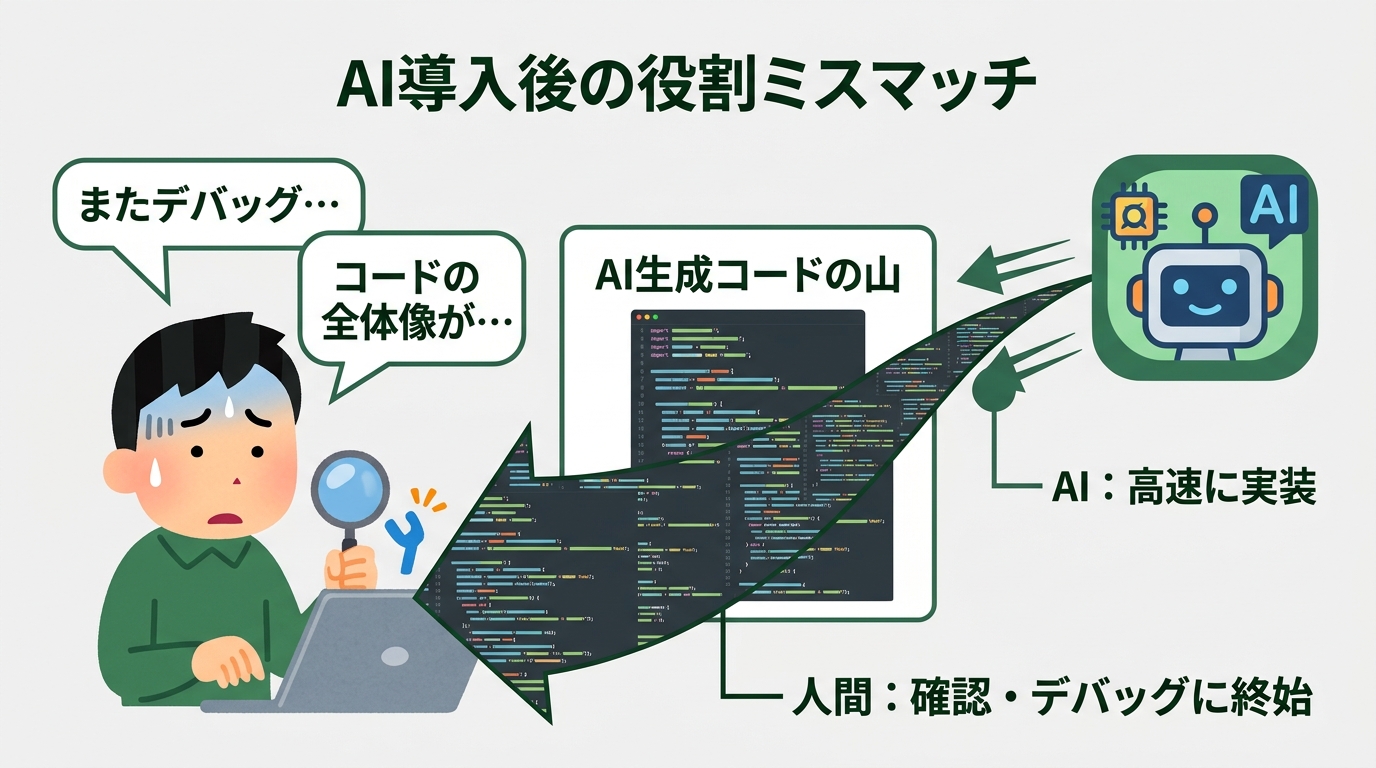
AI has come to handle implementation, but humans are still stuck in the role of “checking and debugging.”
The time humans spend on design (= defining what to build) hasn’t increased. If you just keep checking the code AI generated, the texture of the work doesn’t change.
The case of PeopleX (an HR platform startup) is informative. According to a PR TIMES announcement, the company provided all engineers with Cursor, Claude Code, GitHub Copilot, and the like. As a result, about 80% of new implementation across all products is now AI-generated code. The key to their success is how they share design documents. They set up a system that has Cursor read MD files (markdown-format documents) across projects. Because the definition of “what to build” exists first, AI can generate code while preserving context.
The obvious-sounding thing of “design before you write” tends to get skipped in the vibe-coding context.
The prescription KDDI arrived at: “Spec-Driven Development (SDD)”
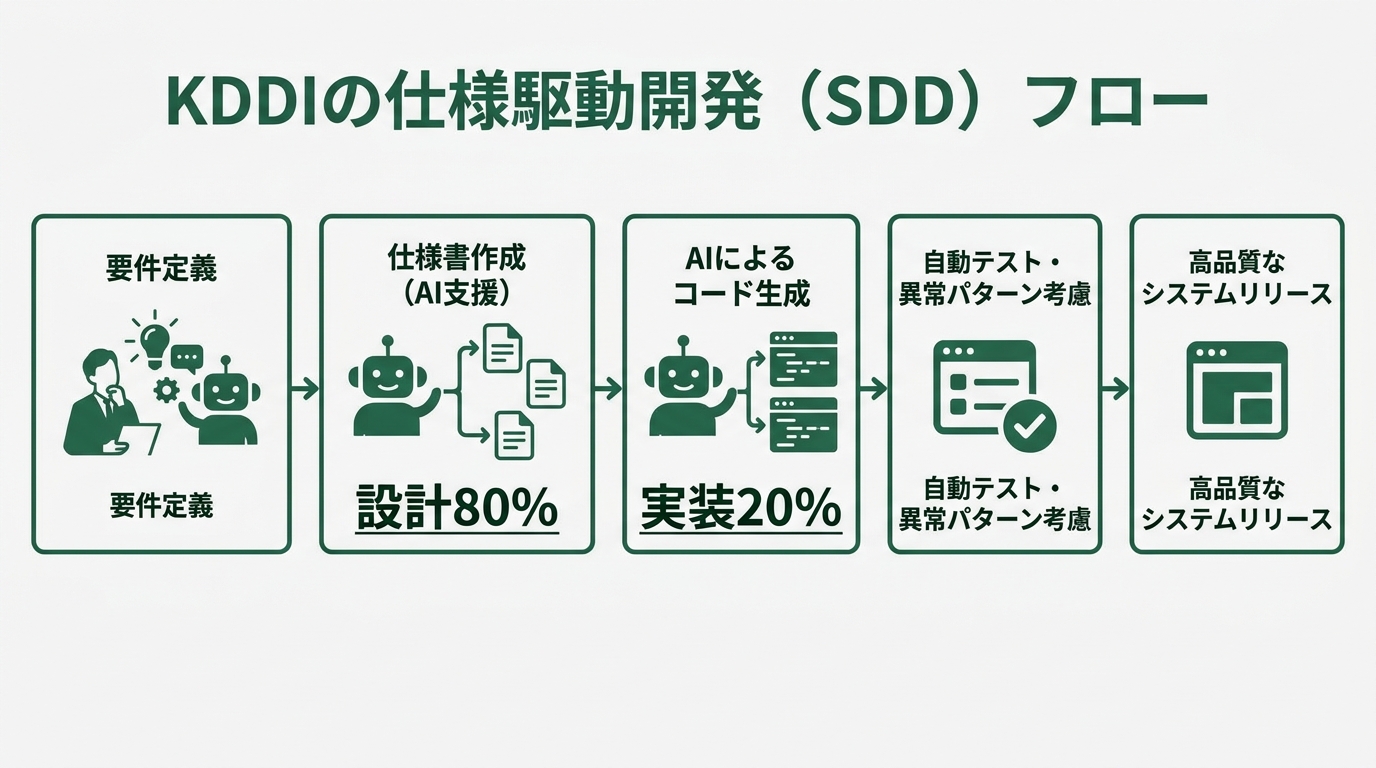
The approach KAG started fully adopting in September 2025 is “Spec-Driven Development,” or SDD.
The idea behind SDD is simple. Write the spec before writing the code. But it’s a little different from the conventional “write a design document, then implement.” AI helps create the spec, and AI generates the code based on that spec — the whole flow is structured.
What KAG currently adopts is “cc-sdd,” a domestic OSS (open-source software — publicly available code that anyone can use for free). According to an explanatory article on Qiita, it works with any of Claude Code, Cursor, or Gemini CLI.
KAG originally evaluated AWS Kiro (AWS’s SDD support tool, with the GA release in November 2025). They later moved to cc-sdd for reasons of Japanese language support and flexibility.
After introducing SDD, KAG’s development flow reportedly flipped from “20% design : 80% implementation” to “80% design : 20% implementation.” Test coverage also improved. The reason is that AI creates specs that consider a vast array of abnormal patterns (edge cases) in advance, raising the comprehensiveness of test code.
When I heard this, I thought it resembled CS work. When a customer comes saying “I’m somehow having trouble,” jumping straight to a solution misses the mark. You first sort out “what the problem is” before moving. Development has the same structure.
According to a Thoughtworks article that picked up SDD as a 2025 AI-assisted engineering practice, SDD is increasingly recognized as a binary choice between “vibe mode (chat first)” and “spec mode (plan first).” There are situations where vibe mode fits. But for products that need ongoing maintenance, or code shared across teams, spec mode is better suited.
Practicing “80% design : 20% implementation” starting today with cc-sdd
Here’s the flow for actually trying out cc-sdd. If you have Claude Code or Cursor installed, you can run it.
# Install cc-sdd (Node.js required)
npm install -g cc-sdd

# Initialize the project
cc-sdd init

# Enter requirements in natural language to generate PLAN.md
cc-sdd plan "I want to build a tool that monitors a specific Slack channel
             and sends an email notification when messages containing
             certain keywords arrive"
When you run cc-sdd plan, the AI breaks down the requirements and generates a PLAN.md (the overall design document). At this stage, not a single line of running code exists. Instead, a design document describing “what to build” is in place.
# After reviewing PLAN.md, generate SPECs per feature
cc-sdd spec --feature slack-monitor

# SPEC.md is generated (the detailed spec for the feature)
# Enumerates inputs, outputs, error handling, and edge cases

# Once the spec is complete, generate code
cc-sdd implement --spec slack-monitor

# Test code is also auto-generated
cc-sdd test --spec slack-monitor
What worked best in this flow was that “AI thinks about error handling and edge cases ahead of time.” Much of what stalls vibe coding is “stopping at unexpected cases.” If they’re written in the spec, AI generates code that includes those cases from the start.
Debugging dropped dramatically.
To be honest about one thing: cc-sdd is still a growing OSS, and the documentation is mostly in English. When you get stuck, the Qiita explanatory article is helpful. Until you get used to it, you don’t have to force yourself to use cc-sdd. Just imitating the procedure of “writing PLAN.md yourself first, then having AI implement it” also yields results. Habits matter more than tools.
In English-speaking regions, “GitHub Spec Kit,” officially provided by GitHub, is also an option. AWS Kiro is strong for use cases that integrate with cloud infrastructure. Just pick whatever fits your environment.
A “Where is my team stuck right now?” checklist
For people who say “I get the idea of SDD, but I’m not sure if it applies to my case,” I made a phase-by-phase diagnostic checklist.
Pattern: stuck in the implementation phase
- You’re making heavy manual fixes to AI-generated code every time
- Pasting error messages directly into the AI has become a daily routine
- “Let’s just run it and figure it out” has become your catchphrase
- No one has a grasp of the overall codebase, and that situation persists
For this pattern, the “write the spec first” phase likely doesn’t even exist. It’s worth trying cc-sdd or AWS Kiro.
Pattern: stuck in the design phase
- You’re deciding “what to build” by chatting with the AI as you go
- Implementation starts while feature boundaries are still vague
- Specs and documentation are written after the fact (or not at all)
- Every request to the AI turns into a long explanation
This pattern is solved by consciously increasing time spent on design. It resembles the work of a product manager or CS role. For people whose engineering didn’t include “organizing requirements,” this shift is especially effective.
Pattern: stuck in the deploy / QA phase
- You’re deploying to production without writing test code
- Reviews of AI-generated code are being skipped
- “It worked locally but not in production” keeps happening
- The intent of AI-generated code isn’t shared across the team
This pattern is exactly the structure the Harness survey points to: “code generation got faster, but DevOps processes haven’t caught up.” Adopting the habit of having AI generate test code too dramatically improves this area.
Looking at the checklists, you notice something. Cases of being stuck “because of AI” are actually few. Most come from the human-side process.
This is the same structure I’ve watched in CS work for 10 years. People tend to think installing a tool solves the problem, but if the way of using it doesn’t change, the situation doesn’t change.
Summary: Sort out the process before the tool
What’s causing vibe-coding burnout isn’t the limits of the tools — it’s the unpreparedness of the process.
As the METR RCT showed, using AI doesn’t automatically make you faster. Even if the volume of code grows, if “design for building the right thing” is skipped, you fall into a loop of debugging and fixing.
The reversal to “80% design : 20% implementation” that KDDI demonstrated requires no special technology. It’s a change of habit: “create the spec before writing the code.” cc-sdd functions as an entry point for starting that habit.
You don’t need to write a perfect spec. Just ask the AI to “make a PLAN.md first.” That 30-minute investment will erase hours of later debugging.
Please remember that vibe coding was originally meant to be fun.
Image directive list
| # | Location | type | Description |
|---|---|---|---|
| 1 | Article opening | eyecatch | A tired engineer holding their head in front of a PC |
| 2 | After H2 “19% slower” | diagram | METR RCT result graph (comparison of work time with vs. without AI) |
| 3 | After H2 “true cause of burnout” | comparison | Comparison diagram of conventional flow (20% design : 80% implementation) vs. SDD (80% design : 20% implementation) |
| 4 | Within H2 “cc-sdd practice” | diagram | cc-sdd workflow diagram (5-step flowchart) |
Total: 4 images

正直、一度エンジニアは諦めました。新卒で入った開発会社でバケモノみたいに優秀な人たちに囲まれて、「あ、私はこっち側じゃないな」って悟ったんです。その後はカスタマーサクセスに転向して10年。でもCursorとClaude Codeに出会って、全部変わりました。完璧なコードじゃなくていい。自分の仕事を自分で楽にするコードが書ければ、それでいいんですよ。週末はサウナで整いながら次に作るツールのこと考えてます。


