AI Fixes the Code AI Wrote. I Tried Cursor Bugbot and Saw Vibe Coding's Next Wall
Since I started vibe coding, the range of what I can build has expanded.
What you'll learn in this article
- The key point to grasp before reading the full article
- How the issue changes the way developers should work next
- Which follow-up article is worth opening next
Since I started vibe coding, the range of what I can build has expanded.
Slack bots, aggregation tools that connect spreadsheets to APIs, internal dashboards. Building “something that works for now” together with AI has gotten so much faster than before. And this is coming from me — someone who started writing code again after a 10-year gap.
That said, to be honest, there’s been one thing nagging at me the whole time.
The anxiety of wondering, “Is the code I wrote (the code AI generated) actually safe?”
I’ve gotten the hang of following the logic, learning how APIs connect, and verifying behavior. But honestly, it’s hard to catch every “bug lurking inside AI-generated code” with my own eyes. Especially when you’re vibe coding solo.
Turns out, I wasn’t the only one with this worry.
According to a US developer survey (getpanto.ai), 92% of developers use AI coding tools daily. Another US survey (secondtalent.com) reports that 63% say, “Debugging AI-generated code is taking longer than I expected.”
Over 90% use it daily, and over 60% are stuck. This is the true identity of vibe coding’s “next wall.”
This time, I want to introduce a tool that might break through that wall — “Cursor Bugbot.” It’s a system where AI automatically reviews AI-written code and flags bugs. At this point in time, when Japanese explanations are nearly nonexistent, I feel it’s worth knowing about early.
How risky is the code AI writes, really?

First, I want to look at the numbers honestly.
As of early 2026, a US survey reports that 41% of all code written in development settings is AI-generated or AI-assisted (secondtalent.com, 2025 survey). Roughly 40% of code has passed through AI’s hands in some form.
The problem is the quality of that code.
| Metric | Number | Source |
|---|---|---|
| Critical bug rate of AI-generated code (vs. humans) | 1.7x | secondtalent.com “AI-Powered Development: The State of Code Quality” 2025 survey |
| Logic/accuracy error rate of AI-generated code (vs. humans) | 1.75x | secondtalent.com (same survey) |
| Security vulnerabilities in AI-generated code (vs. humans) | 2.74x | secondtalent.com (same survey) |
| Percentage of developers who “highly trust” AI code | Just 3% | secondtalent.com (same survey) |
Looking at this, some of you might think, “Wait, is AI dangerous?”
My interpretation is a bit different. It’s more like, “AI lets us write at warp speed. But the quality-check mechanisms haven’t caught up.”
A gap has emerged where the verification process can’t keep pace with how fast AI writes. So the data showing only 3% of developers highly trust AI is, in a sense, an entirely predictable result.
Use it, but don’t trust all of it. The next step that fills that gap is “automating quality assurance.”
[Current state of vibe coding]

Daily AI coding tool usage:           ████████████████████ 92%
Debugging takes longer than expected: ████████████▌       63%
Developers who highly trust AI code:  ▌                    3%

↑ This gap between "use" and "trust" is the backdrop for quality assurance tools entering the scene
The better vibe coding works, the bigger the QA problem gets
Working in CS (customer success), you learn just how tough the “quality problem” gets after building “a tool that works.”
Once customers start using a tool, unexpected behaviors come pouring in one after another. “Working” and “continuing to work safely” are two different things.
I feel vibe coding is heading down the same trajectory. As more people gain the ability to build, the next thing we have to face is the question, “Does it actually work properly?”
This is the “next wall” for vibe coders. And because I come from CS, I really get this.
What is Cursor Bugbot? An AI quality assurance officer standing guard over PRs
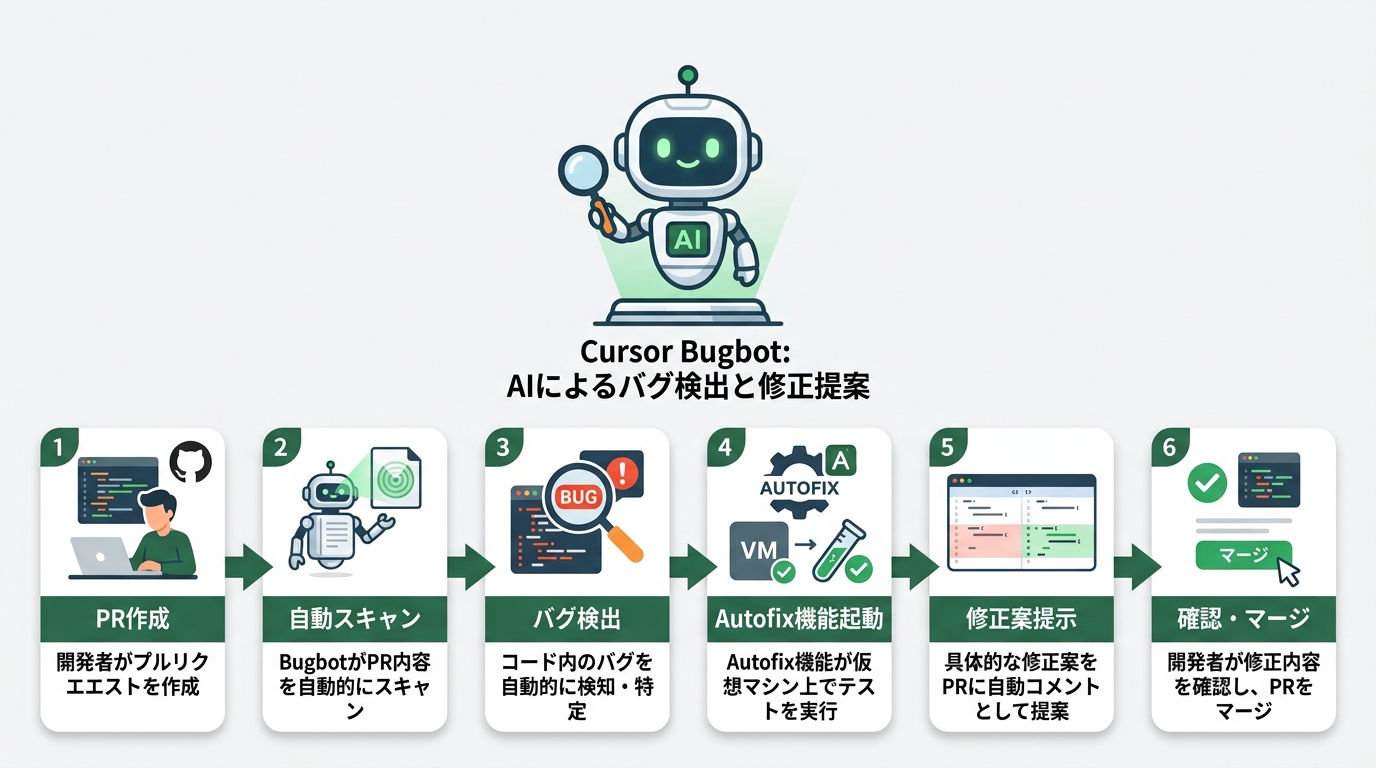
Cursor Bugbot is a bug-detecting AI that integrates automatically into GitHub PRs (pull requests — proposed code changes).
It became generally available (GA) on February 25, 2026. TechCrunch reported on it as an “agentic coding system” on March 5 of the same year. “Agentic” refers to coding assistance where the AI operates autonomously.
The mechanism is: “When a PR comes in, scan it automatically.” Even without a human saying, “Look here,” automatic processing runs in the background every time a PR is created on GitHub.
Reports come in a three-part format.
- Title (a one-line summary of what kind of bug it is)
- Detailed bug description and impact scope (why it’s a problem)
- Diff of the problematic code (which lines are the problem)
Picture it like this: every time you submit a PR, you get a notification saying, “This looks like a problem.”
Here’s how Bugbot operates as a flow.
[Cursor Bugbot operation flow]

Developer creates a PR (submits a code change to GitHub)
    ↓
Bugbot starts auto-scanning in the background
    ↓
No bugs → "clean" label attached to the PR
Bugs found → Comment with the 3-part set: "title, description, diff"
    ↓
Autofix (automatic fix feature) kicks in
    ↓
  Runs tests on a virtual machine
    ↓
  Creates a fix proposal and suggests it on the PR
    ↓
Developer reviews the fix proposal → A human decides whether to merge it
The Autofix feature is “the next level”
Beyond just flagging bugs, a cloud agent (a program that operates autonomously as AI) spins up on an independent virtual machine, runs tests, proposes fixes, and in some cases applies them directly.
According to Cursor’s official numbers, the share of Autofix’s proposed changes that get “merged as-is” exceeds 35%.
More than 1 in 3 cases use AI’s fix as-is. That’s a pretty solid number.
You can accumulate team-specific rules
Bugbot has a custom rules feature.
When you register your team’s “this kind of code is a no-go” best practices, Bugbot includes them in its checks. Picture it as teaching it patterns learned from past incidents.
For teams with their own coding conventions, this feature really shines.
How much can it actually solve? Inside the 76% number

Per data published by Cursor officially, the current “pre-merge problem resolution rate” (as of February 2026) is 76%.
This number wasn’t 76% from the start.
- At launch: 52% resolution rate, 0.2 bugs fixed per PR
- After 40 experiments/improvements: Over 70% resolution rate, 0.5 bugs fixed per PR
- Current (February 2026): 76% resolution rate
Watching the pace of improvement, you can tell the Cursor team is seriously invested in growing this.
The current monthly processing scale is over 2 million PRs. There are real production-company adoptions like Rippling, Discord, Samsara, Airtable, and Sierra AI.
Below is an image of a report Bugbot outputs (a fictional sample).
## 🔴 Bugbot: SQL injection vulnerability detected

**Impact scope**: High risk (security)
**Location**: src/api/users.ts, line 42

**Problem description**:
User input is being inserted directly into the SQL query
without sanitization (a safety-processing step for input values).
There's a risk that malicious input could illicitly manipulate the database.

**Problematic code**:
```diff
- const query = `SELECT * FROM users WHERE id = ${userId}`;
+ // Autofix suggestion:
+ const query = `SELECT * FROM users WHERE id = ?`;
+ db.execute(query, [userId]);  // Made safe with a prepared statement
✅ Autofix ready — apply directly with “Apply fix”
### What about the remaining 24%?

Flipping it around, there are bugs Bugbot can't fully catch in 24% of cases.

Let me be upfront about current limitations. Complex business logic bugs (the kind that require understanding a spec like "in this business flow, this process must not run") are still hard for AI. The same goes for environment-specific bugs and complex multi-threaded race conditions.

To call out a pitfall up front, please avoid the overconfidence of thinking, "Bugbot flagged it, so I'm safe." The tool is fundamentally a review aid, and the right way to use it is with the premise that the final judgment always rests with a human.

If you think of it as a division of labor — "Leave 76% to Bugbot, I'll handle the 24% myself" — it becomes a very practical option.

---

## What sets it apart from competing tools?

Bugbot isn't the only AI code review tool out there. Here's a comparison with the main competitors.
[AI PR review tool comparison (as of March 2026)]
┌─────────────────┬──────────────┬──────────┬───────────────────┐ │ Tool │ Platforms │ Auto-fix │ Strength │ ├─────────────────┼──────────────┼──────────┼───────────────────┤ │ Cursor Bugbot │ GitHub only │ ✅ Yes │ Deep Cursor │ │ │ │ │ integration │ │ CodeRabbit │ GitHub/Lab/ │ △ Limited│ Multi-platform │ │ │ Bitbucket │ │ support │ │ Copilot PR Rev │ GitHub only │ ❌ No │ GitHub native │ │ Greptile │ Multiple │ ❌ No │ Semantic search │ └─────────────────┴──────────────┴──────────┴───────────────────┘
The choice axis is simple.

If you're developing mainly on GitHub and already using Cursor, Bugbot is the smoothest to adopt. Teams using GitLab or Bitbucket aren't currently supported, so CodeRabbit is a better fit as an option.

If you prefer "GitHub native," you'd go with Copilot PR Review, but since it lacks an Autofix feature, you'll need to handle the fix yourself after a bug is flagged.

### A word on its relationship with Claude Code

Let me also touch on how it divides up with Claude Code (the terminal-native AI coding environment from Anthropic).

Claude Code's strengths are depth of reasoning and large-scale context handling, but it has no GUI and is operated from a terminal (command input screen), so its role differs from Bugbot, which integrates automatically into PRs.

The image is: Bugbot is "the PR gatekeeper," while Claude Code is "the thinking partner during implementation." Combining them is the practical way to operate.

For reference, here are the "most loved tool" ratings for AI IDEs as of 2026 (per adventureppc.com).

- **Claude Code**: 46%
- **Cursor**: 19%
- **GitHub Copilot**: 9%

Even though Copilot dominates in enterprise adoption rate, Claude pulling ahead in satisfaction is an interesting data point.

---

## The real talk on pricing and adoption

Pricing is $40/user/month (monthly), $32/user/month (annual).

It's billed separately from the main Cursor subscription (Cursor Pro at $20/month). Combined, that's $60/month.

Each user can run up to 200 PR reviews per month. For teams, it's pooled, so the design works well even with multiple people.

### Honest thoughts for solo vibe coders

For individual use, $40 a month isn't something you can ignore.

If you're in a situation where you're "putting out a lot of PRs every month" or "maintaining business tools with multiple people," cost-effectiveness comes out clearly.

On the flip side, if it's a hobby personal project or a tool still in the prototype stage, you might not need to adopt it from the start. The realistic call is, "Introduce it once a project has matured to the point where you want to guarantee quality."

The setup process is simple.

```bash
# [Bugbot setup steps]
# 1. Visit cursor.com/bugbot and just add the GitHub App

# Example config file (create .cursor/bugbot.yaml in the repo root)
# ────────────────────────────────────────────

bugbot:
  autofix: true           # Enable the automatic fix feature
  rules:
    - no-hardcoded-secrets  # Forbid hardcoded API keys/passwords
    - no-console-logs       # Forbid leftover console.log (debug output)
    - sql-injection-check   # Check for SQL injection (illicit DB manipulation attacks)
  exclude:
    - "**/*.test.ts"       # Test files are excluded from scanning
    - "docs/**"            # Docs are excluded from scanning

# ────────────────────────────────────────────
# That's all — auto-review starts from your next PR
Once you’ve added the GitHub App, automatic scans start running from the next PR. It works on defaults even without a config file, so the easy way in is to try first and adjust after.
Why a “quality wall” has come into view for vibe coding
If you’ve read this far and thought, “This might not apply to me” — hold on a moment.
Vibe coding is winding down its “phase where people who couldn’t code learn to code” stage. The next phase is “the phase where people who learned to code can run that code with peace of mind.”
A paper called “VibeContract,” published on arxiv.org (the academic paper sharing platform) in March 2026, points out the same thing. The title translates to “The Missing QA Piece in Vibe Coding.”
Even academically, vibe coding’s “lack of quality assurance” is starting to be recognized as a problem.
I see Bugbot as one of the most practical answers to this problem available right now.
Let’s look at “what kinds of bugs it can prevent” concretely
Drawing on near-misses I actually experienced with business tools as someone from CS, here are some examples.
// [Examples of bugs that crop up in vibe coding]
// "Works but dangerous" patterns common in AI-written code

// ❌ Bad pattern: missing error handling
async function getCustomerData(customerId) {
  const response = await fetch(`/api/customers/${customerId}`);
  const data = await response.json(); // Ignores errors even if the API fails
  return data;
}

// ✅ The pattern Bugbot recommends:
async function getCustomerData(customerId) {
  const response = await fetch(`/api/customers/${customerId}`);
  if (!response.ok) {
    // Error handling: explicitly handle the case where the API fails
    throw new Error(`API error: ${response.status}`);
  }
  const data = await response.json();
  return data;
}
// Bugbot automatically detects "missing error handling" like this and offers a fix
The practical value of Bugbot is that it automatically checks for this kind of “works but breaks easily” code every time a PR comes in.
For people vibe coding with the stance, “I can’t match a pro engineer, but I can write code that makes my job easier,” automatic quality checks are a pretty reassuring presence.
Wrap-up: Getting ready for vibe coding’s “next step”
Let me sum up the Cursor Bugbot we covered.
What Bugbot can do
- Automatically attaches bug-detection comments to GitHub PRs
- Even proposes fixes via Autofix (35% are merged as-is)
- Learns and applies the team’s custom rules
- Has the scale record of processing over 2 million PRs monthly
Current limitations
- GitHub only (GitLab and Bitbucket are not supported)
- Weak on complex business logic judgment
- Billed separately from the main Cursor app ($40/user/month)
The idea that “AI fixes the code AI wrote” would’ve been “still a ways off” a year ago.
As of March 2026, it has emerged as a tool that processes 2 million PRs per month while delivering a 76% resolution rate. With almost no Japanese explanations available right now, I feel there’s nothing to lose by knowing about it early.
For people who’ve gotten comfortable building with vibe coding, now is a good time to start thinking little by little about how to guarantee quality. Keep Bugbot in the back of your mind as the next step beyond “something that works for now.”
Seriously, it’d be a waste not to use it.
Image directive list (5 total)
- eyecatch × 1 (opening)
- diagram × 1 (vibe coding statistics chart)
- screenshot × 1 (GitHub PR + Bugbot comment screen)
- comparison × 1 (4-tool comparison diagram)
- diagram × 1 (3-phase vibe coding evolution diagram)
eyecatch 1 + diagram 2 + screenshot 1 + comparison 1 = 5 total
Data sources cited in this article: getpanto.ai / secondtalent.com (2025 survey) / cursor.com/blog/building-bugbot / arxiv.org/abs/2603.15691 / adventureppc.com

正直、一度エンジニアは諦めました。新卒で入った開発会社でバケモノみたいに優秀な人たちに囲まれて、「あ、私はこっち側じゃないな」って悟ったんです。その後はカスタマーサクセスに転向して10年。でもCursorとClaude Codeに出会って、全部変わりました。完璧なコードじゃなくていい。自分の仕事を自分で楽にするコードが書ければ、それでいいんですよ。週末はサウナで整いながら次に作るツールのこと考えてます。


