Rethinking After Cursor's Bug—How to Build the Ultimate AI Coding Environment by Blending Claude Code and Cursor in 2026
As a long-time Cursor user, I want to share why a certain bug report in March 2026 made me think, 'I need to rethink this.'
What you'll learn in this article
- Where pricing and adoption questions around Claude Code stand right now
- Which plan or rollout stage fits the reader's situation
- Which follow-up article to open next for setup, cost, or bigger-picture context

As a long-time Cursor user, I want to share why a certain bug report in March 2026 made me think, “I need to rethink this.”
“A bug where changes silently revert”—this was reported in droves on the Cursor forum starting in March. There was even a post saying “four months of work disappeared due to this bug.” On March 21st, an official announcement about service degradation was also released.
That said, I’m not planning to switch. Cursor is still one of the best IDEs out there. But I realized it’s risky to depend entirely on a single tool. That’s when I started thinking about “blending” (using multiple tools strategically).
Around the same time, the news that Claude Code took the #1 spot in the developer “Most Loved” ranking also came out. According to the survey, 46% supported Claude Code, 19% Cursor, and 9% GitHub Copilot.
“So why not just use both well?”—In this article, I’m going to share my answer based on real practice. As someone who came back to engineering from a CS background, I’ve put together the “90:10 rule” and “two-file strategy” I arrived at through actual experimentation.
What Cursor’s Bug Taught Me About the Danger of “Single-Tool Dependency”
In March 2026, a major problem occurred among Cursor users. The “silent revert” bug—where code you thought you’d changed quietly reverted back to its original state without you noticing.
The thread “Revert Changes Broken with New Updates” on forum.cursor.com collected numerous reports. The most shocking comment was “I lost four months of work due to this bug.” On March 21st, Cursor officially acknowledged “service degradation” and announced it had been resolved, but the impression lingered.
Cursor is the market leader, with annual recurring revenue (ARR) said to exceed $500 million. Yet problems like this still happen. The faster the version updates roll out, the higher the risk of bugs slipping in.
This isn’t a “Cursor is bad” story. It’s about “the risk of betting everything on a single AI coding tool.”
So What Should You Do?
The answer is simple. Adopt a mindset of “letting each tool handle what it’s best at,” and have multiple tools share the workload by role. The guideline for this is the “90:10 rule.”
Leave 90% of daily development to Cursor (fast operations within the IDE), and the remaining 10% to Claude Code (planning, reasoning, complex tasks). With this blend, even if one goes down, the other can immediately fill in.
Let me share the gotcha upfront. “Blending” might sound complicated, but in practice it feels more like “always write with Cursor, and only use Claude Code when you’re stuck or thinking about architecture.” You don’t even need to launch both from the start.
The Essential Difference Between the Two Tools—“Editor AI” vs. “Execution AI”
To understand blending, you first need to grasp the fundamental design philosophy difference between the two tools.
In the English-speaking AI development community, these two are called:
- Editor AI: Cursor
- Execution AI: Claude Code
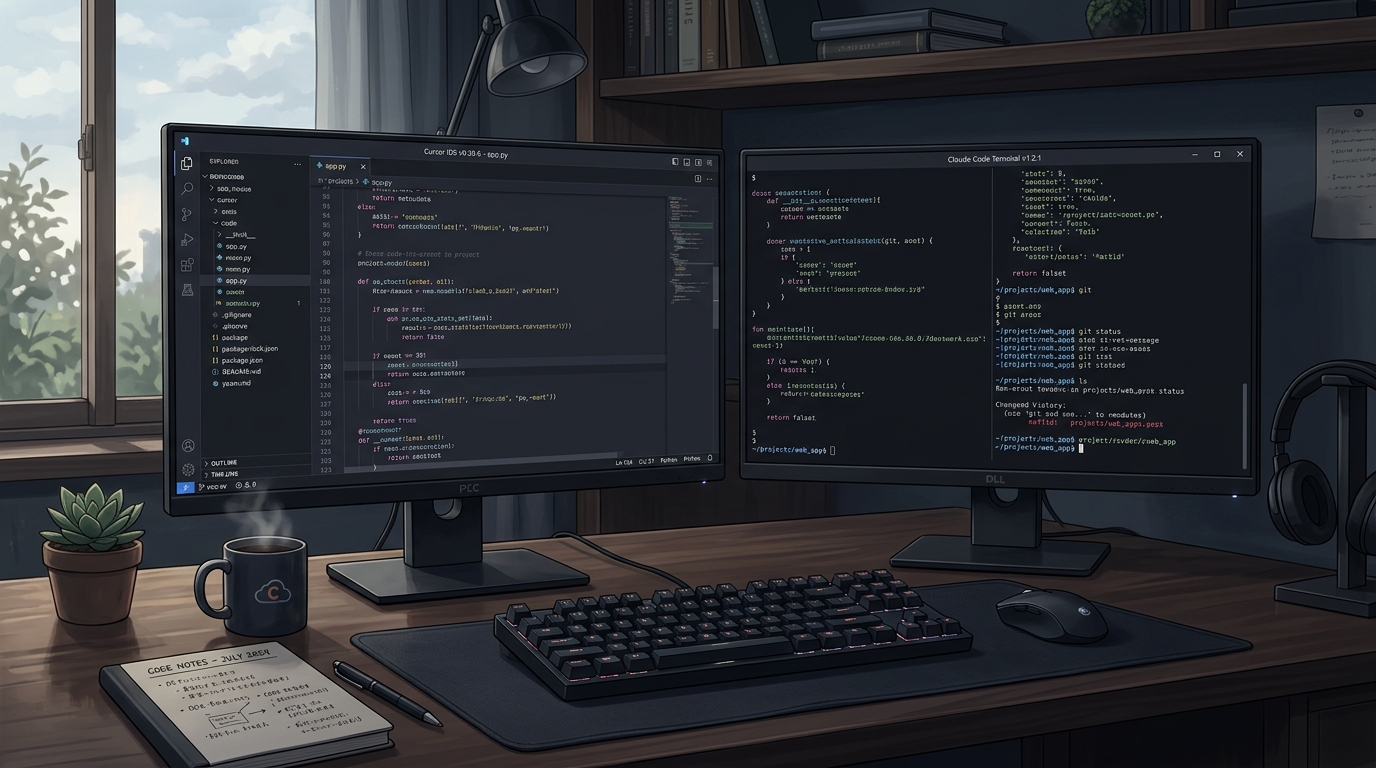
Cursor (Editor AI) Strengths
Cursor is an IDE built by forking VS Code (Integrated Development Environment: software for writing code). Since the editor and AI are deeply integrated, you can get AI suggestions in real-time while writing code.
- Context immediacy: You can pass the file you have open directly to the AI
- Inline editing: AI rewrites code directly at your cursor position
- UX maturity: A polished feel refined over 2–3 years of development
- Multi-file support: Can edit across related files
That said, there’s a caveat with context size—nominally 200K, but there are many reports that it’s actually internally truncated to around 70K–120K (the truncation problem). When dealing with large codebases (the collective body of files and code), this constraint can sometimes show its face.
Claude Code (Execution AI) Strengths
Claude Code is a terminal/CLI-based AI coding tool developed by Anthropic (CLI stands for command-line interface—operating things by typing commands into a black screen). Rather than integrating into the IDE, you use it directly from the terminal.
- Effective context window: 200K (1M token beta with Opus 4.6). The nominal and actual values largely match
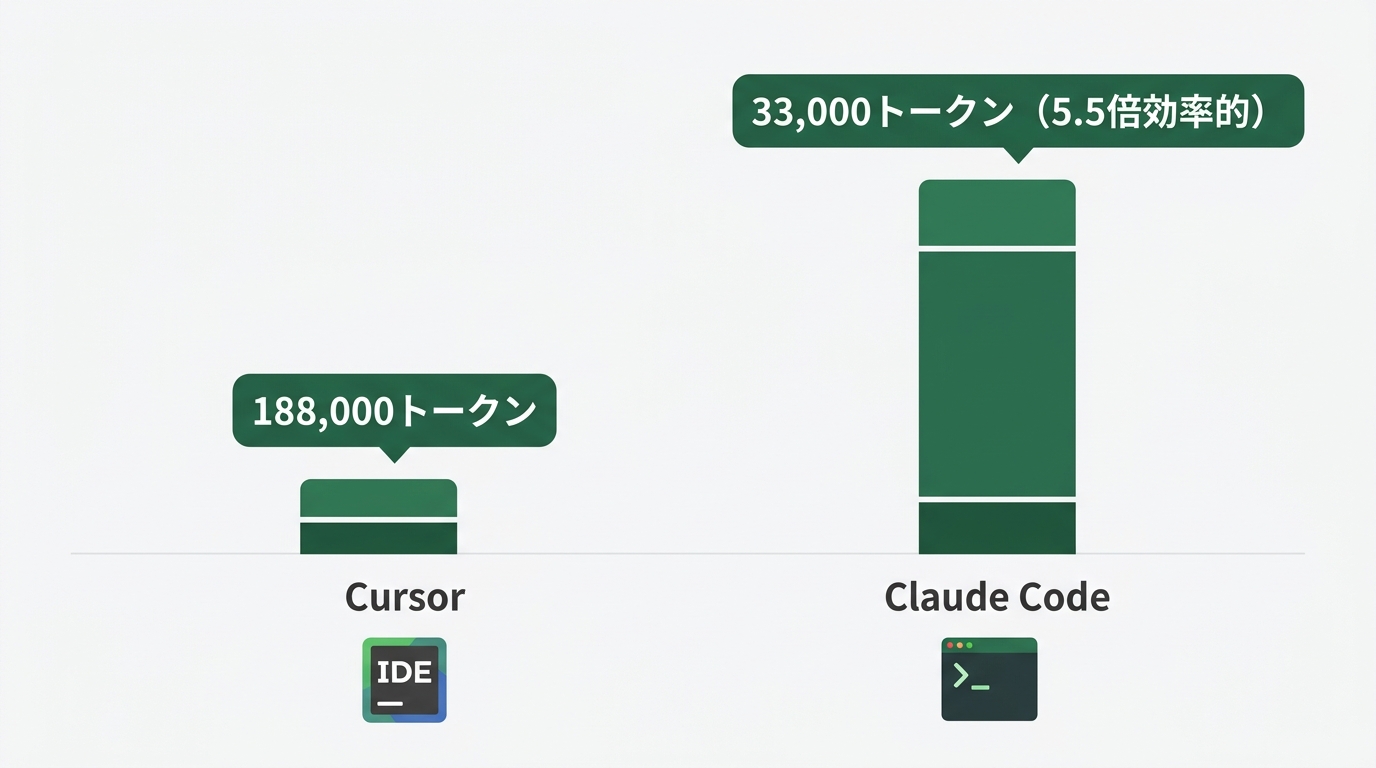
- Token efficiency: In an independent test (verified by Ian Nuttall), Claude Code completed an equivalent task with 33,000 tokens vs. Cursor’s 188,000 tokens. A 5.5x difference (source: builder.io comparison test)
- Maturity of agent mode: Features an “Agent Teams” function that runs multiple Claudes in parallel
- Deep reasoning: Particularly strong at architecture design and complex bug investigation
If token efficiency differs by 5.5x, that means the amount of work you can do at the same monthly price could be 5.5x more. That’s a pretty significant difference cost-wise.
The 90:10 Rule—How to Divide Tasks
You get the theory. So how do you actually divide things up in practice? After trial and error, what I settled on is the “90:10 rule.”
Finish 90% of daily coding with Cursor. Leave the remaining 10%—the “heavy lifting”—to Claude Code. This ratio has become a consensus in the industry as well.
Tasks to Hand to Cursor (90%)
| Task | Reason |
|---|---|
| Code completion and suggestions | Inline display keeps your tempo intact |
| Small-scale refactoring | File-level changes are sufficient |
| Immediate error fixes | The speed of fixing on the spot matters |
| Generating test code | Can write while referencing existing code |
| Adding comments and documentation | Light tasks are fine with the Editor |
Tasks to Hand to Claude Code (10%)
| Task | Reason |
|---|---|
| Consulting on architecture design | Requires large context |
| Large-scale refactoring | Consistent changes spanning multiple files |
| Root cause investigation for bugs | Diagnosis based on understanding the whole codebase |
| Creating specs for new features | Have it write spec.md (specification documents) |
| Parallel agent processing | Run multiple tasks simultaneously with Agent Teams |
The criteria for division are “whether it completes within a single file” and “the amount of context.” If it’s contained within one file, use Cursor; if judgment requires understanding the whole project, use Claude Code—this distinction is intuitive and easy to use.
An Actual Day’s Workflow
# Morning: Push normal development with Cursor
# (A typical day of opening Cursor and writing code)

# When adding a new feature, first organize the spec with Claude Code
claude "I want to add 3D Secure support to this payment feature.
Please check the current codebase and
write a design proposal in spec.md about what should be added where"

# Claude Code reads the README, existing code, and config files
# and generates a design document at docs/spec.md

# After reviewing the design doc, proceed with implementation in Cursor
# When stuck, consult Claude Code again—that's the cycle
Running things this way, you maintain Cursor’s speed while using Claude Code’s deep reasoning at “just the right” moments.
Cost Estimates—How Much to Build a Blended Environment per Month
“Using two tools = double the cost” isn’t necessarily true. Factoring in the token efficiency difference, it actually turns out to be quite cost-effective.
| Plan | Monthly | Claude Code | Cursor |
|---|---|---|---|
| Minimum | About $40 (about ¥5,800) | Pro $20 | Pro $20 |
| Standard | About $120 (about ¥17,400) | Max 5× $100 | Pro $20 |
| Heavy | About $220 (about ¥31,900) | Max 20× $200 | Pro $20 |
*Converted at ¥145/$1
What I recommend is the Standard plan. Claude Code Max comes with 5x the monthly usage. Remember the 5.5x token efficiency figure mentioned earlier. This means you can handle the equivalent of $200/month worth of Cursor Ultra work with Claude Code Max at $100/month.
For side projects or solo development, starting with the combination of Claude Code Pro $20 + Cursor Pro $20 at a total of $40/month is realistic. When you start feeling like “I’ve hit the plan limit from using Claude Code too much,” upgrading to Max at that point avoids waste.
Let me share some cost-saving tips too.
# When passing context to Claude Code, narrow down the files
# Bad pattern (passing all unnecessary files)
claude "Read everything under src/ and find the bug"

# Good pattern (only pass related files)
claude --file src/api/payment.ts --file src/types/payment.d.ts \
  "Investigate the bug in the payment processing"

# Reduce implementation loops by creating spec.md first
claude "First create a spec.md for this feature. Implementation in the next session"
Just by avoiding wasteful token consumption, I’ve experienced reducing monthly costs by 30–40%. Building the habit of “only pass what’s necessary” is what matters.
The “Two-File Strategy” of CLAUDE.md + AGENTS.md
The most important thing in a blended environment is centralizing configuration. If you manage separate rules for Cursor and Claude Code, contradictions will eventually arise. That’s where the “two-file strategy” comes in handy.
- CLAUDE.md: Claude Code-specific rules file (coding style, prohibited patterns, subagent definitions)
- AGENTS.md: An “open standard” config file readable by Claude Code, Cursor, Windsurf, and other IDEs
AGENTS.md is a common config file that doesn’t depend on any specific tool. Both Cursor and Windsurf are increasingly adopting the industry standard of “if this file exists, read it.”

Basic Template for CLAUDE.md
# Project Rules (for Claude Code)

## Coding Style
- Use TypeScript (don't omit type definitions)
- Prefer pure functions
- Write comments in Japanese
- Don't commit console.log

## Prohibited Patterns
- Avoid using any (exceptions only when any is necessary with a stated reason)
- Don't manipulate the DOM directly (go through React state)
- Don't include hardcoded strings in source (move them to a constants file)

## Libraries in Use
- State management: Zustand
- Data fetching: TanStack Query
- Styling: Tailwind CSS

## How to Use Subagents
- For files needing security review, use .claude/agents/security-reviewer.md
- Leave test generation to .claude/agents/test-generator.md

## Notes
- Direct connection to the production database is prohibited
- Don't log the contents of the .env file
Basic Template for AGENTS.md
# Agent Instructions (common across multiple IDEs)

## Project Overview
- Web app with Node.js + TypeScript + React
- Backend is Fastify
- Database is PostgreSQL

## Common Rules
- Always check the existing implementation before modifying code
- Don't write code that breaks tests
- Pass lint and type checks before creating a PR

## Directory Structure
- src/components/ — React components
- src/api/ — API handlers
- src/db/ — Database queries
- src/utils/ — Utility functions
Example of a Subagent Definition
A subagent is an AI agent specialized for a particular expert task. It has independent context within Claude Code, so you can have it handle only the “parts that an expert should look at,” like security or testing.
# Create the .claude/agents/ directory
mkdir -p .claude/agents

# Define a security review-specific agent
cat > .claude/agents/security-reviewer.md << 'EOF'
# Security Reviewer Agent

You are a security expert.
Please review the code from the following perspectives.

## Check Items
- Possibility of SQL injection (attacks that embed malicious SQL code)
- XSS (cross-site scripting) vulnerabilities
- Authentication/authorization bypass possibilities
- Logging of sensitive information
- Inappropriate CORS settings

## Output Format
- If issues are found: report line number, problem description, and fix example together
- If no issues: clearly state "No security issues"
EOF
When using this, you can call it from Claude Code with the --agent security-reviewer option.
Common Pitfalls and How to Handle Them
Let me share upfront the patterns where people tend to fall into “I tried the blended environment but it’s not working.” Here are 4 points to know in advance so you can avoid them.
① Agent Drift
Agent Drift is a phenomenon where an AI agent gradually deviates from the original instructions over a long session. Many people have experienced “it was producing correct code at first, but partway through it started heading in a completely different direction.”
Solution: Always have it reference CLAUDE.md at the start of a session.
# Anchor command at session start
claude "First read CLAUDE.md and AGENTS.md,
and confirm this project's rules before starting"
Just this can significantly reduce Agent Drift. If doing this every time feels tedious, there’s also the method of writing “have me read this at session start” at the top of CLAUDE.md.
② Cursor’s Internal Truncation Problem
Cursor displays “200K token support” in its UI, but there are many reports that internally it’s actually truncated to around 70K–120K. Truncation is the process of cutting down long text to a manageable amount.
If you’re working with a large codebase and feel like “Cursor seems to be ignoring code midway,” that might be this phenomenon.
Solution: Move work requiring large context to Claude Code. This is exactly the scene where you should use the “10%” of the 90:10 rule.
③ Forgetting to Sync CLAUDE.md and AGENTS.md
When the contents of CLAUDE.md (for Claude Code) and AGENTS.md (common across multiple IDEs) start diverging, the AI gets confused about which rules to follow.
Solution: Decide on rules for changes.
- Common rules to always reflect in both → Write in AGENTS.md
- Claude Code-specific settings (such as subagent definitions) → Write only in CLAUDE.md
- Regularly check the diff between the two files
# Command to check the diff between the two files
diff CLAUDE.md AGENTS.md
④ The Hesitation of “Which One Should I Ask?”
At first, you may lose time deciding “is this task for Cursor or Claude Code?” That’s the most wasteful part.
Having a simple decision criterion resolves this.
- When in doubt, try Cursor first. If Cursor doesn’t solve it, consult Claude Code
- The line of “problems solvable in under 1 minute” → Cursor, and “problems you’ll agonize over for 5+ minutes” → Claude Code, is also easy to use
Summary—Who Is This Blended Environment Right For?
I’ve put together the practical insights I’ve gained about blending Claude Code and Cursor. Finally, let me organize “who should start with which plan.”
Strongly Recommended for These People
Cursor heavy users who have recently started feeling limitations If you have issues like context filling up or struggling with large-scale refactoring, try adding Claude Code Pro at $20/month. Even using it just 1–2 times a week at first will let you feel the change.
People who have just started vibe coding (a style of writing code alongside AI) Rather than trying to use all the high-functionality tools from the start, getting comfortable with Cursor first and gradually incorporating Claude Code via the 90:10 rule is smoother. No need to rush. For those wanting to start from the “I’ve never written code” stage, there’s also an introductory article for non-engineers (Vibe Coding Introduction with Claude Code).
Side-gig engineers and solo developers A staged transition starting with the Minimum plan at $40/month and upgrading when you feel you’re using too much is recommended. You don’t need to jump straight to Max $100.
It Might Still Be Too Early for These People
If you’re a beginner not yet comfortable with environment setup, prioritize mastering Cursor or Claude Code alone first. The realistic approach is to think about blending after you’ve reached the state of “I can do quite a bit with one of them.”
Finally
The Cursor bug issue in March 2026 reminded me of the “risk of relying entirely on one tool.” This isn’t a criticism—it’s something that can happen to any tool.
Including the news of Claude Code taking the top spot, now is exactly the moment to think about “how to use them together” rather than “which tool to use.”
Start by just creating a single CLAUDE.md. That alone will dramatically change your development experience. For now, let’s just build something that works! You can get started with a config file of just 10 lines.
References
- Claude Code official best practices: claude.ai/code
- Claude Code pricing: claude.com/pricing
- Cursor forum (bug report thread): forum.cursor.com
- builder.io: Claude Code vs Cursor comparison (English): builder.io/blog/cursor-vs-claude-code
- AGENTS.md open standard explanation: vibecoding.app
This article was written based on information as of March 2026. Pricing and features of each tool are subject to change.

正直、一度エンジニアは諦めました。新卒で入った開発会社でバケモノみたいに優秀な人たちに囲まれて、「あ、私はこっち側じゃないな」って悟ったんです。その後はカスタマーサクセスに転向して10年。でもCursorとClaude Codeに出会って、全部変わりました。完璧なコードじゃなくていい。自分の仕事を自分で楽にするコードが書ければ、それでいいんですよ。週末はサウナで整いながら次に作るツールのこと考えてます。


